wifi iconApple understands that some iPhone and iPad users may prefer to keep tabs on their cellular network data usage, especially if they risk incurring charges by going over a certain limit.

The same goes for users who have a bandwidth cap on their broadband network, or anyone who regularly connects to a public Wi-Fi network that charges per megabyte.

That's why in iOS 13, Apple has included a Low Data Mode for apps that use cellular and Wi-Fi connections. The feature sends an explicit signal to apps to reduce their network data use by deferring non-compulsory tasks and disabling background app refresh.

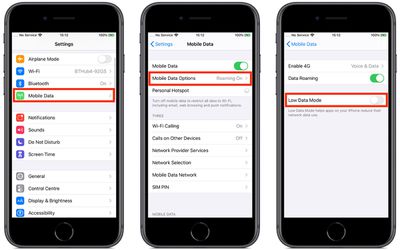
To turn on the cellular or Wi-Fi setting on your ‌iPhone‌ or ‌iPad‌, simply follow these steps.

How to Turn On Cellular Low Data Mode

  1. Launch the Settings app on your device
  2. Tap Cellular (or Mobile Data, depending on your region).
    how to reduce iphone network data usage ios 131

  3. Tap Cellular Data Options (or Mobile Data Options).
  4. Tap the Low Data Mode switch to toggle it to the green ON position.
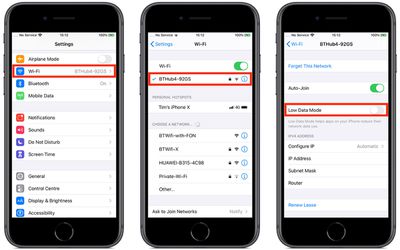
How to Turn On Wi-Fi Low Data Mode

  1. Launch the Settings app on your device
  2. Tap Wi-Fi.
  3. Tap the info button (an encircled 'i' icon) alongside the Wi-Fi network in question.
    how to reduce iphone network data usage ios 132

  4. Tap the Low Data Mode switch to toggle it to the green ON position.
Note that a given third-party app must explicitly support Low Data Mode for there to be any change in its data usage, otherwise enabling the mode won't have any effect.


Related Forum: iOS 13

Popular Stories

imac video apple feature

Apple Unveils First New Products of 2026

Monday January 26, 2026 1:55 pm PST by
Apple today introduced its first two physical products of 2026: a second-generation AirTag and the Black Unity Connection Braided Solo Loop for the Apple Watch. Read our coverage of each announcement to learn more:Apple Unveils New AirTag With Longer Range, Louder Speaker, and More Apple Introduces New Black Unity Apple Watch BandBoth the new AirTag and the Black Unity Connection Braided...

Second Generation AirTag Feature

Apple Unveils New AirTag With Longer Range, Louder Speaker, and More

Monday January 26, 2026 6:07 am PST by
Apple today introduced the second-generation AirTag, with key features including longer range for tracking items and a louder speaker. For those who are not familiar, the AirTag is a small accessory that you can attach to your backpack, keys, or other items. Then, you can track the location of those items in the Find My app on the iPhone, iPad, Mac, Apple Watch, and iCloud.com. The new...
iPhone 5s

iPhone 5s Gets New Software Update 13 Years After Launch

Monday January 26, 2026 3:56 pm PST by
Alongside iOS 26.2.1, Apple today released an updated version of iOS 12 for devices that are still running that operating system update, eight years after the software was first released. iOS 12.5.8 is available for the iPhone 5s and the iPhone 6, meaning Apple is continuing to support these devices for 13 and 12 years after launch, respectively. The iPhone 5s came out in September 2013,...
Apple Logo Spotlight

Apple to Launch These 20+ Products This Year

Sunday January 25, 2026 6:02 pm PST by
2026 promises to be yet another busy year for Apple, with the company rumored to be planning more than 20 product announcements over the coming months. Beyond the usual updates to iPhones, iPads, Macs, and Apple Watches, Apple is expected to release its all-new smart home hub, which was reportedly delayed until the more personalized version of Siri is ready. Other unique products rumored for ...
M5 MacBook Pro

Apple Reportedly Aiming to Upgrade the MacBook Pro Twice This Year

Sunday January 25, 2026 11:46 am PST by
Apple plans to release new MacBook Pro, MacBook Air, Mac Studio, and Studio Display models in the first half of this year, according to Bloomberg's Mark Gurman. In his Power On newsletter today, Gurman added that redesigned MacBook Pro models with an OLED touch screen "should be hitting toward the end of 2026," meaning that the MacBook Pro line would be upgraded twice this year. First up...