

iOS 16: How to Unsend Emails in Apple Mail - MacRumors
Skip to Content

iOS 16: How to Unsend Emails in Apple Mail

by

Apple in iOS 16 and iPadOS 16 has made several improvements to its stock Mail app to put it on a similar standing to rival email apps. One of the new features is an undo send option. Keep reading to learn how it works.
iOS 16 Mail Guide Feature
Have you ever sent an email in haste, only to immediately regret it or realize you've said completely the wrong thing? Apparently enough of us have to make Apple add a new Undo Send feature to its Mail app in iOS 16 and iPadOS 16.

Now after you send an email, Mail will give you a 10-second period in which you can unsend the email if you made a mistake. That's a shorter amount of time than, say, Gmail gives you (30 seconds), but 10 seconds is better than nothing, and it might just save you from inconvenience or even embarrassment.

Here's how to unsend a sent email in the Apple Mail app in iOS 16 and iPadOS 16.

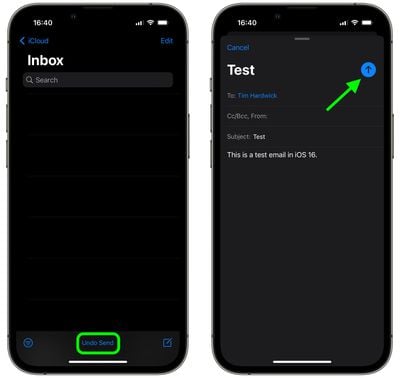
  1. In the Mail app, if you've just sent an email, tap the Undo Send option displayed in blue text at the bottom of your inbox. (If you don't see the option, your 10-second time window for unsending the email has elapsed.
  2. You should be taken back to the email compose interface, where you can correct any errors in the original email.
  3. Tap the blue arrow when you're done to send the email.
mail

That's all there is to it. Note that once you've hit the Undo Send option, you can take all the time you need in the compose screen to edit your email before sending it proper, because the message has already been unsent.

Popular Stories

macOS 27 on MacBook Pro

macOS 27 Will Mark the End of an Era

Saturday April 18, 2026 6:45 am PDT by
During its Platforms State of the Union segment at WWDC 2025, Apple revealed that macOS 26 Tahoe is the final major macOS version for Intel-based Macs. The upcoming macOS 27 release will be compatible with Apple silicon Macs only, meaning that you will need a Mac with an M-series chip or a MacBook Neo with an A18 Pro chip in order to install the software update. macOS 27 should be available...

Aston Martin CarPlay Ultra Screen

Apple Says CarPlay Ultra is Coming to These Vehicle Brands

Saturday April 18, 2026 5:59 am PDT by
Last year, Apple launched CarPlay Ultra, the long-awaited next-generation version of its CarPlay software system for vehicles. Nearly a year later, CarPlay Ultra is still limited to Aston Martin's latest luxury vehicles, but that should change fairly soon. In May 2025, Apple said many other vehicle brands planned to offer CarPlay Ultra, including Hyundai, Kia, and Genesis. CarPlay Ultra...
Tim Cook Rainbow

Apple CEO Tim Cook Stepping Down, John Ternus Taking Over

Monday April 20, 2026 1:33 pm PDT by
Apple CEO Tim Cook is stepping down as Apple's chief executive officer, and hardware engineering chief John Ternus is set to take over, Apple announced today. Cook will continue on as Apple CEO through the summer, with Ternus set to join Apple's Board of Directors and take over as CEO on September 1, 2026. Cook is going to transition to executive chairman, and he will "assist with certain...










































