iOS 26: Turn Off Preferred Routes in Apple Maps - MacRumors
Skip to Content

iOS 26: Turn Off Preferred Routes in Apple Maps

by

In iOS 26, Apple Maps quietly learns your daily driving patterns to help you beat traffic, but you might not want it tracking your regular routes. Here's how to disable the feature.

iOS 26 Maps Glass
Using on-device Apple intelligence, Maps learns the routes you prefer to use to get to locations you visit frequently, such as work, home, and school. The app tracks when you typically visit these places and monitors for traffic or road closures that could impact your commute.

When there's an issue on your usual route, Maps can alert you and suggest alternatives so you arrive on time. The same information appears in a Maps Suggestions widget if you have it added to your Home screen. It's an under-the-hood feature that only activates when needed, so if you have a short commute that doesn't involve roads with frequent traffic, you might never see it.

Why You Might Want to Disable Preferred Routes
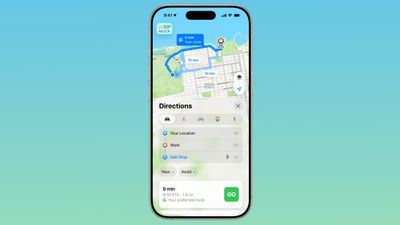
ios 26 maps app preferred route
Preferred Routes can help you avoid unexpected delays, but for whatever reason you might prefer not to have your regular routes tracked, even if the data does stay on-device. You might also find the notifications intrusive if you already know about traffic on your route.

How to Turn Off Preferred Routes

  1. Open the Settings app on your iPhone.
  2. Tap through to Apps ➝ Maps ➝ Location.
  3. Toggle off Preferred Routes and Predicted Destinations.
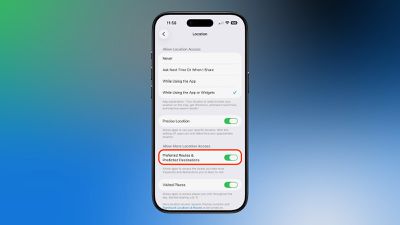
ios 26 maps preferred routes

Once disabled, Apple Maps will no longer learn your preferred routes or send you alerts about traffic conditions on your regular commutes. However, you'll still receive standard navigation and traffic information when actively using the app for directions.

To re-enable the feature, simply toggle Preferred Routes and Predicted Destinations back on in Settings ➝ Apps ➝ Maps ➝ Location.

Popular Stories

Apple Maps General

Apple Maps Flyover Gets a Visual Upgrade in iOS 27

Monday June 8, 2026 4:29 pm PDT by
Apple Maps is getting a visual update in iOS 27, with Apple planning to introduce new aerial imagery that's combined with Visual Intelligence models. Apple said everything will have sharper detail, from the "shapes of individual trees to the way light reflects off the glass of skyscrapers." Flyover is an Apple Maps view that lets users see more than 350 cities in 3D with detailed...
Apple Says iOS 27 Adds These 12 New Features to Your iPhone Feature

Apple Says iOS 27 Adds These 12 New Features to Your iPhone

Tuesday June 9, 2026 9:47 am PDT by
iOS 27's key new feature is a more intelligent and personal version of Siri, but the changes go well beyond that. In a press release today, Apple outlined additional enhancements coming across Apple Maps, Find My, Apple Wallet, Apple Music, and more. Apple Maps has gained an enhanced Flyover experience powered by AI, enabling you to view aerial imagery in "stunning detail" for select cities. ...
liquid glass app icon

Apple Maps to Get These 10 New Features in iOS 27

Thursday June 11, 2026 5:45 am PDT by
Apple Maps is getting a range of new features in iOS 27, headlined by an upgraded Flyover experience that uses AI to improve the realism and detail of its aerial imagery. Flyover is a longstanding feature of Apple Maps and lets users explore more than 350 cities in 3D with detailed landmarks, roads, parks, and buildings. Apple described the enhanced Flyover in iOS 27 as combining aerial...