

How to Turn Off Automatic Ear Detection on Your Powerbeats Pro Earbuds - MacRumors
Skip to Content

How to Turn Off Automatic Ear Detection on Your Powerbeats Pro Earbuds

by

Apple's Beats-branded Powerbeats Pro earbuds include a feature called Automatic Ear Detection that allows the audio routed from a connected device to seamlessly switch to the Powerbeats buds the moment you put them in your ears.

powerbeatsproblack
This means the ‌Powerbeats Pro‌ can automatically pause the audio track when you remove them, and resume playback when you put them back in again, allowing you to jump-start your workout after a quick break.

The feature is enabled by default, but if you want to you can manually disable it once you've connected ‌Powerbeats Pro‌ to an iPhone or iPad.

How to Turn off Automatic Ear Detection

  1. On your iPhone or ‌iPad‌, launch the Setings app.
  2. Tap Bluetooth.
  3. Under the My Devices list, tap the circled "i" icon next to your connected ‌Powerbeats Pro‌ earphones. powerbeatsproautomaticeardetection
  4. Toggle off the switch next to Automatic Ear Detection.
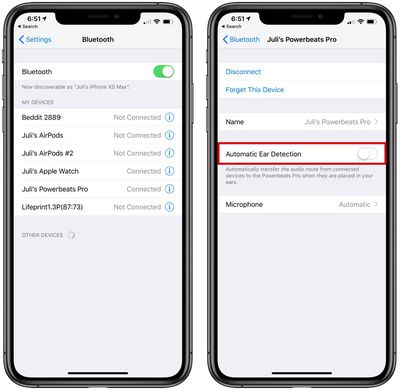
Note that once you've disabled ear detection, you'll have to manually play/pause audio using your audio source device or the ‌Powerbeats Pro‌'s on-bud physical buttons.

Popular Stories

Apple Event Logo

Apple Just Released a New Accessory

Monday May 4, 2026 8:13 am PDT by
Apple today released a new Pride Edition Sport Loop for the Apple Watch. The band features a rainbow design with 11 colors of woven nylon yarns. The new Pride Edition Sport Loop is available to order now on Apple.com and in the Apple Store app in 40mm, 42mm, and 46mm sizes, and it will be available at Apple Store locations starting later this week. In the U.S., the band costs $49. There...



Instagram Feature 2

PSA: Instagram Encrypted Messaging Ends on Friday, May 8

Tuesday May 5, 2026 8:24 am PDT by
Instagram will remove end-to-end encryption for direct messages between users from May 8, 2026. When the date comes around, Meta will potentially be able to see the contents of all messages between users on the social media platform. Encrypting messages has been an optional feature in Instagram since 2023, but in March of this year the social media platform quietly updated a help page to say ...
iOS 26

Apple Says iOS 26.5 Adds Three New Features to Your iPhone

Tuesday May 5, 2026 7:36 am PDT by
iOS 26.5 includes three new features for iPhones, according to Apple's release notes for the update, which is expected to be released next week. As discovered during beta testing, iOS 26.5 enables end-to-end encryption for RCS messaging between iOS and Android devices. Apple says this security upgrade is limited to supported carriers around the world and will continue to roll out....









































