Apple's official TV app is designed to bring together all the ways to watch TV on your device in a single app. The idea behind it is that you can subscribe to just the channels you want, without downloading any apps, and then watch the content on demand and across all your devices.
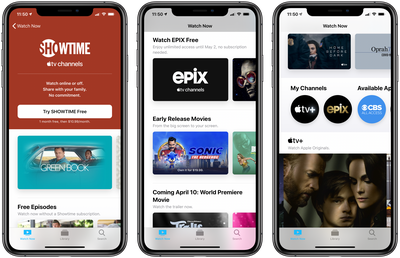
In other words, you don't need a subscription to Apple TV+, Apple's streaming television service, to be able to use the Apple TV app. Rather, the app lists all the television shows and movies from any other streaming service apps on your device, and allows you to access them from the same interface.
Not only that, the Apple TV app is also host to "Apple TV Channels," a section that lets you subscribe to and watch individual services like HBO, Starz, SHOWTIME, and EPIX, right from within the TV app interface.
It's important to note that a paid Apple TV+ subscription doesn't give you access to content listed in the Apple TV Channels section of the TV app. Channels are completely separate from Apple TV+, which refers only to Apple's own channel (also listed in the Channels section).
The following steps show you how to search for Apple TV Channels, subscribe to them, or start a free trial. Note that the availability of some trials may vary by country and region.
How to Subscribe to Apple TV Channels Using the TV app
- On your iPhone, iPad, Apple TV or Mac, launch the Apple TV app.
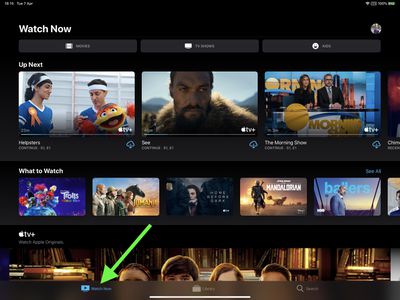
- Select the Watch Now section – on iOS devices it's at the bottom of the screen, on other devices it's at the top of the screen.

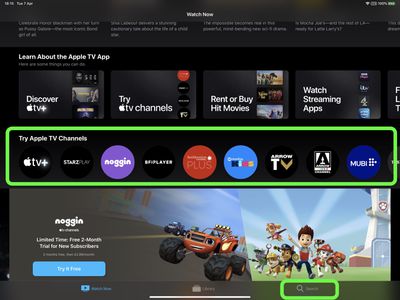
- Scroll down to Try Apple TV Channels or go to Search to find a specific channel.
- Select the channel that you want to subscribe to, or start a free trial.
- Enter your Apple ID and password if prompted.
- Confirm your billing information if required. You may also need to add a valid payment method.
- Agree to any terms and conditions if prompted.
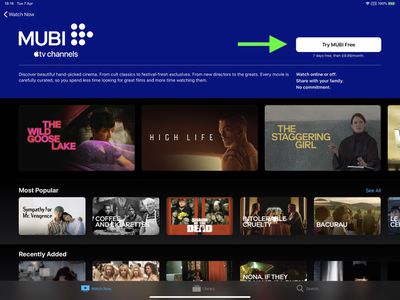
Remember, you can stream content included in your channel subscription in the Apple TV app, without having to download an app. You can also access your subscription on any device that's signed in to the TV app with the same Apple ID.

To learn how you can cancel a subscription to an Apple TV Channel at any time, follow our simple guide.