Skip to Content

How to Schedule and Automate Focus Modes

by

Apple's new Focus feature in iOS 15 lets you set up your device to help you be in the moment and zone in on a single thing. Focus does this by filtering notifications based on what you're doing, and you can customize Focus modes for specific scenarios.
iOS 15 Focus Feature
You can activate a Focus on your iPhone when you want to reduce distractions and spotlight your attention on something, but you can also schedule Focus modes to activate at certain times of the day, like during work hours or when you're winding down for bed.

You can also set a Focus to automatically turn on when you're in a specific location, like at work, or when you open a particular app, like Books or the TV app. The steps below show you how it's done.

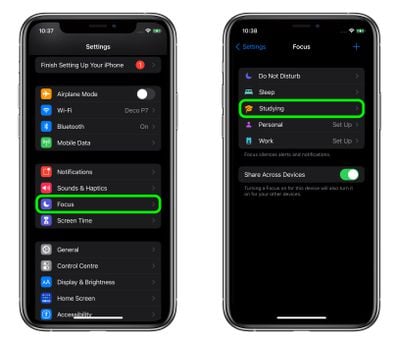
  1. Launch the Settings app on your iPhone, then tap Focus.
  2. Select the Focus mode that you want to schedule.
    focus

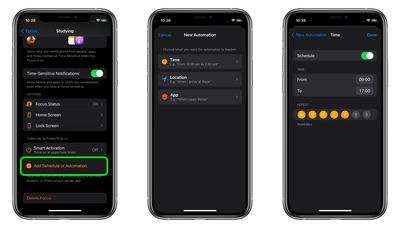
  3. Under "Turn On Automatically," tap Add Schedule or Automation.
  4. Select Time, Location, or App, depending on your use case.
  5. If you selected Time, set the duration using the From and To selectors and the days on which you want the Focus to come on. If you selected Location, search or enter an address using the input field, then tap Done. If you selected App, tap the apps in the list that you want the Focus to activate for, then tap Done.
    focus

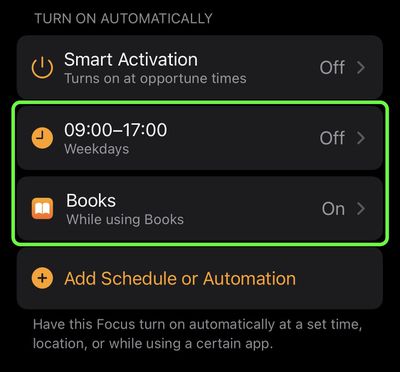
That's all there is to it. Once you've scheduled a Focus or set up an automation, you can find it listed in Settings -> Focus under "Turn On Automatically," where you can enable/disable it, or delete it completely.

focus

Related Forum: iOS 15

Popular Stories

Apple Event Logo

Apple Released Seven New Products Today

Wednesday March 11, 2026 7:05 am PDT by
Starting today, the seven new Apple products that were announced last week are available at Apple Stores and beginning to arrive to customers. The colorful MacBook Neo and all of the other new products are on display at most Apple Store locations around the world starting today. Apple Stores have inventory of the new products for both walk-in customers and Apple Store pickup, but...


iOS 27 Mock Quick

10+ New Features Coming in iOS 27

Friday March 13, 2026 2:13 pm PDT by
We're only three months away from Apple's WWDC 2026 event, which will see the company unveil iOS 27. With the fully revamped version of Siri possibly delayed until September, iOS 27 is shaping up to be the update we wanted iOS 26 to be. There will be new Apple Intelligence features, updates for the iPhone Fold, and more, with the latest rumors summarized below. Foldable iPhone Features...
iOS 27 Mock Quick

iOS 27 Will Reportedly Be Like Mac OS X Snow Leopard

Sunday March 15, 2026 9:42 am PDT by
In his Power On newsletter today, Bloomberg's Mark Gurman reiterated that iOS 27 will be similar to 2009's Mac OS X Snow Leopard, in the sense that one of Apple's biggest priorities is bug fixes for improved performance and stability. During WWDC 2008's State of the Union, Apple showed a slide that said Mac OS X Snow Leopard had "0 new features," as it opted to focus on performance and...