In iOS 16, it's possible to create a shared iCloud Photo Library that allows up to five other friends with Apple products to contribute photos to.

iOS 16 Photos and Camera Guide Feature
This means if you are all at the same event, you can have your iPhone camera automatically upload new shots to the same shared library for you to enjoy and look back on together.

In the Camera app, you can tap a new icon that looks like two people to swap between automatic uploading to the shared library and your personal library. Using Bluetooth, your ‌iPhone‌ can even detect when you're in the same location as other participants in the library and set the Camera app to automatically add photos and videos to the shared library.
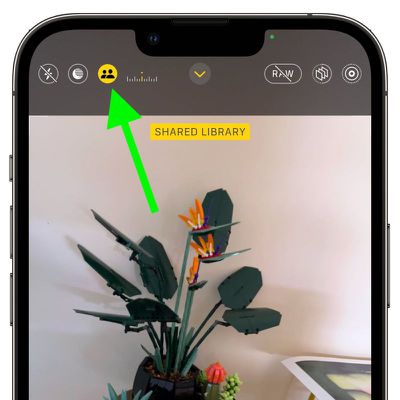
camera
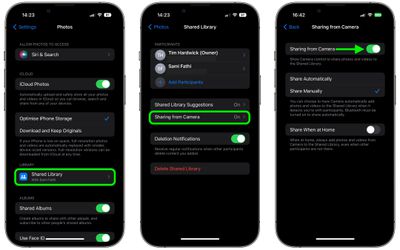
If you don't like the Sharing from Camera app option for whatever reason, you can manually disable it, and if you change your mind, you can re-enable it anytime, so long as you still have a Shared ‌iCloud Photo Library‌ active. The following steps show you how it's done on an ‌iPhone‌ running iOS 16.

  1. Launch the Settings app on your ‌iPhone‌.
  2. Scroll down and tap Photos.
  3. Under "Library," tap Shared Library.
  4. Tap Sharing From Camera.
  5. Toggle the switch on or off next to Sharing from Camera.
settings

If you choose to enable Sharing from Camera, you can use the same menu of options to set the Camera to Share Automatically or Share Manually, with the latter option allowing you to make use of the new upload button in the Camera app, as outlined above.


Popular Stories

Apple Logo Black

Apple Just Made Its Second-Biggest Acquisition Ever After Beats

Thursday January 29, 2026 10:07 am PST by
Apple today confirmed to Reuters that it has acquired Q.ai, an Israeli startup that is working on artificial intelligence technology for audio. Apple paid close to $2 billion for Q.ai, according to sources cited by the Financial Times. That would make this Apple's second-biggest acquisition ever, after it paid $3 billion for the popular headphone and audio brand Beats in 2014. Q.ai has...
14 inch MacBook Pro Keyboard

Apple Changes How You Order a Mac

Saturday January 31, 2026 10:51 am PST by
Apple recently updated its online store with a new ordering process for Macs, including the MacBook Air, MacBook Pro, iMac, Mac mini, Mac Studio, and Mac Pro. There used to be a handful of standard configurations available for each Mac, but now you must configure a Mac entirely from scratch on a feature-by-feature basis. In other words, ordering a new Mac now works much like ordering an...
apple unsold web store

Retail Accessories Apple Won't Sell You Now Available via New Site

Friday January 30, 2026 8:46 am PST by
A newly surfaced resale operation is seemingly offering Apple Store–exclusive display accessories to the public for the first time, potentially giving consumers access to Apple-designed hardware that the company has historically kept confined to its retail environments. Apple designs a range of premium MagSafe charging stands, display trays, and hardware systems exclusively for displays in ...
Apple Creator Studio

Apple's Next Launch is Today

Tuesday January 27, 2026 2:39 pm PST by
Update: Apple Creator Studio is now available. Apple Creator Studio launches this Wednesday, January 28. The all-in-one subscription provides access to the Final Cut Pro, Logic Pro, Pixelmator Pro, Motion, Compressor, and MainStage apps, with U.S. pricing set at $12.99 per month or $129 per year. A subscription to Apple Creator Studio also unlocks "intelligent features" and "premium...
Apple Event Logo

Apple Teases 'Innovations That Have Never Been Seen Before' This Year

Friday January 30, 2026 5:40 am PST by
Apple CEO Tim Cook believes that his company will have opportunities to deliver "innovations that have never been seen before" this year. "As I said at the beginning of my remarks, this was, in so many ways, a remarkable quarter for Apple, and we're excited for all the opportunities we'll have in the year ahead to deliver innovations that have never been seen before and enrich the lives of...