How to Rearrange the Control Center in watchOS 5 - MacRumors
Skip to Content

How to Rearrange the Control Center in watchOS 5

by

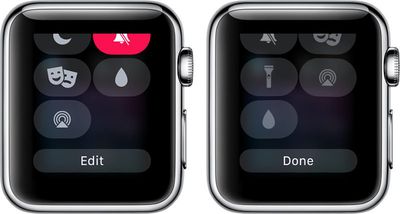
In watchOS 5, you can rearrange the Control Center to put the Control Center features that you use at the top, so they're quicker to access when you swipe up on your Apple Watch.

Unfortunately, there's no way to remove features you don't often use, but you can bury those less desirable options at the bottom of the menu.

  1. Bring up the Control Center by swiping upwards on the Apple Watch's display from the watch face.
  2. Scroll down to the bottom.
  3. Select "Edit."
  4. While the Control Center icons are wiggling, use a finger to pull an icon out of its position and then drag it into a new one.applewatchcontrolcenteredit
  5. When finished, tap "Done."

That's all there is to it. It's a simple little function that you might not think to look for, but it can be handy if there are Control Center features that you use on a regular basis because you're able to get to them more quickly.

Related Roundup: Apple Watch 11

Buyer's Guide: Apple Watch (Caution)

Top Rated Comments

pdaholic Avatar
103 months ago
Unfortunately this will apply to the <.0001% who have watchos5 installed on their watches now. Hopefully I’ll remember this article when os5 launches months from now!
Score: 1 Votes (Like | Disagree)

Popular Stories

apple watch series 11 spring

Apple Stores Will Soon Be Able to Restore Apple Watch Software In-House

Wednesday April 15, 2026 5:36 pm PDT by
Apple retail locations and Apple Authorized Service Providers will soon be able to restore Apple Watch software in-store without needing to send an Apple Watch to a service center, according to a retail source that spoke to MacRumors. Right now, Apple Watches that can't be restored using an iPhone need to be mailed to an Apple Repair Center for service. There is no in-store repair option, so ...


youtube iphone apple watch health ad 2026

New Apple Ad Sells the iPhone and Apple Watch Health Pairing

Thursday April 23, 2026 11:18 am PDT by
Apple has published a new ad to appeal to customers in the market for an iPhone and Apple Watch pairing, highlighting the insights it can offer for your health. Titled simply "Health with iPhone + Apple Watch," the half-minute ad focuses on a woman waiting in line at a cafe who begins receiving unsolicited health and fitness advice from other people in the queue, as well as local residents,...

watchos 26 gradient light

This New Apple Watch Face Is Coming in watchOS 26.5

Friday April 24, 2026 5:51 am PDT by
iOS 26.5 and watchOS 26.5 will have a new Pride Luminance wallpaper and Apple Watch face when the updates are released in the coming weeks, according to Bloomberg's Mark Gurman. In a brief tweet, Gurman revealed that Pride Luminance will "Celebrate the vibrancy and individuality of the LGBTQ+ community and customize your watch face with colors from Pride flags." iOS 26.5 has been in...