

Quickly Check Wi-Fi Network Security on iPhone - MacRumors
Skip to Content

Quickly Check Wi-Fi Network Security on iPhone

by

In iOS, Apple makes it easy to spot potentially unsafe Wi-Fi networks before you connect. There are helpful privacy indicators in Control Center that instantly show whether nearby networks are password-protected or open to the public.
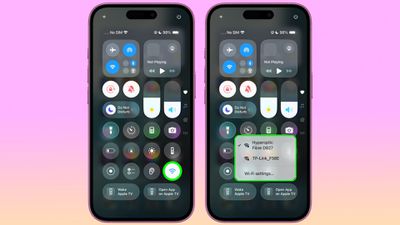
ios control center wifi security

Accessing Wi-Fi Privacy Indicators

Getting to these privacy indicators is straightforward. Pull down from the top-right corner to invoke Control Center, then touch and hold the standalone Wi-Fi control. You'll see a list of detected nearby networks, each displaying a lock icon next to password-protected private networks, with no lock showing for public networks.

If you haven't added the standalone Wi-Fi control (long press a space, then tap Add Control), you can tap the Connectivity group – located by default in the top-left corner of Control Center – and then hold the Wi-Fi symbol within that. This group is also home to controls for Bluetooth, Cellular Data, AirDrop, VPN and Personal Hotspot.
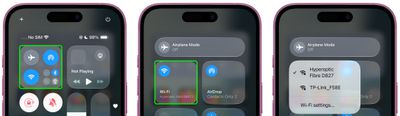
ios control center connectivity panel
The lock symbols make it simple to distinguish between secure private networks and potentially risky public hotspots that don't require a password. It's a small but welcome improvement that helps you quickly make more informed decisions about which networks to join without having to delve into settings, thereby reducing the risk of connecting your iPhone or iPad to unsecured Wi-Fi.


Popular Stories

Four iPhone 18 Pro Colors Mock Feature

iPhone 18 Pro Launching Later This Year With These 10 New Features

Tuesday May 26, 2026 6:32 am PDT by
While the iPhone 18 Pro and iPhone 18 Pro Max are not launching until September, there are already plenty of rumors about the devices. It was initially reported that the iPhone 18 Pro models would have fully under-screen Face ID, with only a front camera visible in the top-left corner of the screen. However, the latest rumors indicate that only one Face ID component will be moved under the...

Apple Watch Ultra 2 Black Titanium

watchOS 27 Will Add These New Features to Your Apple Watch

Sunday May 24, 2026 11:53 am PDT by
Apple will unveil watchOS 27 during its WWDC 2026 keynote on Monday, June 8, and a handful of new features have been rumored already. The first developer beta of watchOS 27 should be available immediately following the keynote, and a public beta typically follows in July. The update should be released to all users with a compatible Apple Watch model in September. Below, we recap watchOS...
iPhone 15 General Feature Green

Apple Preparing 'Most Significant Overhaul in the iPhone's History'

Friday May 22, 2026 1:36 pm PDT by
Apple reportedly plans to unveil its first foldable iPhone in September this year — it may be named "iPhone Ultra" — and expectations are high. In his Power On newsletter, Bloomberg's Mark Gurman said the foldable iPhone will be "the most significant overhaul in the iPhone's history." "iPhone 4, iPhone 6 and iPhone X were clearly a big deal, but this is a whole new design," he said....











































