

How to Disable Night Mode on Your iPhone's Camera - MacRumors
Skip to Content

How to Disable Night Mode on Your iPhone's Camera

by

When using the Camera app on iPhones, the ‌Night Mode‌ feature comes on automatically when the camera sensor registers an indoor or outdoor scene that is dark enough to warrant brightening, resulting in natural colors and reduced noise. That's the idea, anyway. The reality is that ‌Night Mode‌ won't always capture the kind of nighttime image that you want.
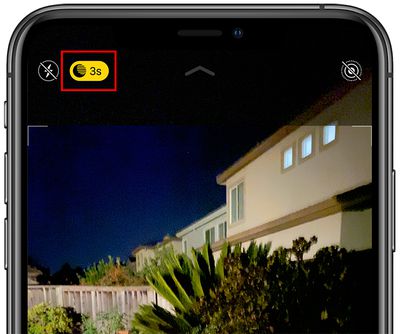
nightmodebutton
If you're aiming to shoot an authentic evening scene in which any sources of light remain subdued, for example, it's better to turn off ‌Night Mode‌ to prevent extreme light exposure and a blown out picture.

If you don't want ‌‌Night Mode‌‌ engaged when you're shooting in low light environments, you can turn it off by tapping the yellow ‌‌Night Mode‌‌ button when it appears at the top of the viewfinder. The problem is, when you open the Camera app again and the sensor detects low light, ‌Night Mode‌ will automatically enable itself again.

In iOS 14, there was no way to disable ‌Night Mode‌ for good – you had to manually switch ‌Night Mode‌ off every time you relaunch the Camera. But in iOS 15 and later, you can turn off ‌Night Mode‌ and ensure that it stays off whenever you subsequently open the Camera app. Here's how.

  1. Launch the Settings app on your iPhone.
  2. Tap Camera.
  3. Tap Preserve Settings.
  4. Toggle the Night Mode switch to the green ON position.
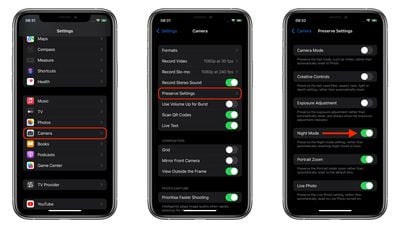
settings
Turning on this switch makes the Camera remember that you disabled ‌Night Mode‌ last time you were shooting. You can still manually enable ‌Night Mode‌ in the Camera app in the usual way, but now you're in control of when it's active.

Popular Stories

Four iPhone 18 Pro Colors Mock Feature

iPhone 18 Pro Launching Later This Year With These 10 New Features

Tuesday May 26, 2026 6:32 am PDT by
While the iPhone 18 Pro and iPhone 18 Pro Max are not launching until September, there are already plenty of rumors about the devices. It was initially reported that the iPhone 18 Pro models would have fully under-screen Face ID, with only a front camera visible in the top-left corner of the screen. However, the latest rumors indicate that only one Face ID component will be moved under the...

Apple Watch Ultra 2 Black Titanium

watchOS 27 Will Add These New Features to Your Apple Watch

Sunday May 24, 2026 11:53 am PDT by
Apple will unveil watchOS 27 during its WWDC 2026 keynote on Monday, June 8, and a handful of new features have been rumored already. The first developer beta of watchOS 27 should be available immediately following the keynote, and a public beta typically follows in July. The update should be released to all users with a compatible Apple Watch model in September. Below, we recap watchOS...
Apple Watch Blood Glucose Monitoring Feature 2

Apple Watch for Diabetes: The Latest on Apple's Plans for Non-Invasive Blood Sugar Monitoring

Tuesday May 26, 2026 9:30 am PDT by
For many years now, it has been rumored that the Apple Watch will eventually gain non-invasive blood sugar monitoring capabilities, which would enable millions of people with diabetes to track their blood glucose levels without needing to prick their skin with a needle or wear a dedicated continuous glucose monitor. According to Bloomberg's Mark Gurman, Apple recently shifted oversight of...










































