Skip to Content

macOS Monterey: How to Make Your Mac User Profile an Animated Memoji

by

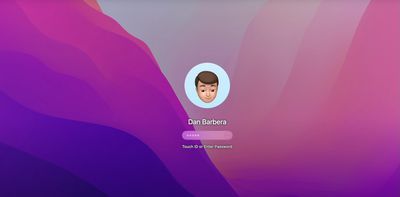
In macOS Monterey, you can use an animated Memoji as your Mac user profile instead of a standard static image. Of course you could always use a still photo of yourself to welcome you at startup and on the Lock Screen, but where's the fun in that? Keep reading to learn how it's done.
login

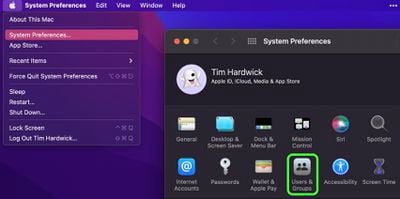
  1. Click the Apple () symbol in the menu bar and select System Preferences....
  2. Click Users & Groups in the preferences pane. You can also click on your profile picture in the top left of the window.
    sys prefs

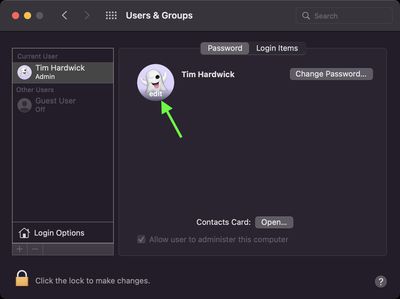
  3. Make sure the Current User is highlighted in the sidebar, then hover your pointer over the circled profile picture and click edit.
    user profile

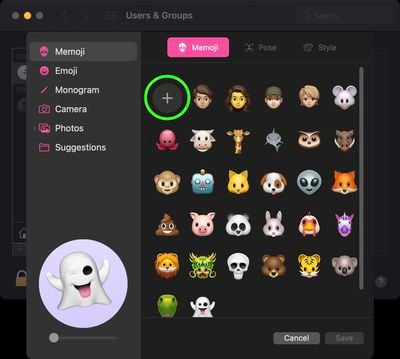
  4. With Memoji selected in the sidebar, click on an existing Memoji. Alternately, create one from scratch by clicking the big round plus button, where you'll find a wealth of features from which you can create your personalized avatar.
    memoji

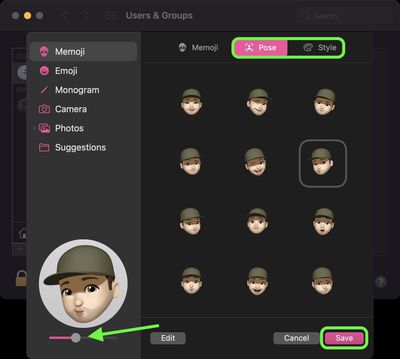
  5. Once you've settled on a Memoji, use the Pose tab in the main Memoji selection window to give your avatar a facial expression. (Note, you can use the slider below the preview window to zoom your character's face in the profile circle.) You can also use the Style tab to change the color of your Memoji's background.
    memoji

  6. Once you're done, click Save.

Next time you login to your Mac, you'll see your animated Memoji avatar there to welcome you. And if you get your login password wrong a few times, just watch the expression on their face go from mildly irritated to thoroughly irate.

Tag: Memoji
Related Forum: macOS Monterey

Popular Stories

iOS 27 Mock Quick

iOS 27 Will Reportedly Be Like Mac OS X Snow Leopard

Sunday March 15, 2026 9:42 am PDT by
In his Power On newsletter today, Bloomberg's Mark Gurman reiterated that iOS 27 will be similar to 2009's Mac OS X Snow Leopard, in the sense that one of Apple's biggest priorities is bug fixes for improved performance and stability. During WWDC 2008's State of the Union, Apple showed a slide that said Mac OS X Snow Leopard had "0 new features," as it opted to focus on performance and...
AirPods Max 2 Feature

Apple Announces AirPods Max 2 With H2 Chip and More

Monday March 16, 2026 6:12 am PDT by
Apple today unveiled AirPods Max 2, with key upgrades including the H2 chip, increased active noise cancellation, improved sound quality, and features such as Adaptive Audio, Conversation Awareness, Voice Isolation, and Live Translation. The new AirPods Max have the same overall design as the previous generation, with most of the new features coming from the upgrade to the H2 chip:- Adaptive ...

iOS 27 Mock Quick

10+ New Features Coming in iOS 27

Friday March 13, 2026 2:13 pm PDT by

We're only three months away from Apple's WWDC 2026 event, which will see the company unveil iOS 27. With the fully revamped version of Siri possibly delayed until September, iOS 27 is shaping up to be the update we wanted iOS 26 to be. There will be new Apple Intelligence features, updates for the iPhone Fold, and more, with the latest rumors summarized below. Foldable iPhone Features...