How to Lock WhatsApp on iPhone With Face ID or Touch ID - MacRumors
Skip to Content

How to Lock WhatsApp on iPhone With Face ID or Touch ID

by

whatsappiconcleanedWhatsApp on iPhone includes an option to lock the app with your device's Face ID or Touch ID authentication. This article explains how to enable the feature.

Locking WhatsApp is a neat way of doubling the security and privacy of your messages, and especially useful if your iPhone isn't set up to automatically lock after a few minutes of idle time, because even you leave your iPhone unlocked, your WhatsApp chats will remain safely hidden from sight.

Follow the steps below to require ‌Face ID‌ or ‌Touch ID‌ to unlock WhatsApp on your iPhone.

  1. Launch WhatsApp on your iPhone.
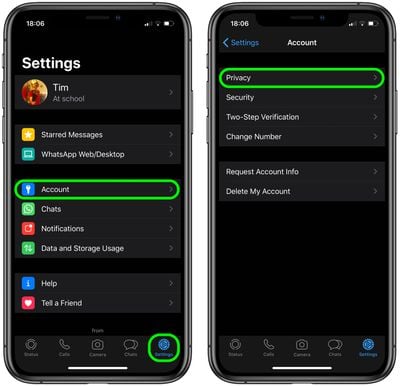
  2. If you're viewing a chat thread, back out of it, then tap Settings in the bottom-right corner of the screen.
  3. Tap Account.
  4. Tap Privacy.whatsapp

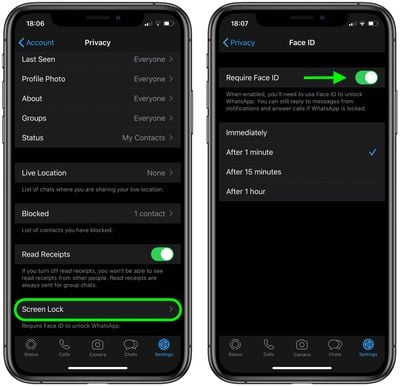
  5. Tap Screen Lock.
  6. Toggle on Require Face ID / Require Touch ID.

  7. Select a time delay if desired, or allow it to lock Immediately.
    whatsapp

Note that you'll still be able to reply to messages from notifications and answer calls when WhatsApp is locked.

Popular Stories

Whatsapp Feature

WhatsApp Working on View-Once Text Messages for iPhone

Wednesday June 17, 2026 1:48 am PDT by
WhatsApp is working on a way to let users send text messages that can only be viewed once, similar to the feature already available for photos, videos, and voice notes. According to WABetaInfo, after typing a message in the chat bar, users will be able to select a new "Send as view once" option by long-pressing the Send button. When the message is sent, the recipient will be able to open the ...

Whatsapp Feature

WhatsApp Now Lets You Reserve a Username

Monday June 29, 2026 4:01 pm PDT by
Popular messaging app WhatsApp is now allowing users to reserve usernames ahead of plans to launch username-based messaging. Right now, WhatsApp uses a person's phone number as an identifier, but usernames will allow people to interact without having to exchange personal information. Username reservations are rolling out starting this week, and not all users will have access to the...


Whatsapp Feature

WhatsApp Beta Adds Green Dot to Show Who's Online

Monday July 6, 2026 3:56 am PDT by
WhatsApp appears to be introducing a new visual indicator that shows when a contact is online, according to WaBetaInfo. The feature adds a small green circle to a contact's profile photo when they're active in the app, and which disappears the moment they leave, all updated in real time. The indicator is now being tested for the WhatsApp iPhone app in TestFlight after it debuted on Android...