

In iOS 15.5, Apple added an option that lets iPhone and iPad users automatically limit the number of episodes stored on their device. This article explains how it works.
Downloading podcasts to your iPhone or iPad is a great way to ensure that you have something interesting to listen to on your commute or on your travels, regardless of whether you have a Wi-Fi or cellular connection.
However, if you subscribe to several shows that tend to publish new episodes at a rate that means you struggle to listen to them before the next episode arrives, your iPhone can quickly fill up with unplayed podcasts.
Given that everything from music to photos and video are continually vying for your iPhone storage space, this doesn't make for an ideal situation. Fortunately, Apple has realized this, and in the latest iOS 15.5 update it has added options for its official Podcasts app that let you limit automatic downloads based on a set criteria.
You can now opt to download and keep only the latest episode per show, or the latest 2, 3, 5, or 10 episodes per show. Or if you'd rather limit downloads to only those published within the last day or days, you can do that instead, up to a maximum of 30 days. Alternatively, if storage isn't an issue, you can opt to download and keep all new episodes.
Before you follow the steps below, make sure your device is running iOS 15.5 or iPadOS 15.5 or later. You can check that your iPhone or iPad is up-to-date with the latest version by going to Settings -> General -> Software Update.
- Launch Settings on your iPhone or iPad.
- Scroll down and tap Podcasts.
- Under "Automatic Downloads," tap Automatically Downloaded.
- Choose your preferred option to download and keep podcasts either by basing it on the number of latest episodes per show or by the number of days that have passed.
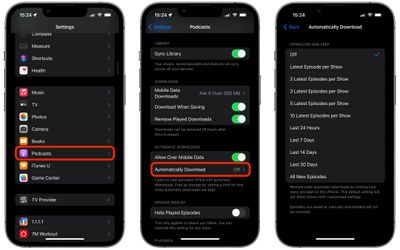
Note that when episodes fall outside of the limit you impose, they will automatically be removed from your device, although this doesn't apply to episodes you saved or manually downloaded. It's also worth bearing in mind that the option you choose will not affect shows with customized settings.












































![Apple Pulls Keynote, Pages and Numbers From App Store [Update: Back]](https://images.macrumors.com/t/Okb7kitB_gNr6qe5Pex9nQIysD8=/112x112/article-new/2026/01/Apple-Creator-Studio-iWork-suite.jpg)

