

iPhone 15 Pro: How to Hide the Silent Mode Bell Icon in the Status Bar - MacRumors
Skip to Content

iPhone 15 Pro: How to Hide the Silent Mode Bell Icon in the Status Bar

by

On iPhone 15 Pro and iPhone 15 Pro Max models, Apple has introduced a physical, programmable Action button that replaces the traditional ring/silent switch above the volume buttons.
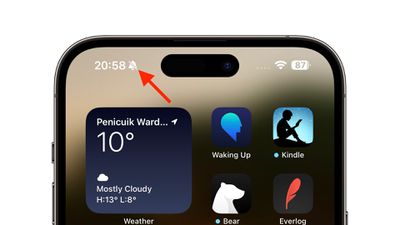
silent mode icon status bar
The Action button can be programmed to perform several different functions, but the ability to switch between Silent and Ring mode has not gone away. By default, one long press of the Action button will mute your device (the button's haptic feedback will emit three pulses).

Both iPhone 15 Pro models display a crossed-out bell symbol next to the time in the status bar to indicate that Mute/Silent mode is activated, and it will remain until you long press the Action button again to unmute your device.

If you tend to have your iPhone in Silent mode, this status bar symbol can become distracting and annoying, but fortunately Apple has had the foresight to include a way to get rid of it. Simply follow the steps below.

  1. Open the Settings app.
  2. Tap Sounds & Haptics.
  3. Under "Silent Mode," toggle off the switch next to Show in Status Bar.
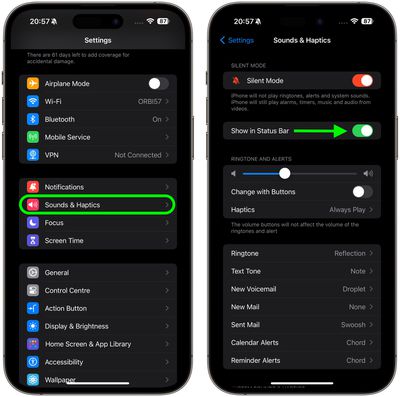
settings

That's all there is to it. The silent indicator will no longer appear in the status bar, even when Silent mode is active.


Popular Stories

Aston Martin CarPlay Ultra Screen

Apple Says CarPlay Ultra is Coming to These Vehicle Brands

Thursday May 21, 2026 11:53 am PDT by
Last year, Apple launched CarPlay Ultra, the long-awaited next-generation version of its CarPlay software system for vehicles. Nearly a year later, CarPlay Ultra is still limited to Aston Martin's latest luxury vehicles, but that should change fairly soon. In May 2025, Apple said many other vehicle brands planned to offer CarPlay Ultra, including Hyundai, Kia, and Genesis. CarPlay Ultra...
ios 26 iphone 16 pro lock screen notifications feature 1

iOS 27 Notifications Will Slide in From Left Side of Your iPhone's Screen

Friday June 5, 2026 7:24 am PDT by
Bloomberg's Mark Gurman today revealed another iOS 27 change: notifications will slide in from the left side of the screen instead of from the top. In addition, accessing Notification Center on iOS 27 will require swiping down on the top-left corner of the screen. If you swipe down on the Dynamic Island area, a new "Search or Ask" interface tied to the revamped Siri will appear, instead of...
WWDC26 Mock Feature 2

Will Apple Launch New Hardware at WWDC Next Week?

Friday June 5, 2026 7:56 am PDT by
Apple has several hardware releases in the pipeline, but will we see any of them unveiled at this year's Worldwide Developers Conference? WWDC is primarily a software event where new versions of iOS, iPadOS, macOS, watchOS, tvOS, and visionOS take center stage, but it's not unusual for Apple to introduce new hardware during the developer conference. Take WWDC 2017, for example, where Apple...










































