As part of Apple Intelligence, iOS 18.1 includes a new dedicated Reduce Interruptions focus mode that only shows you important notifications that need attention while filtering out everything else. Keep reading to learn how to use it.
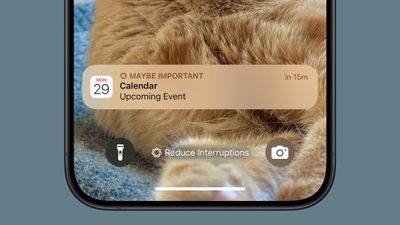
The Reduce Interruptions focus offers a middle ground between receiving all notifications and using Do Not Disturb. Essentially it acts as a smart filter for your notifications, so you see only what's truly important in the moment. For example, it might allow messages about schedule changes, urgent work communications, and time-sensitive alerts, while bundling less urgent updates for later review.
As an Apple Intelligence feature, Reduce Interruptions requires an iPhone 16 series or iPhone 15 Pro model running iOS 18.1 or later. You'll need your device set to U.S. English with Apple Intelligence enabled to get started (Settings ➝ Apple Intelligence & Siri).
- Open Settings and tap Focus.
- Tap Reduce Interruptions.
- Tap People to select contacts who can break through.
- Tap Apps to choose which apps can send immediate notifications.
- Enable Intelligent Breakthrough & Silencing for AI-based filtering.
- Open Control Center, long press Focus, and tap Reduce Interruptions to enable it.
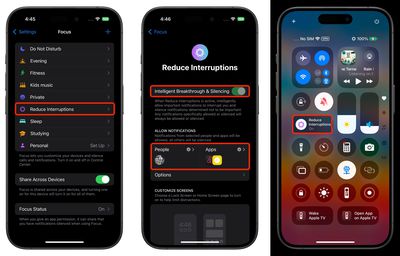
Whenever you customize an existing Focus mode or create a new one, you will see the new toggle to turn on Intelligent Breakthrough and Silencing. This option allows important notifications to interrupt you, while muting notifications that are not important, which is the same thing that the Reduce Notifications focus does. You can override the notification settings for specific apps and people, which is how it worked prior to iOS 18.1.