Apple's iOS 18.1 update, set to be released on October 28, brings powerful new search functions to the Photos app. It now allows you to find specific images with unprecedented precision, thanks to its natural language input capabilities powered by Apple Intelligence. Here's how to make the most of it.
In iOS 18.1, the key to effective searching in Photos is using natural language. Instead of simple keywords, try describing the photo you're looking for in detail. The app can now understand complex queries and find images based on specific elements within them.
For example, if you've previously identified friends and family using the People and Pets features, you can search for "Dad smiling" or "Snowy sleeping." The more specific you are, the more word suggestions you'll get, and better your results will be. You can even search for actions or emotions, like "kids laughing at swings" or "couple dancing at wedding."
The new search function is also pretty handy at finding objects and scenes. Try queries like "car next to lake" or "sunset over city skyline." Tap the suggested words that apply. You can combine multiple elements in your search, such as "yellow flowers in vase by window."
If you're a food lover, searches like "pizza with mushrooms" or "steak and chips on table" can help you find culinary inspirations from your photo library. When searching for people, you can now include details about their appearance or actions. "Mum in green hat with wine glass" or "Emma in wedding dress" are examples of how specific you can get.
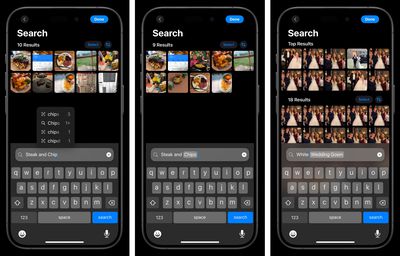
The Photos app can even search within videos. If you remember a specific moment in a video but can't recall which one, try describing the scene. For instance, "baby crawling" or "fireworks over lake" can take you directly to that moment.
Note that for these advanced search features to work, the Photos app needs time to index your library. This process happens on your device to protect your privacy, so be patient if searches aren't immediately accurate after updating to iOS 18.1.
With practice, you'll find that the new search function in Photos can help you rediscover forgotten memories and locate specific images with ease. Don't be afraid to get creative with your searches – you might be surprised at what the app can find. Note that only iPhone 15 Pro and iPhone 16 models support Apple Intelligence.