Apple has introduced a major redesign of the Photos app in iOS 18, consolidating its various sections into a single, scrollable view. This new Library View aims to streamline navigation and improve access to your photo collections. Here's how to navigate the updated interface.
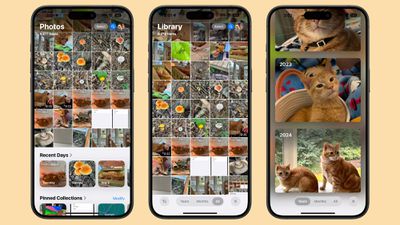
When you open the Photos app in iOS 18, you'll immediately notice the absence of separate tabs. Instead, you're greeted with the main Photo Library grid, displaying about 30 images at once. To access additional content that was previously found in separate tabs, simply scroll down. This new layout combines elements from the former "For You" and "Albums" sections into one cohesive view.
To adjust the number of images displayed on screen, you'll need to first swipe down to enter the full Photo Library view. From there, use pinch gestures to zoom in or out, allowing you to see more or fewer images at once. In this view, you'll also find the familiar Years and Months organizational options for browsing your photo history. Note that the Days option has been removed and replaced with a Recent Days Collection, accessible by scrolling down.
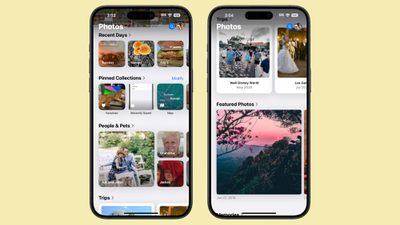
Navigation within the new Photos app relies heavily on vertical scrolling. As you move through your library, you'll encounter various image collections that were previously housed in the "For You" tab, followed by your Albums. To return to the main grid, simply swipe back up. Throughout the app, you'll also notice a blue search icon for quick access to the search function, as well as a Select button for managing multiple images.
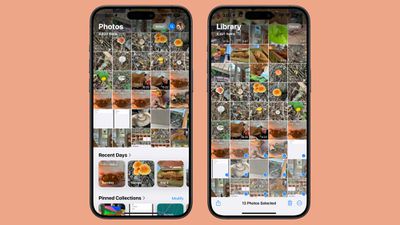
While the new all-in-one screen layout may take some getting used to, it retains most features from previous versions of the Photos app. The redesign aims to offer a more fluid browsing experience, allowing you to access your entire photo library and curated collections without switching between tabs. As you explore the new interface, you'll hopefully find that this streamlined approach makes it easier to rediscover and manage your memories in iOS 18.