In iOS 26, Apple has a helpful new feature that notifies you when your iPhone's camera lens needs cleaning – something Android devices have offered for years. Here's how to turn on this smart notification system.
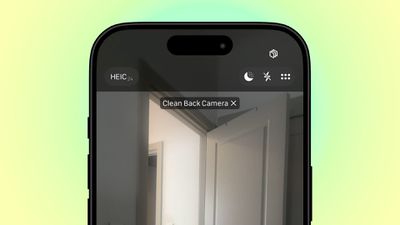
clean back camera hint
Whenever your iPhone's camera is active, iOS 26 monitors the incoming light for signs of reduced clarity or smudging that could indicate a dirty lens. When triggered, you'll see a discrete alert suggesting you clean your camera lens to improve image quality.

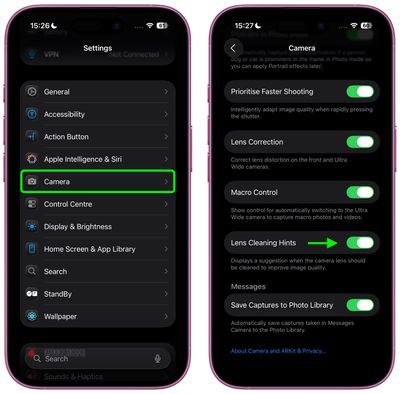
To benefit from the feature, you'll need an iPhone running iOS 26 (currently in beta). It's currently unclear which models support Lens Cleaning Hints, but you can check by looking for the following toggle:

  1. Open Settings on your iPhone.
  2. Scroll down and tap Camera.
  3. Toggle on Lens Cleaning Hints.

settings
Once enabled, your iPhone will analyze image quality and display a notification in the Camera app when it detects your rear camera lens could benefit from cleaning.

This feature joins another camera-related change in iOS 26 – a completely redesigned Camera app interface that includes a new minimalist navigation bar. If you don't have the beta software installed, you shouldn't have long to wait: Apple is expected to officially release iOS 26 in September.

Top Rated Comments

turbineseaplane Avatar
26 weeks ago

Doesn't look like it's supported on the 13 Pro. I don't see the option.
Lens Cleaning Hints require the latest Neural Engine, Apple Intelligence and a special co-processor.

Please upgrade to a new iPhone.
We'd also be happy to sustainably recycle your 13 Pro for you at an Apple Store.

-TC


Attachment Image
Score: 15 Votes (Like | Disagree)
Timpetus Avatar
26 weeks ago
Discreet, not discrete. Discreet means unobtrusive, discrete means separate.
Score: 9 Votes (Like | Disagree)
mattopotamus Avatar
26 weeks ago

Seems like a feature that would be ON by default, but you have to turn it on?
It is on by default. Just checked, running the beta, and it was on.
Score: 8 Votes (Like | Disagree)
26 weeks ago
Seems like a feature that would be ON by default, but you have to turn it on?
Score: 7 Votes (Like | Disagree)
26 weeks ago

Whenever your iPhone's camera is active, iOS 26 monitors the incoming light for signs of reduced clarity or smudging that could indicate a dirty lens. When triggered, you'll see a discrete alert suggesting you clean your camera lens to improve image quality.
* discreet

Discrete means separate. Discreet means subtle, unobtrusive.
Score: 7 Votes (Like | Disagree)
26 weeks ago

Neat... now we need another article "How to properly clean your iPhone lenses" ;)
With a link to the Apple branded microfiber cloth!
Score: 5 Votes (Like | Disagree)

Popular Stories

maxresdefault

Apple Shows Off a Key Reason to Upgrade to the iPhone 17

Saturday February 7, 2026 9:26 am PST by
Apple today shared an ad that shows how the upgraded Center Stage front camera on the latest iPhones improves the process of taking a group selfie. "Watch how the new front facing camera on iPhone 17 Pro takes group selfies that automatically expand and rotate as more people come into frame," says Apple. While the ad is focused on the iPhone 17 Pro and iPhone 17 Pro Max, the regular iPhone...
apple wallet drivers license feature iPhone 15 pro

Apple Says These 7 U.S. States Plan to Offer iPhone Driver's Licenses

Monday February 9, 2026 6:24 am PST by
In select U.S. states, residents can add their driver's license or state ID to the Apple Wallet app on the iPhone and Apple Watch, and then use it to display proof of identity or age at select airports and businesses, and in select apps. The feature is currently available in 13 U.S. states and Puerto Rico, and it is expected to launch in at least seven more in the future. To set up the...
m5 macbook pro deal

Why You Shouldn't Buy the Next MacBook Pro

Tuesday February 10, 2026 4:27 pm PST by
Apple is planning to launch new MacBook Pro models as soon as early March, but if you can, this is one generation you should skip because there's something much better in the works. We're waiting on 14-inch and 16-inch MacBook Pro models with M5 Pro and M5 Max chips, with few changes other than the processor upgrade. There won't be any tweaks to the design or the display, but later this...
iOS 26

Apple Releases iOS 26.3 and iPadOS 26.3

Wednesday February 11, 2026 10:07 am PST by
Apple today released iOS 26.3 and iPadOS 26.3, the latest updates to the iOS 26 and iPadOS 26 operating systems that came out in September. The new software comes almost two months after Apple released iOS 26.2 and iPadOS 26.2. The new software can be downloaded on eligible iPhones and iPads over-the-air by going to Settings > General > Software Update. According to Apple's release notes, ...

Apple Logo Zoomed

Apple Expected to Launch These 10+ Products Over the Coming Months

Tuesday February 10, 2026 6:33 am PST by
It has been a slow start to 2026 for Apple product launches, with only a new AirTag and a special Apple Watch band released so far. We are still waiting for MacBook Pro models with M5 Pro and M5 Max chips, the iPhone 17e, a lower-cost MacBook with an iPhone chip, long-rumored updates to the Apple TV and HomePod mini, and much more. Apple is expected to release/update the following products...