iOS 26: Customize Your iPhone Home Screen Wallpaper - MacRumors
Skip to Content

iOS 26: Customize Your iPhone Home Screen Wallpaper

by

With iOS 26, Apple gives you more control than ever over how your Home screen looks and feels. For example, as part of the new Liquid Glass redesign you can now make app icons and widgets clear. You can also now set the wallpaper directly from the Home screen, whereas previously you had to go into Settings.
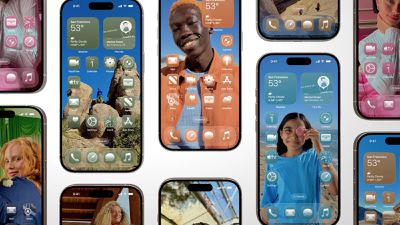
iOS 26 Screens
Bear in mind that the new Liquid Glass design means the wallpaper you choose directly influences the appearance of your dock, folders, and app icons, making your customization choices more impactful than before.

Change Wallpaper From Home Screen

Here's the quickest way to change your wallpaper in iOS 26:

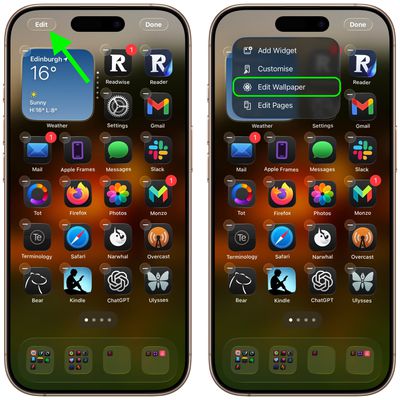
  1. Touch and hold any empty space on your Home screen.
  2. Tap Edit in the top-left corner.
  3. Tap Edit Wallpaper in the popup menu.

edit wallpaper home screen ios

Customization Options

Once you're in the wallpaper editing interface, you'll find several ways to personalize your Home screen.

  • Pair matches the wallpaper with your Lock Screen.
  • Color offers uniform colors from a menu of swatches.
  • Gradient blends your chosen color into another color.
  • Photo lets you select and crop a picture from your library.
  • Blur toggles image blurring for a softer effect.
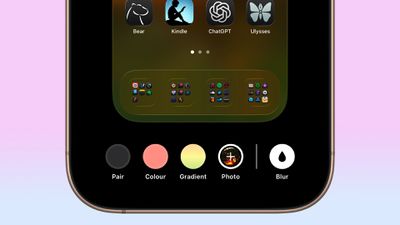
wallpaper customizations

Remember that Home screen wallpaper changes won't affect your Lock Screen. These are customized independently, so you can mix and match different styles for each screen.

More New Customization Options

In iOS 26, Apple has also added a new feature to its Home screen customization options that can match the color of your app icons with your iPhone's case color or the actual color of your iPhone. Click the links to learn how it's done.


Popular Stories

iCloud iPhone 17 Pro

iPhone Users Who Pay for iCloud Storage Get Two New Perks on iOS 27

Thursday July 2, 2026 6:10 am PDT by
If you pay for certain iCloud+ storage plans beyond the 5GB that Apple offers for free, you will receive two more perks on iOS 27 at no additional cost. A summary of the two new iCloud+ perks on iOS 27:Increased daily usage limits for some new Apple Intelligence features, including image generation in the revamped Image Playground app. HomeKit Secure Video cameras receive generated video...

Apple Event Logo

Apple Just Released a New Product

Thursday July 2, 2026 8:04 am PDT by
Apple's first product release of summer 2026 occurred this week, but do not get too excited, as it is merely the Beats Solo Buds in a new color. Beats Solo Buds are now offered in orange through Best Buy in the U.S., with availability set to expand to 7-Eleven stores in Japan on July 4. Apple already offered orange Solo Buds in India for free with the purchase of an iPhone 15 or iPhone 15 ...
iphone 17 ceramic shield

iPhone 18 With 9GB RAM Still Won't Support Two New iOS 27 Features

Friday July 3, 2026 12:10 pm PDT by
The lower-end iPhone 18 and iPhone 18e will be equipped with 9GB of RAM, up from 8GB in the iPhone 17 and iPhone 17e, according to supply chain analyst Ming-Chi Kuo. In a social media post, Kuo said the 1GB increase in RAM will ensure that Apple Intelligence features continue to run smoothly on the pair of devices. The higher-end iPhone 18 Pro, iPhone 18 Pro Max, and foldable "iPhone Ultra...