Skip to Content

iOS 18: Get Rid of Website Distractions in Safari

by

Are you tired of pop-ups, banners, and autoplay videos interrupting your web browsing experience? With iOS 18 and iPadOS 18, Apple introduces a game-changing feature in Safari called Distraction Control. This powerful tool helps you focus on the content that matters by minimizing intrusive elements on webpages.

safari icon blue banner
In this tutorial, we'll walk you through how to use Distraction Control to streamline your browsing and reduce visual clutter. While it's not designed as an ad blocker, Distraction Control can significantly improve your reading experience by hiding static distractions.

Using the following steps, you'll be able to manage sign-in prompts, cookie notices, newsletter sign-ups, and more. Note that it's an opt-in feature for hiding elements on the page, and Apple says that nothing is hidden that is not proactively selected.

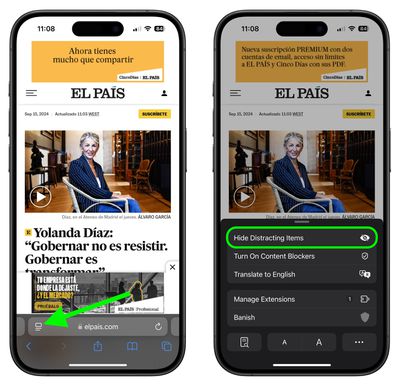
  1. In Safari, tap the Page menu in the left of the address bar.
  2. Select Hide Distracting Items.
    safari

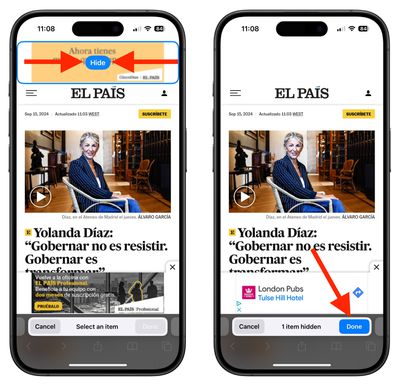
  3. Select the area on the page that you want to hide, then tap Hide.
  4. When you're finished selecting areas to hide, tap Done in the address bar.
    Monday 16 Sep 2024 16 37 39

When you re-visit a site on which you have distracting items hidden, you'll see an icon in the address bar that looks like an eye crossed out. If you tap the Page menu, you'll also see an option to Show Hidden Items that when selected will instantly reveal all hidden elements on the webpage.


Note that your Distraction Control settings remain on-device and will not sync from device to device, so you will need to hide website elements on each one of your Apple devices.


Tag: Safari

Popular Stories

Apple Event Logo

Apple Released Seven New Products Today

Wednesday March 11, 2026 7:05 am PDT by
Starting today, the seven new Apple products that were announced last week are available at Apple Stores and beginning to arrive to customers. The colorful MacBook Neo and all of the other new products are on display at most Apple Store locations around the world starting today. Apple Stores have inventory of the new products for both walk-in customers and Apple Store pickup, but...
ios 26 4 yellow

Everything New in iOS 26.4 Beta 4

Monday March 9, 2026 3:50 pm PDT by
Apple is continuing to test the iOS 26.4 beta, and the latest update is now available for developers and public beta testers. As testing goes on, there are fewer new features in each beta, but today’s release adds new emoji characters and a few other changes. New Emoji Apple added new emoji characters, including trombone, treasure chest, distorted face, hairy creature, fight cloud, orca,...
Apple 50 Years of Thinking Different

Apple Announces 50th Anniversary Plans

Thursday March 12, 2026 6:10 am PDT by
Apple today announced that it will celebrate the company's 50th anniversary over the coming weeks, but it has yet to reveal any specific plans. Apple was founded on April 1, 1976, so the company will turn 50 on April 1, 2026. "While Apple is known for looking forward, this milestone offers a special moment to reflect on the journey that has brought the company here, to celebrate the...