iOS 17.2: How to Lock Your iPhone Journal - MacRumors
Skip to Content

iOS 17.2: How to Lock Your iPhone Journal

by

Apple introduced its long-awaited Journal app for iPhone in iOS 17.2. Keep reading to learn how to keep your journal's contents secure and safe away from prying eyes.
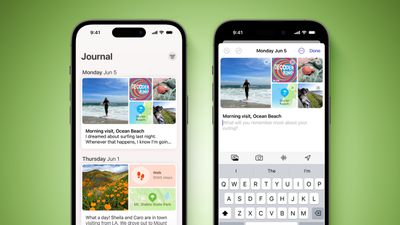
Journal App iOS 17 Feature Green
Apple announced in June 2023 announced it was bringing its own journaling app to iOS 17, and it has since been confirmed that the app is included in iOS 17.2, which is currently available to download as a beta.

Apple's Journal app lets you record your daily thoughts and activities, incorporating data like photos, music listened to, workouts, and more, plus it suggests topics to write about.

Of course, privacy and security are paramount when it comes to personal journaling. That's why the Journal app comes with security features including encryption and passcode protection, to safeguard your journal from unauthorized access.

The following steps show you how to lock the Journal app on iPhone.

  1. Launch the Settings app on your iPhone.
  2. Scroll down and tap Journal.
  3. Tap Lock Journal, then enter your iPhone passcode.
  4. Toggle on the Lock Journal switch.
  5. Tap Require Passcode, then choose from the options: Immediately, After 1 minute, After 5 minutes, and After 15 minutes.
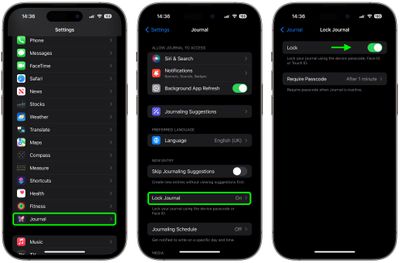
lock journal

That's all there is to it. Your journal is now inaccessible without entering your device passcode, or using Face ID or Touch ID, providing you with peace of mind every time you record sensitive or personal information.


Popular Stories

iphone 16 teal

'Siri AI' Lawsuit Update: Apple to Pay Owners of These iPhone Models

Thursday July 9, 2026 7:08 am PDT by
In May, Apple agreed to pay $250 million to settle a U.S. class action lawsuit over Siri AI's delayed launch, and eligible iPhone users could receive up to a $95 payout. This week, the California court overseeing the case held a hearing regarding preliminary approval of the settlement, but the judge has not yet issued a ruling. It will likely be at least a few more months before eligible...

Apple TV Thumb 3

Everything Coming in the 2026 Apple TV 4K

Wednesday July 8, 2026 4:51 pm PDT by
The Apple TV 4K hasn't been updated since 2022, and it's due for a refresh. An update is planned for 2026, but Apple is likely going to wait to launch it after Siri AI launches in iOS 27. Design Apple TV design updates don't happen often, and that's not changing. The next Apple TV is going to have the same squircle shape as the current model, and it'll continue to be made from a black...
apple wallet drivers license feature iPhone 15 pro

Apple Says iPhone Driver's Licenses Will Expand to These 6 U.S. States

Thursday July 9, 2026 7:29 am PDT by
In select U.S. states, residents can add their driver's license or state ID to the Apple Wallet app on the iPhone and Apple Watch, and then use it to display proof of identity or age at select airports and businesses, and in select apps. To set up the feature, open the Wallet app on the iPhone and tap on the plus sign in the top-right corner. Next, tap on Driver's License and ID Cards,...