How to Hide the MacBook Pro Notch - MacRumors
Skip to Content

How to Hide the MacBook Pro Notch

by

Apple's 2021 MacBook Pro models unexpectedly came with a display notch, or as Apple calls it, a camera housing, which sits dead center at the top of the screen. This article covers all the ways you can conceal the notch or at least make it play nice with your apps using software-based solutions.
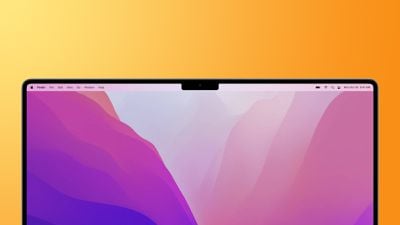
macbook pro 2021 notch feature
The inclusion of a notch on the redesigned 14-inch and 16-inch MacBook Pro allowed Apple to slim down the display bezels and move the menu bar up around the camera housing to leave more screen real estate below, but it was a controversial decision.

For some users, the appearance of the notch in the center of the menu bar is a blight on an otherwise fantastic screen. For others, its location actively interferes with app menu items. Either way many would rather not have it at all. Thankfully, there are ways to hide the notch to varying degrees or make it compatible with app menu bars.

Let's take a look at the available tricks below, starting with how to conceal the notch completely.

Hide the Notch With Fullscreen Mode

The easiest way to make the notch essentially invisible when you're using a specific app is to use it in fullscreen mode. If you click the green button in the row of traffic lights at the top-left corner of the app window, the app will expand to fill the screen. This automatically hides the contents of the menu bar by turning it black.
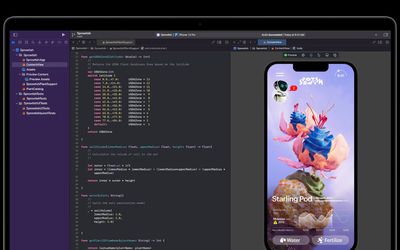
macos notch hides in full screen
You can hover over the menu bar with your mouse pointer to reveal the menu items, but the effect is such that you don't even see the notch is there in front of you for as long as you stay in fullscreen mode. To exit out of fullscreen, simply click the green traffic light button again.

Apps That Hide the Notch Completely

If you don't like the notch staring you in the face while you look at the display, there's an app for that. While the following third-party apps don't outright cancel the notch, they at least make its existence less obvious by forcing a black menu bar, similar to how macOS Monterey adds a black bezel to the top of the display when apps are in fullscreen mode, only by adapting your chosen wallpaper instead, like so.
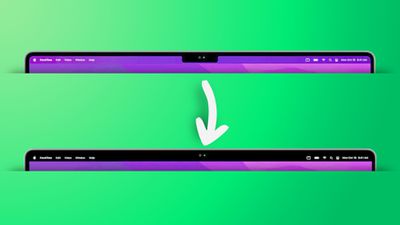
remove notch app feature2
Forehead (Free): Besides letting you switch between your default wallpaper and a black notchless one, Forehead includes options to round the corners of the screen, similar to the rounded top corners of the new MacBook Pros. The ability to simulate a notch on older Macs is coming in an update.

TopNotch (Free): Offers the same features as Forehead, and also supports Dynamic Wallpapers, works with multiple displays and spaces, and remains in the background and detects for wallpaper changes.

De-Notch-ifier ($9.95): Offers the same features as TopNotch, just in the form of a dropdown menu in the menu bar. De-Notch-ifier isn't a completely new app, rather it's a pre-configured version of Boring Old Menu Bar that gives you a boring old non-transparent menu bar on macOS Big Sur and later. If you buy one app, you get the other for free.

Scale App Menu Bars to Adjust to the Notch

In some cases, older apps that make extensive use of menu bar items may have some of their content concealed beneath the camera housing, making for an unsightly appearance and difficulty accessing menu options. Going fullscreen or hiding the notch with a third-party app doesn't solve this issue, so what can be done to fix it?
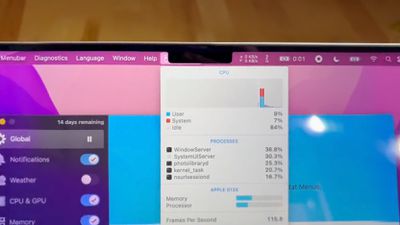
notch behavior feature
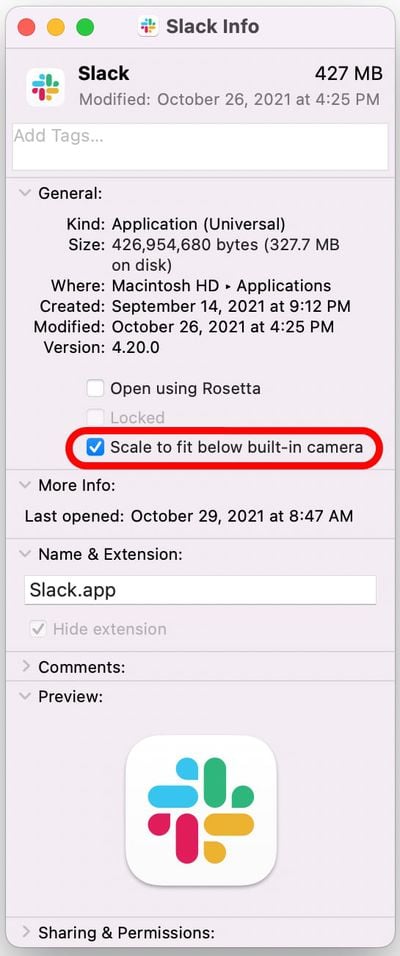
Fortunately, Apple was wise to the potential issue of having menus or menu items in the menu bar inadvertently being hidden behind the notch. In macOS Monterey, there is a compatibility setting called "Scale to fit below built-in camera," which adjusts an app's settings so that it either uses the whole display or uses only the area below the camera housing.

"Scale to fit" ensures the menu bar and app windows appear below the built-in camera on your Mac and are always visible. Moreover, if the app has menu bar items or windows that would appear behind the camera housing, all open apps or apps that share the same space appear below the camera until you quit the app using the scaled setting.

Here's how to turn it on for an individual Mac app.

  1. Close the app that you want to adjust for the notch.
  2. Launch Finder and select the Applications folder.
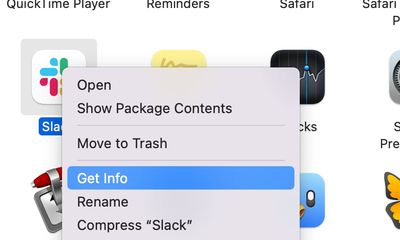
  3. Right-click (Ctrl-click) the icon for the app in question and choose Get Info.
    mac app notch get info

  4. Check the box next to Scale to fit below built-in camera.mac app scale below camera

Now restart the app, and as it launches you should see the screen automatically scale to fit its entire menu bar below the notch area, ensuring all of the app's menu bar items stay visible.


Related Forum: macOS Monterey

Popular Stories

iOS 28 AI

Apple Taking New Approach to Developing iOS 28 and macOS 28

Sunday November 8, 2026 7:42 am PST by
Apple has made a change to its development process for iOS 28, macOS 28, and corresponding software updates, according to Bloomberg's Mark Gurman. In his Power On newsletter today, he said Apple separates development of each year's new operating systems into three major stages. Typically, he said each stage consists of four weeks of coding followed by a four-week "convergence" period where...
apple pro tell logo

Apple Launching Two More New Products This Friday

Monday November 9, 2026 4:22 am PST by
The Apple launches keep coming! The company is set to release two new products on Friday, November 13: the all-new Apple HomeView and the fourth-generation Apple TV 4K, both of which have been available to pre-order since mid-October. Apple HomeView: Apple's new smart home display, powered by Apple Intelligence with Siri AI, for entertainment and managing the home. Available in tabletop and...


imac video apple feature

November 20 to Mark the End of an Era at Apple

Wednesday November 11, 2026 7:51 am PST by
Apple has announced that the long-running Apple Support Community discussion forums for user-to-user tech support will be permanently closing on Friday, November 20. The forums have existed in some form for nearly 30 years, so it is the end of an era. Effectively immediately, the Apple Support Community forums are in a read-only state, with new posts no longer being accepted. The final...
Latest Stories
Apple Invites App Updated With Two New Features
34 minutes ago
Google Says Gemini App Rolling Out on Apple CarPlay Starting Today
2 hours ago
Is It Worth Buying a Ceramic Apple Watch?
5 hours ago
Samsung Early Black Friday Event Brings Major Sales to Frame TVs and More
6 hours ago
iPhone 18 Pro Max Wins Battery Test Involving 32 Smartphones
6 hours ago
AirTag 2 4-Pack Hits Record Low $69.99 Price Ahead of Black Friday
8 hours ago
Rumored Apple Smart Glasses Mentioned in Supplier's Earnings Briefing
8 hours ago
Make Apple Watch Listen for Sounds Like the Doorbell
12 hours ago
Apple Chip Supplier TSMC Approves $1 Billion AI Investment
12 hours ago
'Apple Support Community' Permanently Closing on November 20
18 hours ago
Apple's Holiday Gift Guide Highlights iPhone Duo and More
21 hours ago
Three Workers Die at Tata iPhone Parts Plant in India
21 hours ago
iCloud Mail, Calendar, Contacts and More Experiencing Outage [Updated]
22 hours ago
Apple's Claris Testing 'Harbor' App for Local AI on Macs
22 hours ago
iFixit's PROLED MacBook Pro Teardown Reveals Logo LEDs
1 day ago
10 Free iPhone Duo Apps Worth Downloading
1 day ago
Apple Releases New AirPods Firmware
1 day ago
Amazon Begins Early Black Friday Sale, Featuring Sitewide Discounts on Tech and Decor
1 day ago
Apple Announces Swift Student Challenge Ahead of WWDC 2027
1 day ago
Next iPad Air Likely to Have These 10 New Features
1 day ago
iPad Mini 2021 vs. 2026 Buyer's Guide: Is It Worth Upgrading?
1 day ago
New Apple TV Sign Language Feature Announced
1 day ago
Disable Touch on MacBook Pro PROLED XDR and When Using Sidecar
1 day ago
Anker's Early Black Friday Sale Surprises With Mystery Boxes and Big Discounts
1 day ago
Apple Arcade Adding These Four Games in December
1 day ago
OLED iPad Air Rumored to Launch in Two Sizes in Early 2027
1 day ago
The Original iPod Went on Sale 25 Years Ago Today
1 day ago
Apple Maps Could Factor Parking Into Your Arrival Time
1 day ago
Waze Now Alerts Drivers to Nearby Cyclists Using Garmin LiveTrack
1 day ago
iPhone 20 Pro: Ten Big Changes That Could Redefine Apple's Flagship
1 day ago