

Hard Reset or Force Restart Your iPhone 16 - MacRumors
Skip to Content

Hard Reset or Force Restart Your iPhone 16

by

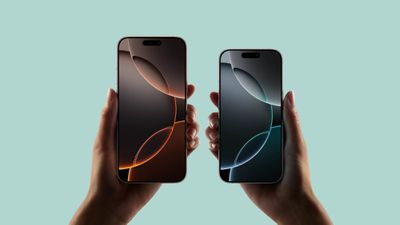
Apple's iPhone 16 and ‌‌‌iPhone 16‌ Plus‌‌ come in the same size options as their equivalents in last year's iPhone 15 series, while the ‌iPhone 16‌ Pro and ‌‌‌iPhone 16‌ Pro‌‌ Max have ever so slightly bigger screens than their predecessors. All ‌iPhone 16‌ models now also come with a Camera Control button, but otherwise share similar design elements with Apple's 2023 flagship smartphone lineup, such as an all-screen design, Dynamic Island, an Action button, and no Home button on the front.
iphone 16 pro pro max
As such, the method of hard resetting or force restarting hasn't changed from the previous series. Still, if you're upgrading from a device with a Home button, keep reading to learn how to hard reset or force reset your ‌iPhone 16‌, as the process can come in handy if your device bugs out or stops responding for any reason.

How to Hard Reset the iPhone 16 (All Models)

  1. Quickly press and release the Volume Up button.
    force restart iphone 14

  2. Quickly press and release the Volume Down button.
  3. Press and hold the Side button until the Apple logo appears, then release the Side button.
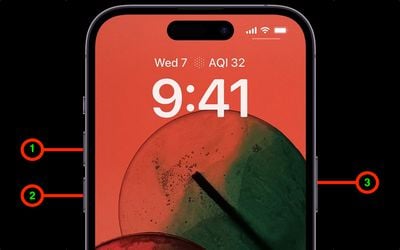
During this process, you will see a slider to power off the iPhone. You're going to want to ignore it and continue holding down the Side button until the screen goes black. At that point, the Apple logo will pop up, and after the restart is complete, the screen will activate once again.

Using the force restart process prevents you from having to shut the iPhone down entirely, which takes a few more steps and takes longer to boot up again.

If you do want to shut the iPhone down, you can do so by going to the General section of the Settings app, scrolling down to the bottom, and choosing the Shut Down option.


Popular Stories

iCloud iPhone 17 Pro

iPhone Users Who Pay for iCloud Storage Get Two New Perks on iOS 27

Tuesday June 9, 2026 11:29 am PDT by
If you pay for extra iCloud storage on your iPhone, beyond the 5GB included for free, you might receive two more perks on iOS 27 at no additional cost. First, Apple said there will be daily usage limits for some of the new and enhanced Apple Intelligence features on iOS 27, including image generation. However, the company noted that "increased access" is available with "most" iCloud+ storage ...


CarPlay Siri AI

Apple Announces New CarPlay Features on iOS 27, Including Video Apps

Monday June 8, 2026 4:17 pm PDT by
Back at WWDC 2025, Apple revealed that it was planning to allow CarPlay users to watch video via AirPlay in their vehicles while they are not driving, but we did not hear many specific details about this functionality until now. In a WWDC 2026 video aimed at developers, Apple said the CarPlay video feature is available in new vehicles that support it. When playing a video in an iPhone app...
Apple Says iOS 27 Adds These 12 New Features to Your iPhone Feature

Apple Says iOS 27 Adds These 12 New Features to Your iPhone

Tuesday June 9, 2026 9:47 am PDT by
iOS 27's key new feature is a more intelligent and personal version of Siri, but the changes go well beyond that. In a press release today, Apple outlined additional enhancements coming across Apple Maps, Find My, Apple Wallet, Apple Music, and more. Apple Maps has gained an enhanced Flyover experience powered by AI, enabling you to view aerial imagery in "stunning detail" for select cities. ...








































