Skip to Content

How to Fake a Dropped Call on Your iPhone When You No Longer Want to Chat

by

If you've ever wanted to end a call on your iPhone without seeming rude, this handy little trick is for you. Keep reading to learn how to fake a dropped call.
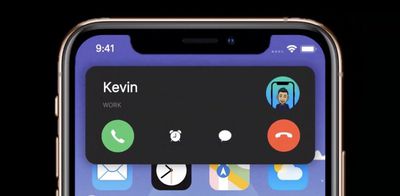
ios 14 phone calls
Whenever you hang up a call on ‌iPhone‌, the person on the other end sees a message on their phone saying "Call Ended." This is usually treated as a clear indication that you ended the call on purpose, since if the call had dropped due to bad reception, the message would have read "Call Failed," which sounds a lot less incriminating.

So what if you want to end a call without it looking like you abruptly and rudely hung up? The answer is to turn on Airplane mode. That's because when Airplane mode is enabled during a call, the call immediately ends and the person on the other end sees "Call Failed," as if the conversation ended through no fault of your own. Granted, it's sneaky, but it works.

The easiest way to turn on Airplane Mode is via Control Center. To open Control Center, swipe down diagonally from the top-right corner of the screen (if your ‌iPhone‌ has a Home button, swipe up from the bottom of the screen). Then, tap the button that looks like an airplane so that it turns orange and the green cellular button next to it grays out. The cellular provider name in the top-left corner will also be replaced by a plane symbol.
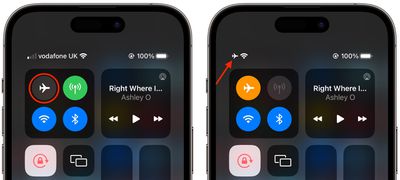
control center
This should immediately end the call, and all that the person on the other end will see is that the call "failed." If you still appear to be on the call, chances are you have Wi-Fi calling enabled, in which case simply tap the blue Wi-Fi button in Control Center to end Wi-Fi calling.

Popular Stories

Multicolored Low Cost A18 Pro MacBook Feature

Apple Accidentally Leaks 'MacBook Neo'

Tuesday March 3, 2026 7:00 am PST by
Apple appears to have prematurely revealed the name of its rumored lower-cost MacBook model, which is expected to be announced this Wednesday. A regulatory document for a "MacBook Neo" (Model A3404) has appeared on Apple's website. Unfortunately, there are no further details or images available yet. While the PDF file does not contain the "MacBook Neo" name, it briefly appeared in a link...
imac video apple feature

Apple Unveils Two New Products

Monday March 2, 2026 7:49 am PST by
Apple today introduced two new devices, including the iPhone 17e and an updated iPad Air. iPhone 17e features the same overall design as the iPhone 16e, but it gains Apple's A19 chip, MagSafe for magnetic wireless charging and magnetic accessories, Apple's second-generation C1X modem for faster 5G, and a doubled 256GB of base storage. In the U.S., the iPhone 17e starts at $599, just like the ...
MacBook Neo Feature Pastel 1

Apple Announces $599 'MacBook Neo' With A18 Pro Chip

Wednesday March 4, 2026 6:15 am PST by
Apple today announced the "MacBook Neo," an all-new kind of low-cost Mac featuring the A18 Pro chip for $599. The MacBook Neo is the first Mac to be powered by an iPhone chip; the A18 Pro debuted in 2024's iPhone 16 Pro models. Apple says it is up to 50% faster for everyday tasks than the bestselling PC with the latest shipping Intel Core Ultra 5, up to 3x faster for on-device AI workloads,...