One of the issues that Apple Card users sometimes raise is that while the Wallet app offers plenty of well-organized information about spending, there's no option to directly share transaction data from the card with many third-party money management apps like Mint or Lunch Money.

Fortunately, Apple has provided a solution – you can now download a CSV/OFX spreadsheet from the Wallet app that contains all your ‌Apple Card‌ data, which you can then import into most budgeting apps and get a more complete picture of your finances.

Alternatively, if you're a Quicken or QuickBooks users, you can directly export into the appropriate QFX/QBO formats. The following steps show you how it's done.

  1. Launch the Wallet app on your iPhone.
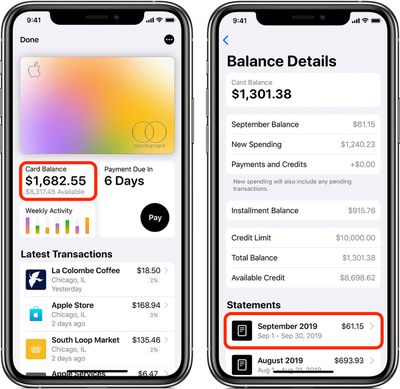
  2. Tap the Card Balance panel under your ‌Apple Card‌.
  3. Scroll down to the Statements section and tap on the month you wish to export transactions from.
    Apple Card
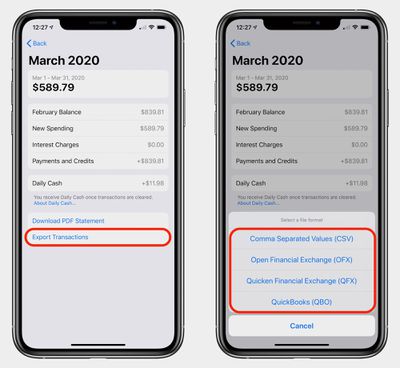
  4. Tap Export Transactions at the bottom.
  5. Select CSV, OFX, QFX, or QBO from the pop-up menu.
    apple card export how to
  6. To save the data as a CSV/OFX/QFX/QBO file, tap the Share icon in the upper-right corner of the screen, where you can opt to AirDrop it to another device such as your Mac, print it, or Save to Files to save it your iCloud folders or on your ‌iPhone‌.

Note that some budgeting apps accept imported transaction data, but may need file format conversions prior to import.


Top Rated Comments

jimthing Avatar
78 months ago

I'm very uneducated on this, but I thought the UK was moving to something called open banking? OFX has been around since the 90's, and apparently most implementations here in the US are old and not using the newer revisions which causes security issues.
We are, but meh... I rechecked my cc's and actually precisely ONE currently does CSV/OFX. Open banking AFAI have noticed just seems to allow ones ac's to be seen in other banks apps. That's NOT offering financial controls, just a minor convenience factor.
AFAIK, we don't seem to have something like Mint here in the UK yet, unfortunately. It's funny how the US does these for years, but Chip&Pin cards are only just a thing – we need to learn from one another, haha. ?
Score: 2 Votes (Like | Disagree)
kylew1212 Avatar
79 months ago
Can't wait for OFX support to pull this in an automated fashion!
Score: 1 Votes (Like | Disagree)
ajfahey Avatar
74 months ago
I run Quicken on a virtual Windows machine using Parallels. This solution requires me to get my download from my iPhone to my Mac so I can get it to my virtual machine. This isn't a "it just works" solution". It's a software patch.
Score: 1 Votes (Like | Disagree)
bchery21 Avatar
79 months ago
This is great!
Score: 1 Votes (Like | Disagree)
Seasherm Avatar
10 months ago
This is terrific advice until you try to follow it. There are no options at the bottom of the current screens to allow downloading of any kind. The best offered is a pdf. A pdf, to track my finances. I do import into Quicken, and none of the most useful information is provided. I have dozens of "Apple" as descriptions of my charges. Useless, and your methods above no longer work.


Score: 1 Votes (Like | Disagree)
Black Belt Avatar
79 months ago
Is this 1990?
Score: 1 Votes (Like | Disagree)

Popular Stories

imac video apple feature

Apple Unveils First New Products of 2026

Monday January 26, 2026 1:55 pm PST by
Apple today introduced its first two physical products of 2026: a second-generation AirTag and the Black Unity Connection Braided Solo Loop for the Apple Watch. Read our coverage of each announcement to learn more:Apple Unveils New AirTag With Longer Range, Louder Speaker, and More Apple Introduces New Black Unity Apple Watch BandBoth the new AirTag and the Black Unity Connection Braided...
iPhone 5s

iPhone 5s Gets New Software Update 13 Years After Launch

Monday January 26, 2026 3:56 pm PST by
Alongside iOS 26.2.1, Apple today released an updated version of iOS 12 for devices that are still running that operating system update, eight years after the software was first released. iOS 12.5.8 is available for the iPhone 5s and the iPhone 6, meaning Apple is continuing to support these devices for 13 and 12 years after launch, respectively. The iPhone 5s came out in September 2013,...
Second Generation AirTag Feature

Apple Unveils New AirTag With Longer Range, Louder Speaker, and More

Monday January 26, 2026 6:07 am PST by
Apple today introduced the second-generation AirTag, with key features including longer range for tracking items and a louder speaker. For those who are not familiar, the AirTag is a small accessory that you can attach to your backpack, keys, or other items. Then, you can track the location of those items in the Find My app on the iPhone, iPad, Mac, Apple Watch, and iCloud.com. The new...
Apple Logo Spotlight

Apple to Launch These 20+ Products This Year

Sunday January 25, 2026 6:02 pm PST by
2026 promises to be yet another busy year for Apple, with the company rumored to be planning more than 20 product announcements over the coming months. Beyond the usual updates to iPhones, iPads, Macs, and Apple Watches, Apple is expected to release its all-new smart home hub, which was reportedly delayed until the more personalized version of Siri is ready. Other unique products rumored for ...
Apple Creator Studio

Apple's Next Launch is Today

Tuesday January 27, 2026 2:39 pm PST by
Update: Apple Creator Studio is now available. Apple Creator Studio launches this Wednesday, January 28. The all-in-one subscription provides access to the Final Cut Pro, Logic Pro, Pixelmator Pro, Motion, Compressor, and MainStage apps, with U.S. pricing set at $12.99 per month or $129 per year. A subscription to Apple Creator Studio also unlocks "intelligent features" and "premium...