How to Disable the Ultra Wideband Chip in Your iPhone 11 Pro to Prevent Location Data Usage - MacRumors
Skip to Content

How to Disable the Ultra Wideband Chip in Your iPhone 11 Pro to Prevent Location Data Usage

by

In December 2019, a security researcher discovered that Apple's iPhone 11 Pro models access user location data even when all apps and system services on the iPhone are set to not request the data.
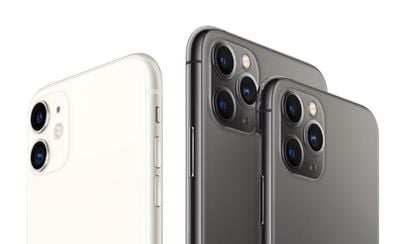
iphone 11 and 11 pro no background
Apple responded by explaining that ‌these iPhone‌ models have a U1 Ultra Wideband chip, and there are some areas where Ultra Wideband technology is not allowed because of international regulations. These iPhones use location data to make sure they're not in restricted areas. In other words, what the researcher had discovered was expected behavior.

Apple says that the location checks are done on-device and no data about location is being sent to Apple's servers. Even so, with the release of iOS 13.3.1, Apple is adding an option to its iPhone software that allows users to turn off the UI chip entirely if they so wish.

The new option is hidden away in settings, but you can find it by following the steps below.

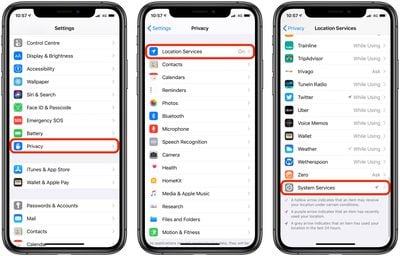
  1. Launch the Settings app on your iPhone.
  2. Tap Privacy.
  3. Tap Location Services.
  4. Tap System Services at the bottom of the menu.
    settings

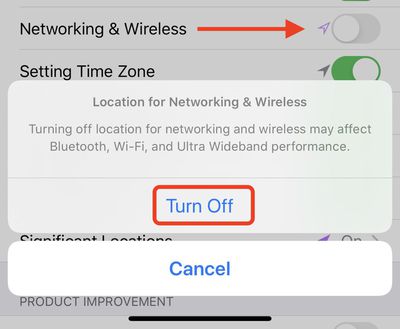
  5. Toggle the Networking & Wireless switch to the grey OFF position.
  6. A prompt will appear – tap Turn Off to confirm.settings

Note that leaving the Ultra Wideband chip disabled in this way may also affect your iPhone's Bluetooth and Wi-Fi performance, so it's best to weigh up the pros and cons with regards to your own needs and circumstances.

Popular Stories

macOS 27 on MacBook Pro

macOS 27 Will Mark the End of an Era

Saturday April 18, 2026 6:45 am PDT by
During its Platforms State of the Union segment at WWDC 2025, Apple revealed that macOS 26 Tahoe is the final major macOS version for Intel-based Macs. The upcoming macOS 27 release will be compatible with Apple silicon Macs only, meaning that you will need a Mac with an M-series chip or a MacBook Neo with an A18 Pro chip in order to install the software update. macOS 27 should be available...
Aston Martin CarPlay Ultra Screen

Apple Says CarPlay Ultra is Coming to These Vehicle Brands

Saturday April 18, 2026 5:59 am PDT by
Last year, Apple launched CarPlay Ultra, the long-awaited next-generation version of its CarPlay software system for vehicles. Nearly a year later, CarPlay Ultra is still limited to Aston Martin's latest luxury vehicles, but that should change fairly soon. In May 2025, Apple said many other vehicle brands planned to offer CarPlay Ultra, including Hyundai, Kia, and Genesis. CarPlay Ultra...
Tim Cook Rainbow

Apple CEO Tim Cook Stepping Down, John Ternus Taking Over

Monday April 20, 2026 1:33 pm PDT by
Apple CEO Tim Cook is stepping down as Apple's chief executive officer, and hardware engineering chief John Ternus is set to take over, Apple announced today. Cook will continue on as Apple CEO through the summer, with Ternus set to join Apple's Board of Directors and take over as CEO on September 1, 2026. Cook is going to transition to executive chairman, and he will "assist with certain...