Skip to Content

Delete Messages Attachments on iPhone and iPad

by

Apple's Messages app offers one of the most convenient ways of having a text-based conversation with your contacts on iPhone and iPad, but messages aren't the only things you can send and receive. Apple's iMessage service enables all manner of files and attachments to be shared, such as photos, links, documents, audio messages, and more.

General Apps Messages
Files that are sent to you can of course be accessed directly from within a message thread, but you don't have to go scrolling through hundreds of messages to delete the files you've received. Apple also provides a way to see every file that has been sent to you in a chat thread in one easily accessible location, where you can remove them all in one fell swoop to free up space.

  1. Launch the Messages app on your iPhone or iPad.
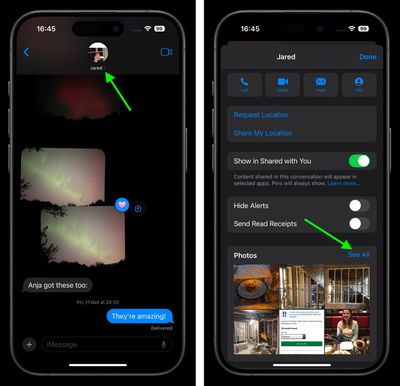
  2. Open a conversation, then tap the contact bubble(s) at the top of the screen.
  3. Scroll down to the attachment sections, where you'll find all the files that have been sent to you in the course of the conversation. These sections are conveniently subdivided into file types, such as Photos and Documents. Tap See All to see all the files related to a category.
    messages

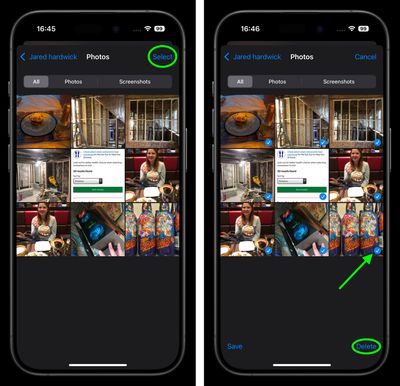
  4. Tap Select at the top-right corner of the screen, then tap the files that you want to delete to select them.
  5. Once you've made your selections, tap Delete in the bottom-right corner of the screen.
  6. Tap Delete [number of files] Attachments to confirm.
    messages

If you want to free up even more space on your device, you can repeat the above steps for other chat threads, too.


Popular Stories

Multicolored Low Cost A18 Pro MacBook Feature

Apple Accidentally Leaks 'MacBook Neo'

Tuesday March 3, 2026 7:00 am PST by
Apple appears to have prematurely revealed the name of its rumored lower-cost MacBook model, which is expected to be announced this Wednesday. A regulatory document for a "MacBook Neo" (Model A3404) has appeared on Apple's website. Unfortunately, there are no further details or images available yet. While the PDF file does not contain the "MacBook Neo" name, it briefly appeared in a link...
imac video apple feature

Apple Unveils Two New Products

Monday March 2, 2026 7:49 am PST by
Apple today introduced two new devices, including the iPhone 17e and an updated iPad Air. iPhone 17e features the same overall design as the iPhone 16e, but it gains Apple's A19 chip, MagSafe for magnetic wireless charging and magnetic accessories, Apple's second-generation C1X modem for faster 5G, and a doubled 256GB of base storage. In the U.S., the iPhone 17e starts at $599, just like the ...
Apple iPhone 17e feature

Apple Announces iPhone 17e With A19 Chip, MagSafe, and More

Monday March 2, 2026 6:07 am PST by
Apple today announced the iPhone 17e, featuring the A19 chip, MagSafe connectivity, faster charging, and more. The iPhone 17e contains the A19 chip introduced in iPhone 17. It features a 6-core GPU and a 4-core GPU. Apple pointed out that this makes it up to 2x faster than the iPhone 11. The new 16-core Neural Engine is optimized for large generative models. The iPhone 17e also contains...