How to Customize the Mouse Pointer in macOS Monterey - MacRumors
Skip to Content

How to Customize the Mouse Pointer in macOS Monterey

by

In macOS Monterey, Apple allows you to change the color of the mouse pointer from the standard white outline and black fill, to pretty much any color combination you want.
magicmouse2 1
So if you're having a hard time working out when it moves or changes to an insertion point, crosshair, hand, or other shape, it's worth switching things up. The following steps show you how.

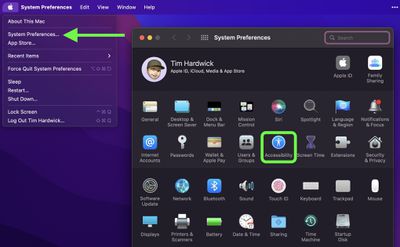
  1. Launch System Preferences from your Mac's Dock, from the Applications folder, or from the Apple menu bar ( -> System Preferences...).
  2. Click the Accessibility preference pane.
    sysprefs

  3. In the side column, under "Vision," click Display.
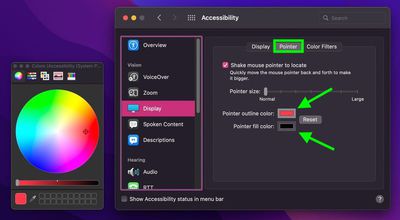
  4. Click the Pointer tab in the window of options.
  5. Click the color swatches next to the Pointer outline color and Pointer fill color settings, then choose a custom color from the palette that appears. Any changes you make will be immediately visible.
    pointer

Experiment with the colors to find the combination that works for you. You can always click Reset to revert the mouse pointer to its default colors.

Related Forum: macOS Monterey

Popular Stories

MacBook Pro Low Angle Wide Lens

Apple to Launch 'MacBook Ultra' With These Six New Features

Friday April 24, 2026 10:32 am PDT by

While the 14-inch and 16-inch MacBook Pro were just updated with M5 Pro and M5 Max chips last month, bigger changes are reportedly around the corner. According to Bloomberg's Mark Gurman, the higher-end MacBook Pro models will be receiving a major redesign by early 2027, and he said that Apple might use "MacBook Ultra" branding for them. If so, the MacBook Ultra would likely be a...
Apple TV Thumb 3

Here's What's Coming in the 2026 Apple TV

Thursday April 23, 2026 12:08 pm PDT by
There are a lot of folks waiting for a new version of the Apple TV because the set-top box hasn't been updated since 2022. There is an update coming this year, but people will need to wait a bit longer because Apple is holding the next Apple TV until the new version of Siri comes out this fall. Design Apple TV design updates don't happen often, and that's not changing in 2026. The next...
Apple Maps General

Tim Cook Calls Apple Maps Launch His 'First Really Big Mistake' as CEO

Thursday April 23, 2026 5:29 am PDT by
Outgoing Apple CEO Tim Cook has named the botched 2012 launch of Apple Maps as his "first really big mistake" in the role, according to a Bloomberg report covering the town hall meeting that was held Tuesday with his recently announced successor, John Ternus. The Maps app launched with mislabeled landmarks, faulty directions, and a user experience that fell well short of Google Maps at the...