

How to Control Your iPhone With Your Apple Watch - MacRumors
Skip to Content

How to Control Your iPhone With Your Apple Watch

by

In watchOS 9, Apple includes a feature that allows you to control your iPhone with your Apple Watch. Keep reading to learn how it works.
watchOS 9 header
With the release of iOS 16 and watchOS 9, Apple introduced new accessibility features including the ability to control your Apple Watch with your iPhone, and vice versa.

Both features are designed to make the Apple Watch and iPhone experience more accessible for people with physical and motor disabilities, but they can also be useful if, for example, your iPhone's screen is cracked or unresponsive, or the device is simply out of reach.

The following steps show you how to control your iPhone with your Apple Watch. Bear in mind that the watch needs to be paired to the iPhone you want to control, and the watch and phone need to be running watchOS 9 and iOS 16, respectively.

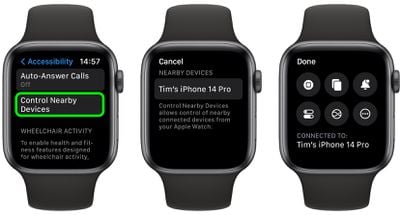
  1. On your Apple Watch, open the Settings app.
  2. Scroll down and tap Accessibility.
  3. Select Control Nearby Devices.
  4. Select your iPhone (or iPad) from the list.
watch

Once connected, you'll see a series of control buttons enabling you to perform a variety of actions on your ‌iPhone‌, including Go to Home Screen, Open App Switcher, Open Notification Center, Open Control Center, and Activate Siri. Tapping the More button will also give you media playback controls.

Note that if VoiceOver is enabled on your Apple Watch and you control a nearby device, VoiceOver will also be enabled on that device, and the VoiceOver gestures that you use on your Apple Watch are performed on the device.


Popular Stories

macOS 27 on MacBook Pro

macOS 27 Will Mark the End of an Era

Saturday April 18, 2026 6:45 am PDT by
During its Platforms State of the Union segment at WWDC 2025, Apple revealed that macOS 26 Tahoe is the final major macOS version for Intel-based Macs. The upcoming macOS 27 release will be compatible with Apple silicon Macs only, meaning that you will need a Mac with an M-series chip or a MacBook Neo with an A18 Pro chip in order to install the software update. macOS 27 should be available...


Aston Martin CarPlay Ultra Screen

Apple Says CarPlay Ultra is Coming to These Vehicle Brands

Saturday April 18, 2026 5:59 am PDT by
Last year, Apple launched CarPlay Ultra, the long-awaited next-generation version of its CarPlay software system for vehicles. Nearly a year later, CarPlay Ultra is still limited to Aston Martin's latest luxury vehicles, but that should change fairly soon. In May 2025, Apple said many other vehicle brands planned to offer CarPlay Ultra, including Hyundai, Kia, and Genesis. CarPlay Ultra...
Tim Cook Rainbow

Apple CEO Tim Cook Stepping Down, John Ternus Taking Over

Monday April 20, 2026 1:33 pm PDT by
Apple CEO Tim Cook is stepping down as Apple's chief executive officer, and hardware engineering chief John Ternus is set to take over, Apple announced today. Cook will continue on as Apple CEO through the summer, with Ternus set to join Apple's Board of Directors and take over as CEO on September 1, 2026. Cook is going to transition to executive chairman, and he will "assist with certain...








































