

Using iCloud Keychain, Apple's Safari browser stores and syncs all the passwords you use for different websites and apps through iCloud. And in iOS 14 and later, Apple provides security recommendations that warn you if a password you're using is putting your accounts at risk.
Safari securely monitors your saved passwords using strong cryptographic techniques, and regularly checks derivations of your passwords against a list of breached passwords in a secure and private way that doesn’t reveal your password information to anyone, including Apple. If Safari discovers a breach, it will alert you and can automatically generate a new secure password.
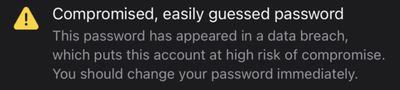
Examples of security alerts that you might see include:
- Many people use this password, which makes it easy to guess.
- This password is easy to guess.
- This password uses a sequence. Using common patterns makes passwords easy to guess.
- You're using this password on other websites, which increases the risk to this account if one of those other accounts is compromised.
- This password has appeared in a data breach, which puts this account at high risk of compromise. You should change your password immediately.
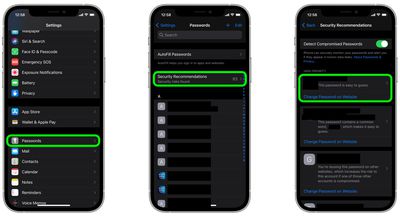
To check your passwords for security recommendations generated by Safari in iOS, simply follow the steps below.
- Launch the Settings app on your iPhone or iPad.
- Scroll down and tap Passwords.
- Tap Security Recommendations.
- Check the list of recommendations under "High Priority." Tap a recommendation for more details, or tap Change Password on Website to open a browser window and change your password.
If you're using Safari on Mac, you can find the same security recommendations available in the Passwords tab in Safari -> Preferences....





























![Apple Pulls Keynote, Pages and Numbers From App Store [Update: Back]](https://images.macrumors.com/t/Okb7kitB_gNr6qe5Pex9nQIysD8=/112x112/article-new/2026/01/Apple-Creator-Studio-iWork-suite.jpg)














