How to Change the Name of Your AirPods Max - MacRumors
Skip to Content

How to Change the Name of Your AirPods Max

by

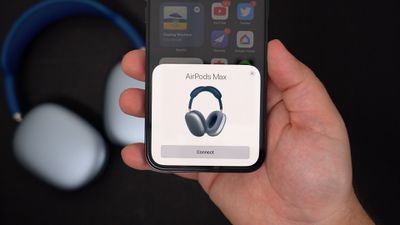
When you've successfully paired new AirPods Max to an iPhone or iPad, Apple's over-ear headphones are given the default label "[Your Name]'s ‌AirPods Max" in Bluetooth device lists. If you want, you can change this name by following these simple steps.
airpods max reaons 5

How to Change the Name of AirPods Max on iOS

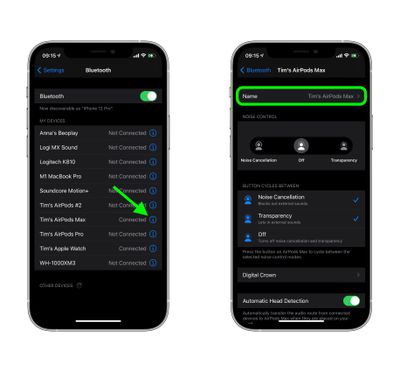
  1. On your iPhone or ‌iPad‌, launch the Settings app.
  2. Tap Bluetooth.

  3. Tap the "i" icon next to your AirPods Max in the My Devices list.
    settings

  4. At the next screen, tap Name and then input a new name for your headphones using the onscreen virtual keyboard.
How to Change the Name of AirPods Max on Mac

You can also rename your AirPods Max headphones on your Mac. Simply follow these steps to do so.

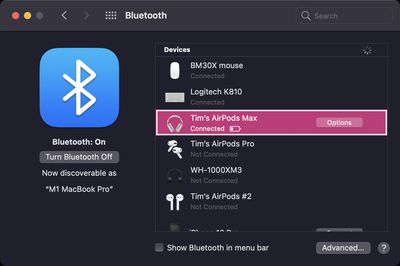
  1. On your Mac, launch System Preferences.
  2. Click the Bluetooth pane.
    Mac bluetooth

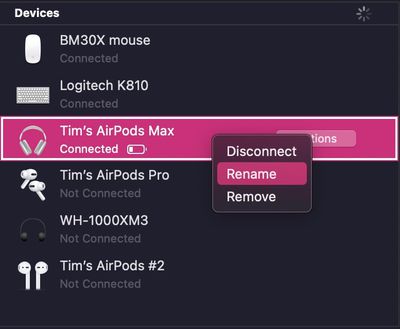
  3. With your AirPods Max connected to your Mac, right-click them in the Devices list and then select Rename in the pop-up menu.
    Mac bluetooth

  4. Type in a new name for your AirPods Max.
  5. Click the Rename button to confirm.

Note that the custom name you assign to your AirPods Max headphones will stay with them, so you'll be able to recognize them as such on any other devices you connect them to in future.

Related Roundup: AirPods Max 2
Buyer's Guide: AirPods Max (Buy Now)
Related Forum: AirPods

Popular Stories

AirPods Pro Beta Firmware 2

Apple Releases New AirPods Firmware With iOS 27 Features

Monday September 14, 2026 11:42 am PDT by
Apple today released new firmware for the AirPods Pro 2, AirPods Pro 3, AirPods 4, and AirPods Max 2. The firmware is available for all of the above devices, and it will enable support for new iOS 27 features. The firmware has a build number of 9A348. In iOS 27, iPadOS 27, and macOS Golden Gate, Apple is adding a new AirPods interface, a slider for Adaptive mode, and support for custom EQ....





iOS 27 Next to iPhone

Here's When iOS 27 Rolls Out Today in Every Time Zone [Update: It's Out]

Sunday September 13, 2026 3:00 am PDT by
Update 10:04 a.m.: iOS 27 is rolling out now, though it may take a bit for all users to see it, so keep checking! Apple is about to release iOS 27, which will finally deliver more advanced Siri AI capabilities as well as a variety of other refinements, improvements, and new features to iPhones. It's Apple's biggest software update of the year, and Apple announced at Wednesday's iPhone event...
iOS 27 Icon iPhone

iOS 27 Available Now With These 8 New Features

Monday September 14, 2026 9:00 am PDT by
Update — 10 a.m. Pacific Time: Apple has released iOS 27. During its iPhone 18 Pro and iPhone Duo event last week, Apple announced that iOS 27 will be released widely on Monday, September 14. iOS 27 should be available around 10 a.m. Pacific Time / 1 p.m. Eastern Time today via the Settings app, under General → Software Update. Below, we have highlighted eight new features and...