Skip to Content

Change Clock Style on Your iPhone Lock Screen

by

If you're new to iPhone, Apple recently opened up the Lock Screen to a wealth of personalization options not seen before. iPhone users can change not only the wallpaper but also the clock font and color, and with the addition of widgets, users can customize the look and control the information density.
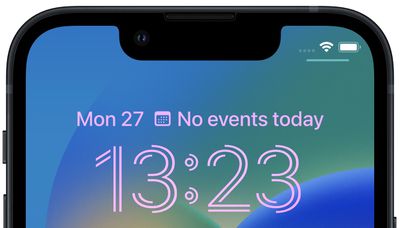
Lock Screen clock
As a result of all the new personalization features, Apple has overhauled the Lock Screen editing interface, which now has many similarities to the watch face gallery on Apple Watch. The following steps show you how you can change the font and color of the digital clock on your own Lock Screen.

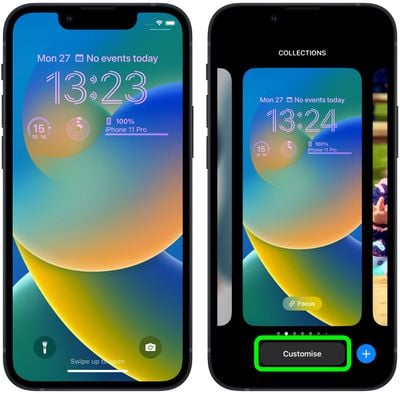
  1. Unlock your ‌‌iPhone‌‌ with Face ID or Touch ID, then press and hold the Lock Screen.
  2. Swipe to the Lock Screen that you want to adjust and then tap Customize.
    Lock Screen

  3. Select the Lock Screen option.
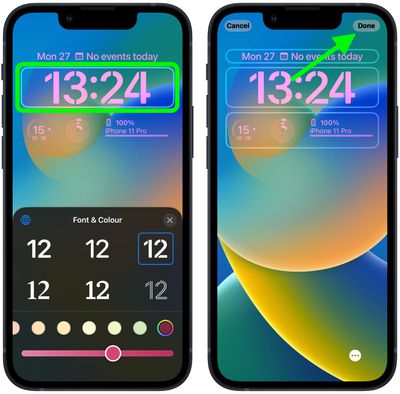
  4. Tap within the frame containing the digital clock readout.
  5. Use the menu of options for changing the font style and the color of the clock readout. You can also use the slider to adjust the hue of the selected color.
  6. When you're happy with the look of the clock, tap Done in the top-right corner of the screen, then tap the Lock Screen in the wallpaper gallery to activate it.Lock Screen

Note that you can customize the current Lock Screen at any time by invoking the gallery view from the Lock Screen with a long press, or by going into Settings -> Wallpapers.

Popular Stories

Apple Event Logo

Apple Released Seven New Products Today

Wednesday March 11, 2026 7:05 am PDT by
Starting today, the seven new Apple products that were announced last week are available at Apple Stores and beginning to arrive to customers. The colorful MacBook Neo and all of the other new products are on display at most Apple Store locations around the world starting today. Apple Stores have inventory of the new products for both walk-in customers and Apple Store pickup, but...
iOS 27 Mock Quick

10+ New Features Coming in iOS 27

Friday March 13, 2026 2:13 pm PDT by
We're only three months away from Apple's WWDC 2026 event, which will see the company unveil iOS 27. With the fully revamped version of Siri possibly delayed until September, iOS 27 is shaping up to be the update we wanted iOS 26 to be. There will be new Apple Intelligence features, updates for the iPhone Fold, and more, with the latest rumors summarized below. Foldable iPhone Features...
3D Printed iPhone Fold Thumb 2

iPhone Fold: 5 Things We Learned This Week About Apple's Foldable

Friday March 13, 2026 6:24 am PDT by
It's been a big week for foldable iPhone rumors. In case you missed any of them, here are five developments that we've covered over the last few days. Apple is expected to launch the iPhone Fold this September. For everything else we know, be sure to check out our dedicated roundup. Display Crease Early reports suggested Apple had solved the crease problem that has plagued many...