Whenever you move a file on your Mac to the Trash, it stays there until you manually right-click (Ctrl-click) the trash icon and select Empty Trash. This system offers a useful fallback method if you decide you don't want to delete a file, because it allows you to return a file to its original place using the Put Back option (accessed via a right-click on the trashed file in question).
trash can macos
In macOS Sierra and later, Apple also offers an option that can automatically empty your Mac's trash every 30 days. It's a useful feature if you find you have a large turnover of redundant files every month, and it helps you to free up storage on a regular basis. However, locating the option to enable it isn't so obvious – read on to find out how it's done.

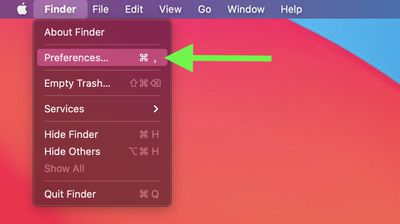
  1. On your Mac, click the Finder icon in the Dock or click anywhere on the desktop, then select Finder -> Preferences... from the menu bar.
    finder

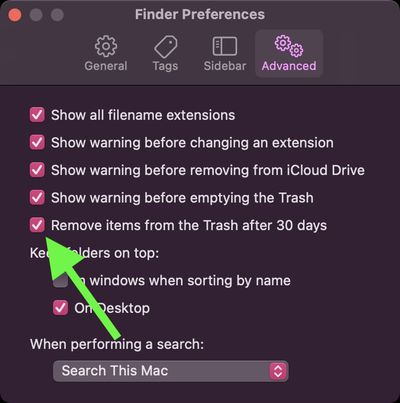
  2. In the preferences window, click the Advanced tab.
    finder

  3. Locate the option labeled Remove items from the Trash after 30 days and check the box beside it.
    finder

Once you've done that, your Mac will automatically delete all the files in your Trash every 30 days. To disable the option at any time, simply repeat the steps above but uncheck the box next to the associated option.

If you're looking for other ways to free up local storage and you have iCloud, check out the Optimize Mac Storage option.


Related Forum: macOS Big Sur

Popular Stories

Apple Creator Studio

Apple Introduces New 'Creator Studio' Bundle of Apps for $129 Per Year

Tuesday January 13, 2026 6:11 am PST by
Apple today introduced a new Apple Creator Studio bundle that offers access to six creative apps, as well as exclusive AI features and content, as part of a single subscription. In the U.S., pricing is set at $12.99 per month or $129 per year. Here are the six apps included with an Apple Creator Studio subscription:Final Cut Pro on the Mac and iPad Logic Pro on the Mac and iPad Pixelmator...


Verizon New

Verizon is Down: iPhones Show 'SOS' Mode Due to Network Outage [Resolved]

Wednesday January 14, 2026 10:18 am PST by
Verizon is experiencing a major outage across the U.S. today, with hundreds of thousands of customers reporting issues with the network on the website Downdetector. There are also complaints across Reddit and other social media platforms. iPhone users and others with Verizon service are generally unable to make phone calls, send text messages, or use data over 5G or LTE due to the outage....
iPhone Top Left Hole Punch Face ID Feature Purple

New Leak Reveals iPhone 18 Pro Display Sizes, Under-Screen Face ID, and More

Wednesday January 14, 2026 7:09 am PST by
While the iPhone 18 Pro models are still around eight months away, a leaker has shared some alleged details about the devices. In a post on Chinese social media platform Weibo this week, the account Digital Chat Station said the iPhone 18 Pro and iPhone 18 Pro Max will have the same 6.3-inch and 6.9-inch display sizes as the iPhone 17 Pro and iPhone 17 Pro Max. Consistent with previous...
iOS 26

Here's What's New in iOS 26.3 So Far

Monday January 12, 2026 1:15 pm PST by
Apple today seeded the second beta of iOS 26.3, nearly a month after the first beta. So far, the update includes a couple of new features for iPhones. iOS 15.3 through iOS 18.3 were all released in late January over the years, so it is thereby likely that iOS 26.3 will be released towards the end of this month as well. The update is compatible with the iPhone 11 series and newer. Below,...
airpods pro 3 design

Apple Releases New AirPods Pro 3 Firmware Update

Tuesday January 13, 2026 11:29 am PST by
Apple today released a firmware update for the AirPods Pro 3. The latest firmware has a version number of 8B34, up from the previous version 8B30. Apple has a support document for AirPods firmware updates, and it indicates that the 8B34 update contains unspecified "bug fixes and other improvements." No other AirPods models received firmware updates today. How to install AirPods Pro...