Skip to Content

Live Activities Taking Over Your Apple Watch? Here's the Fix

by

In watchOS 26, the Smart Stack for your Apple Watch is pretty clever. The collection of widgets can be pulled up with a scroll of the Digital Crown, and shows you relevant information throughout your day. But sometimes, its eagerness to help can be a bit much, especially when it comes to Live Activities.
live activities watch
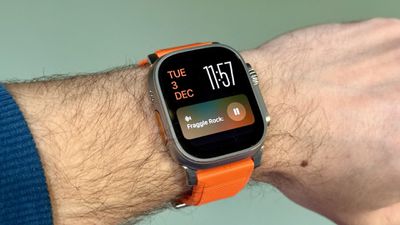
You're probably familiar with this scenario: You raise your wrist expecting to see your customized watch face, but it's been replaced by media playback controls because someone's watching your Apple TV, or a timer you set earlier for cooking that still has ages left to run. Live Activities in the Smart Stack can clearly be useful, but having them automatically take over your display isn't always ideal. Here's how to take back control:

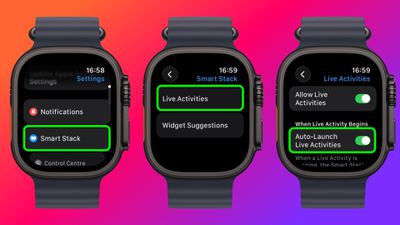
  1. Open Settings on your Apple Watch.
  2. Tap Smart Stack.
  3. Select Live Activities.
  4. Toggle off the switch next to Auto-Launch Live Activities.
settings

After disabling auto-launch, Live Activities will still be available in your Smart Stack when you want them – you'll just need to manually scroll to see them instead of having them pop up automatically.

If you want more granular control, you're in luck. From the same settings screen you can control which Apple apps display Live Activities. Using the Watch app on your iPhone, you can also manage Live Activities settings for third-party apps. This lets you keep the notifications you find useful while preventing the less important ones from interrupting your watch face.

Pro Tip: If it's just those persistent media controls that bug you, head to Media Apps in the same settings menu and turn off Live Activities completely, or alternatively under "Auto-Launch," select Off or Smart Stack for a more focused watch face experience.

Top Rated Comments

Return Zero Avatar
4 weeks ago
My problem is still the Smart Stack automatically activating when the crown is turned accidentally. The fact they don't let you deactivate this is asinine, especially considering 1) they completely changed the core functionality of both buttons a while back, and 2) they've added so much more customization to almost everything else.

Score: 8 Votes (Like | Disagree)
the 12th Doctor Avatar
4 weeks ago
Here’s some pictures from 10 years ago…knock it tf off Smart Stack. I get it. I’ve gotten fat.

Score: 8 Votes (Like | Disagree)
mr_matalino Avatar
4 weeks ago
I can’t tell you how bad I needed this article!!!
Score: 6 Votes (Like | Disagree)
rotvaldi Avatar
4 weeks ago
They replaced the large sports buttons with small circular ones, which are difficult to press while moving during physical activity.
Score: 5 Votes (Like | Disagree)
ProbablyDylan Avatar
4 weeks ago

Stand up!!!! xD
"WOW! You sure slept badly, huh?"
"HEY! Did you notice it's super loud in here?"
"Don't forget to breathe!"

🙄
Score: 3 Votes (Like | Disagree)
zach-coleman Avatar
4 weeks ago
I found it really odd that by default they basically removed double tap’s largest feature (pause/play on media) unless you dig into settings to make the media player full screen again.
Score: 2 Votes (Like | Disagree)

Popular Stories

Apple Event Logo

Apple Released Seven New Products Today

Wednesday March 11, 2026 7:05 am PDT by
Starting today, the seven new Apple products that were announced last week are available at Apple Stores and beginning to arrive to customers. The colorful MacBook Neo and all of the other new products are on display at most Apple Store locations around the world starting today. Apple Stores have inventory of the new products for both walk-in customers and Apple Store pickup, but...
ios 26 4 yellow

Everything New in iOS 26.4 Beta 4

Monday March 9, 2026 3:50 pm PDT by
Apple is continuing to test the iOS 26.4 beta, and the latest update is now available for developers and public beta testers. As testing goes on, there are fewer new features in each beta, but today’s release adds new emoji characters and a few other changes. New Emoji Apple added new emoji characters, including trombone, treasure chest, distorted face, hairy creature, fight cloud, orca,...
Apple MacBook Pro M4 hero

Apple Planning 'MacBook Ultra' With Touchscreen and Higher Price

Sunday March 8, 2026 8:05 am PDT by
Apple is planning to launch an all-new "MacBook Ultra" model this year, featuring an OLED display, touchscreen, and a higher price point, Bloomberg's Mark Gurman reports. Gurman revealed the information in his latest "Power On" newsletter. While Apple has been widely expected to launch new M6-series MacBook Pro models with OLED displays, touchscreen functionality, and a new, thinner design...