

Apps That Have Added iOS 16 Lock Screen Widget Support

Apple in iOS 16 introduced a customizable Lock Screen, complete with widgets. You can have up to five separate widgets on your Lock Screen, including four below the time and one above the time. There are several widgets available from Apple for apps like Weather, Calendar, Clock, Fitness, and Reminders, but third-party app developers are also able to create widgets for the Lock Screen.
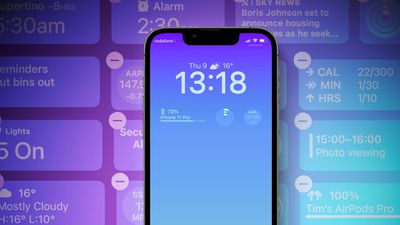
widgets ios 16 feature
We've rounded up a bunch of third-party apps that have implemented widget support as of today, so you can see some of the widget options available to you. Note that if you're planning on getting an iPhone 14 Pro, widgets will be available even when your screen is off thanks to the Always-On display.

Flighty

Flight tracking app Flighty offers several different widget options. You can see a countdown to your trip before you go, and when you're ready to travel, you can see your gate code, seat number, and take off time. When the flight's in the air, you can see an in-flight progress bar, and then when you land, you can view your arrival gate, weather, and baggage carousel information.
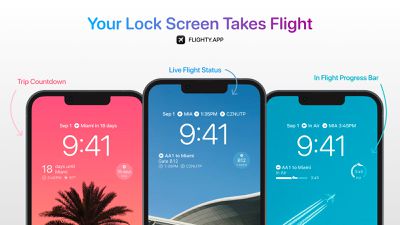
flighty app

Facebook

Facebook's widgets let you see which friends have birthdays and it provides top updates from the people that you follow.
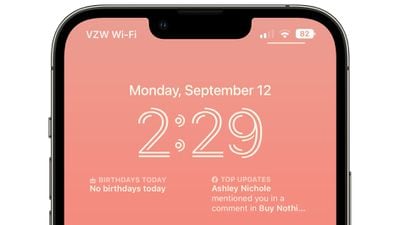
ios 16 facebook widget

Apollo

Reddit app Apollo has added several fun widgets that you can choose from. There's a widget to get you right to trending posts, a distance scrolled widget, a karma widget, and an inbox widget so you can see if you have any unread messages. There are also widgets that show you how your most recent post or comment is performing, and an option to get to a favorite subreddit or a random subreddit.
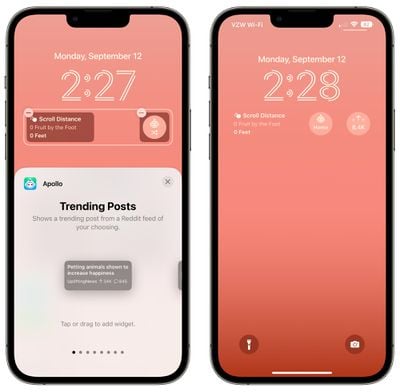
ios 16 apollo widgets

Fantastical

With Fantastical's Lock Screen widget, you can see your upcoming events and a mini calendar. Fantastical also supports Focus Filters, another iOS 16 feature.


Scanner Pro

Scanner Pro's simple widget lets you tap to get right to the camera for scanning documents.
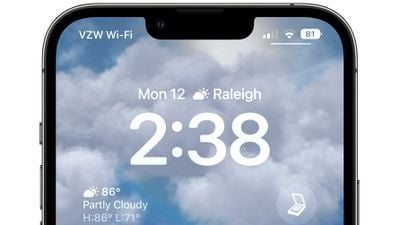
scanner pro ios 16

Gmail, Chrome, and Maps

Google added a number of new widgets across its apps, as we highlighted earlier this morning. There are widgets for Google Maps Chrome, Google News, Gmail, and more.
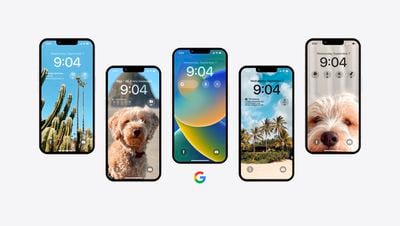
Google Lock Screen Widgets iOS 16

  • Google: Initiate a search via text, voice, or the camera by opening up the app
  • Gmail: View the number of messages in your inbox
  • Chrome: Initiate a search, including by voice or in incognito mode
  • Google Drive: Quickly access starred files and folders
  • Google Maps: View real-time traffic updates and estimated travel times to frequently traveled places like home and work
  • Google News: View real-time headlines

Things 3

The Things widget allows you to set up a widget that takes you directly to your Today list, Inbox, Deadlines, and more. You can set up a widget for any list that you use. Things has a rectangular widget below the clock that shows three tasks, and a smaller widget that can be added above the clock that shows a single to-do.
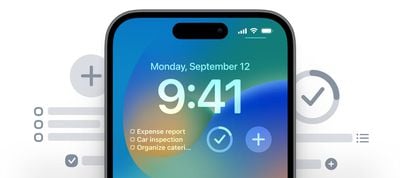
ios 16 things 3 widget
There are also widget options for adding a new to-do and showing the progress that you've made with your daily to-do list.

Halide

The Halide widget lets you access the Halide camera app from the Lock Screen. Tapping it opens up the Halide app so you have quicker access to the Halide camera.

Paku for PurpleAir

For those who like to track air quality using PurpleAir, Paku has been updated with a widget that adds air quality information to the Lock Screen.
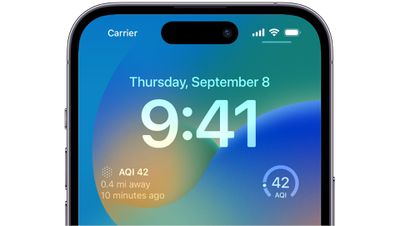
ios 16 paku air quality

Slopes: Ski & Snowboard

Ski app Slopes has added widgets that show resort conditions and the snow forecast, along with a Season Stats widget that shows performance.
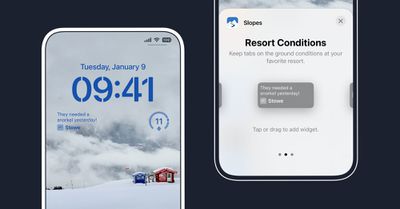
ios 16 slopes widget

CARROT Weather

CARROT Weather has more than a dozen weather widgets to choose from. You can select a Snark widget that shows typical snarky comments, or opt for different widgets that include conditions, high and low, daily forecast, wind, UV index, humidity, visibility, and more. Many of the widgets require a Premium subscription.
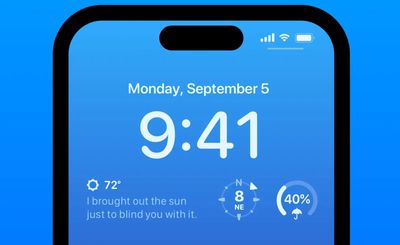
carrot weather ios 16 widget

Parcel

Package tracking app Parcel has added a widget that lets you see the status of a delivery.
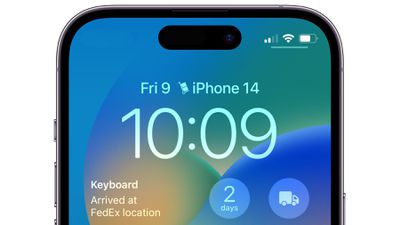
parcel app widget ios 16

Let Us Know Your Favorite Widget

See an app with a cool widget? Let us know in the comments and we'll add it to the list.

Related Forum: iOS 16

Popular Stories

iOS 26

iOS 26.2 Coming Soon With These 8 New Features on Your iPhone

Thursday December 11, 2025 8:49 am PST by
Apple seeded the second iOS 26.2 Release Candidate to developers earlier this week, meaning the update will be released to the general public very soon. Apple confirmed iOS 26.2 would be released in December, but it did not provide a specific date. We expect the update to be released by early next week. iOS 26.2 includes a handful of new features and changes on the iPhone, such as a new...
iOS 26

iOS 26.4 and iOS 27 Features Revealed in New Leak

Friday December 12, 2025 10:56 am PST by
Macworld's Filipe Espósito today revealed a handful of features that Apple is allegedly planning for iOS 26.4, iOS 27, and even iOS 28. The report said the features are referenced within the code for a leaked internal build of iOS 26 that is not meant to be seen by the public. However, it appears that Espósito and/or his sources managed to gain access to it, providing us with a sneak peek...
AirPods Pro Firmware Feature

Apple Releases New Firmware for AirPods Pro 2 and AirPods Pro 3

Thursday December 11, 2025 11:28 am PST by
Apple today released new firmware designed for the AirPods Pro 3 and the prior-generation AirPods Pro 2. The AirPods Pro 3 firmware is 8B30, up from 8B25, while the AirPods Pro 2 firmware is 8B28, up from 8B21. There's no word on what's include in the updated firmware, but the AirPods Pro 2 and AirPods Pro 3 are getting expanded support for Live Translation in the European Union in iOS...
iOS 26

Apple Releases iOS 26.2 With Alarms for Reminders, Lock Screen Changes, Enhanced Safety Alerts and More

Friday December 12, 2025 10:10 am PST by
Apple today released iOS 26.2, the second major update to the iOS 26 operating system that came out in September, iOS 26.2 comes a little over a month after iOS 26.1 launched. ‌iOS 26‌.2 is compatible with the ‌iPhone‌ 11 series and later, as well as the second-generation ‌iPhone‌ SE. The new software can be downloaded on eligible iPhones over-the-air by going to Settings >...
Google maps feaure

Google Maps Quietly Added This Long-Overdue Feature for Drivers

Wednesday December 10, 2025 2:52 am PST by
Google Maps on iOS quietly gained a new feature recently that automatically recognizes where you've parked your vehicle and saves the location for you. Announced on LinkedIn by Rio Akasaka, Google Maps' senior product manager, the new feature auto-detects your parked location even if you don't use the parking pin function, saves it for up to 48 hours, and then automatically removes it once...
AirTag 2 Mock Feature

Apple AirTag 2: Four New Features Found in iOS 26 Code

Thursday December 11, 2025 10:31 am PST by
The AirTag 2 will include a handful of new features that will improve tracking capabilities, according to a new report from Macworld. The site says that it was able to access an internal build of iOS 26, which includes references to multiple unreleased products. Here's what's supposedly coming: An improved pairing process, though no details were provided. AirTag pairing is already...
macOS Tahoe 26 Thumb

Apple Releases macOS Tahoe 26.2 With Edge Light

Friday December 12, 2025 10:08 am PST by
Apple today released macOS Tahoe 26.2, the second major update to the macOS Tahoe operating system that came out in September. macOS Tahoe 26.2 comes five weeks after Apple released macOS Tahoe 26.1. Mac users can download the macOS Tahoe update by using the Software Update section of System Settings. macOS Tahoe 26.2 includes Edge Light, a feature that illuminates your face with soft...
iOS 26

15 New Things Your iPhone Can Do in iOS 26.2

Friday December 5, 2025 9:40 am PST by
Apple is about to release iOS 26.2, the second major point update for iPhones since iOS 26 was rolled out in September, and there are at least 15 notable changes and improvements worth checking out. We've rounded them up below. Apple is expected to roll out iOS 26.2 to compatible devices sometime between December 8 and December 16. When the update drops, you can check Apple's servers for the ...

Top Rated Comments

applepotato666 Avatar
43 months ago
Anyone else not seeing them? Tried a restart after updating but they’re still not appearing
Score: 38 Votes (Like | Disagree)
The_Cynic Avatar
43 months ago
I do so hope that my favourite app “LifeRemaining” gets a widget as soon as possible. It’s a real nifty little app that takes all your existing medical conditions, family history of medical conditions, income levels, education level, and all the data from the health app and uses GPS to track where in the social-economic global chain you live, and gives you a very accurate countdown to your most likely time of death.

Now, whenever the madness of happiness first spreads its joyous tendrils out to give me false hope, I can simply lift my phone and be reminded of how pointless and futile it all is. Sure, I could just simply open the app and look at the pretty countdown graphs and most probable cause of death, but that’s extra steps needed, time I could be better spending watching my life meter go down.

To have this on the Lock Screen is a real game changer for me.
Score: 21 Votes (Like | Disagree)
Ant2369 Avatar
43 months ago
Live widgets is what I’m looking forward too
Score: 11 Votes (Like | Disagree)
adrianlondon Avatar
43 months ago
I feel a bit sorry for those buying the most expensive new phone for the AOD, as just one line of widgets doesn't seem enough.

Note: If you've updated an app and can't find the widget to add, open the app once.
Score: 7 Votes (Like | Disagree)
digduggler Avatar
43 months ago
Carrot. Surprised you missed that one. Pretty popular app.
Score: 6 Votes (Like | Disagree)
machpost Avatar
43 months ago
I have the most recent versions of the Gmail and Facebook apps installed, but I don't see any option for adding widgets related to these apps.
Score: 5 Votes (Like | Disagree)














