iOS 27 Adds a Useful New Copy-and-Paste Feature to Your iPhone - MacRumors
Skip to Content

iOS 27 Adds a Useful New Copy-and-Paste Feature to Your iPhone

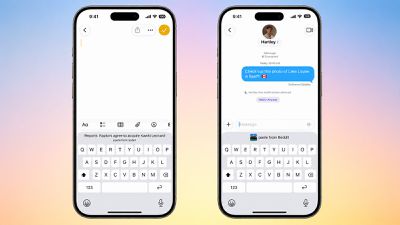
iOS 27 adds a new copy-and-paste feature to the iPhone's keyboard, enabling convenient one-tap pasting for text, photos, links, and more.
iOS 27 Paste From
For example, if you copy a link in Safari and move to the Notes app, a "paste from Safari" option with the link will automatically appear above the keyboard. Tapping on the shortcut adds the link to the note. Or if you copy a photo in the Reddit app and open the Messages app, a "paste from Reddit" option will appear above the keyboard.

Given this feature is built into the keyboard, it works across many combinations of apps, making pasting more convenient across iOS 27.

The keyboard has already surfaced one-time verification codes since iOS 12.

iOS 27 is currently available in developer beta, with a public beta to follow in July. The update is expected to be released to all users with an iPhone 11 or newer in September, and this small yet useful feature will likely be popular.

Related Roundups: iOS 27, iPadOS 27
Related Forum: iOS 27

Popular Stories

iOS 27 Next to iPhone

Here's When iOS 27 Rolls Out Today in Every Time Zone [Update: It's Out]

Sunday September 13, 2026 3:00 am PDT by
Update 10:04 a.m.: iOS 27 is rolling out now, though it may take a bit for all users to see it, so keep checking! Apple is about to release iOS 27, which will finally deliver more advanced Siri AI capabilities as well as a variety of other refinements, improvements, and new features to iPhones. It's Apple's biggest software update of the year, and Apple announced at Wednesday's iPhone event...
iOS 27 Icon iPhone

iOS 27 Available Now With These 8 New Features

Monday September 14, 2026 9:00 am PDT by
Update — 10 a.m. Pacific Time: Apple has released iOS 27. During its iPhone 18 Pro and iPhone Duo event last week, Apple announced that iOS 27 will be released widely on Monday, September 14. iOS 27 should be available around 10 a.m. Pacific Time / 1 p.m. Eastern Time today via the Settings app, under General → Software Update. Below, we have highlighted eight new features and...
iPhone Handoff Feature

iOS 27 Introduces New 'iPhone Handoff' Feature

Wednesday September 2, 2026 12:35 pm PDT by
Apple has added a new "iPhone Handoff" feature to iOS 27 that will allow you to switch between two iPhones while using the same phone number on each device. This functionality was briefly mentioned during the WWDC 2026 keynote in June, on a slide that listed hundreds of new features coming in iOS 27 and corresponding software updates, but Apple never shared any further details at the time. ...

Top Rated Comments

11 weeks ago
that is cool but I wish for clipboard history as I switched from android. I missed that feature.
Score: 13 Votes (Like | Disagree)
11 weeks ago
Just add a copy-paste button within the entire grey space at the bottom... Don’t make it too sensitive, to avoid accidental clicks when swiping up, but do utilize this whole empty space for those who wants it, it’s not that complicated...
Score: 11 Votes (Like | Disagree)
slippery-pete Avatar
11 weeks ago
Never fear, complaints are here!!!!
Score: 7 Votes (Like | Disagree)
TheMacDaddy1 Avatar
11 weeks ago
How about a whole new keyboard that works as well as Gboard on Android??

I have a Pixel 10 Pro XL at work for testing. The keyboard is SOOOO much better than an iPhone keyboard. Slightly bigger keys, number row, awesome tactile feedback, a down carrot to pull down the keyboard at anytime, dragging across they spacebar to move the cursor in ANY app.

It makes the the iPhone keyboard looks so bad.
Score: 6 Votes (Like | Disagree)
11 weeks ago
Yet they still don't support paste without formatting.
Score: 5 Votes (Like | Disagree)
eveluvsrainbows Avatar
11 weeks ago

How about a whole new keyboard that works as well as Gboard on Android??

I have a Pixel 10 Pro XL at work for testing. The keyboard is SOOOO much better than an iPhone keyboard. Slightly bigger keys, number row, awesome tactile feedback, a down carrot to pull down the keyboard at anytime, dragging across they spacebar to move the cursor in ANY app.

It makes the the iPhone keyboard looks so bad.
the iOS keyboard already has both tactile feedback and the ability to hold down on the space bar to move the cursor to another position, and this works in all apps too. the keys being slightly bigger doesn’t make gboard a better keyboard. and there is already a way to dismiss the keyboard in nearly every iOS app as well. the only thing the iOS keyboard doesn’t have is a number row, but the vast majority of users don’t need that, not to mention making the keyboard taller will leave less room for your actual content.

therefore, i don’t really agree that gboard makes the iOS keyboard look bad at all nor do i share the opinion that gboard is that much better than the iOS keyboard. the iOS keyboard has served me well for the past six years and every time i have used an android keyboard it made me want to go back to the iOS keyboard for its simplicity. so honestly gboard is not better than the ios keyboard in my opinion.
Score: 4 Votes (Like | Disagree)
















