PSA: iOS 26.2 Turns on Automatic Software Updates for Some Users
After installing iOS 26.2, if you're just tapping through screens, you could miss the update turning on automatic software updates.
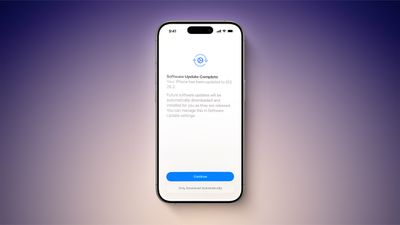
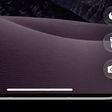
At the "Software Update Complete" stage where you normally tap on continue to get to the Home Screen, there might be an extra little bit of information. Some users are seeing a warning that future updates will be automatically downloaded and installed, with the option toggled on automatically if the Continue button is tapped. There's a subtle "Only Download Automatically" option that does not opt you into automatic updates if you're paying attention, but it's easy to miss.
You won't see iOS 26.2 turn on automatic software updates if you already have them on, and it doesn't even seem to be showing up for all users that have automatic update installation turned off. You might want to double check your settings just in case, and even if iOS 26.2 didn't turn on automatic software updates, it's worth knowing about the possibility because it's an option that Apple can sneak into any update. If you've ever had an update mysteriously install on your device when you didn't manually do it, it's probably because automatic software updates was quietly turned back on.
If you did install iOS 26.2 and accidentally turned on automatic updates, you can undo it by going to General > Software Update > Automatic Updates and toggling the option off. From there, you can choose to allow updates to automatically download, and toggle off the automatic installation of system files.

Popular Stories
While the iPhone 18 Pro and iPhone 18 Pro Max are not expected to launch for more than five more months, there are already plenty of rumors about the devices.

It was initially reported that the iPhone 18 Pro models would have fully under-screen Face ID, with only a front camera visible in the top-left corner of the screen. However, the latest rumors indicate that only one Face ID component...
The all-new MacBook Neo has been such a hit that Apple is facing a "massive dilemma," according to Taiwan-based tech columnist and former Bloomberg reporter Tim Culpan.
In the iPhone 16 Pro models, the A18 Pro chip has a 6-core GPU. During the chip manufacturing process, however, sometimes a CPU or GPU core can turn out to be faulty. Rather than discarding the leftover A18 Pro chips with...
Apple is looking for a "breakthrough" with its push into wearable AI devices, including an "AirTag-sized pendant," according to Bloomberg's Mark Gurman.
In a report, he said the pendant is reminiscent of the failed Humane AI Pin, but it would be an iPhone accessory rather than a standalone product.
The pendant would feature an "always-on" camera and a microphone for Siri voice commands,...
Popular Stories
Apple has released iOS 26.4, the fourth major point update for iPhones since iOS 26 was released in September, and there are at least 14 notable changes and improvements worth checking out. We've rounded them up below.
The update doesn't have the enhanced Siri feature set we were hoping for – that's likely to arrive in iOS 27 – but there are quite a few other new additions included. They ...
Apple today seeded the fourth betas of upcoming iOS 26.4 and iPadOS 26.4 updates to developers for testing purposes, with the software coming a week after Apple provided the third betas to developers.

Registered developers can download the betas from the Settings app on the iPhone or iPad by going to the General section and selecting Software Update.
iOS 26.4 and iPadOS 26.4 add multiple...
The fourth iOS 26.4, iPadOS 26.4, and macOS Tahoe 26.4 betas that Apple provided to developers today introduce nine new emoji characters.
Trombone
Treasure Chest
Distorted Face
Hairy Creature (aka Bigfoot or Sasquatch)
Fight Cloud
Orca
Landslide
There are also new skin tone modifiers people wrestling and dancers with bunny ears, as well as a gender neutral option for ...