Apple today released a new version of iOS 26 (23A345) that's available for the iPhone 17 Pro and iPhone 17 Pro Max. Reviewers who already have a device will be able to update now, while new iPhone 17 owners will need to update when receiving their devices starting tomorrow.
The new version of iOS 26 that Apple released today appears to be limited to the iPhone 17 Pro and iPhone 17 Pro Max, but the iPhone 17 and iPhone Air will have a launch day update too.
All four iPhones have iOS 26 pre-installed, but they have iOS 26 23A330, and not the launch version of iOS 26 that came out on Monday. The iPhone 17 and the iPhone 17 Air will need to be updated to iOS 26 version 23A341 tomorrow.
The iPhone 17 Pro and iPhone 17 Pro Max will need to be upgraded to iOS 26 version 23A345, which is the update that Apple just released.
It's not clear what's in the new version of iOS 26 for the iPhone 17 Pro and iPhone 17 Pro Max.
The iPhone Air, iPhone 17, iPhone 17 Pro, and iPhone 17 Pro Max will start arriving to customers on Friday, September 19.
Some Apple retail employees have been told to warn customers against visiting to purchase an iPhone Duo without a pre-order on Friday, October 23.
Apple Store employees told MacRumors that they have been advised that there will likely be no iPhone Duo stock available for walk-in purchases on launch day. Staff have been instructed to discourage customers without pre-orders from coming in...
Monday October 19, 2026 9:37 am PDT by Joe Rossignol
Apple today sent out invites for an experience in Los Angeles on Wednesday, October 28, and the "Pro and tell" tagline on the invitation likely means that the rumored MacBook models with touch-enabled OLED displays will stick with MacBook Pro branding instead of the once-rumored "MacBook Ultra" name.
The long-rumored "iPhone Ultra" ended up being named iPhone Duo, so speculation that Apple...
Sunday October 18, 2026 7:33 am PDT by Joe Rossignol
Despite knowing that the iPhone Duo would face "severe supply constraints" due to manufacturing challenges, Apple chose to begin iPhone Duo pre-orders on Friday instead of waiting until it had more inventory ready, according to Bloomberg's Mark Gurman. In his Power On newsletter today, he called this decision a "major mistake."
"Let me cut to the chase: Apple made a major mistake here," he...
After two days, my standby battery drain has reduced, but every time I actually use the phone, it warms up and the battery percentage counts down like a timer. Thanks Apple, thanks a lot. But hope this lasts only a few more days instead of being permanent.
Not really? Most phones that are being delivered on launch day were packaged up and had the software flashed onto them likely about a month ago, I’d much rather my first experience using a phone be with a build from now, not a month ago. Even the latest public release for all phones of 26.0 is 11 builds newer than what was flashed on the 17 series, and even the first RC after the event was still 10 builds newer. This new day one update build is 15 builds newer than what comes preinstalled.
Many iPhones over the years (including the 5s) had day one updates or updates that were really close to the time of release. It happens.
Google's Pixel phones usually have day one updates. Samsung's phones often do too. Game consoles, TVs, etc. all do too. Hardware gets locked in at some point with an OS installed. New bugs or security flaws are found, requiring a patch. Or, the software has otherwise been updated. This is the nature of software and product development.
If companies wait until software is perfect, they'll never release any products.
Weren't they going to eliminate this need by updating while they were still in-box? https://forums.macrumors.com/threads/apples-presto-wireless-update-tech-may-soon-reach-the-mac.2461280/
I have the same question. Do we update the 17 before we transfer the files from our current iPhone?
Whenever I have a new device and it needs to be updated out of the box, I run quickly through the setup entering only what is required (WiFI) so that I get straight to the home screen. I don’t put in an AppleID, or setup FaceID, I just skip them. I run the update and then erase the device again. Then I do the transfer/restore.
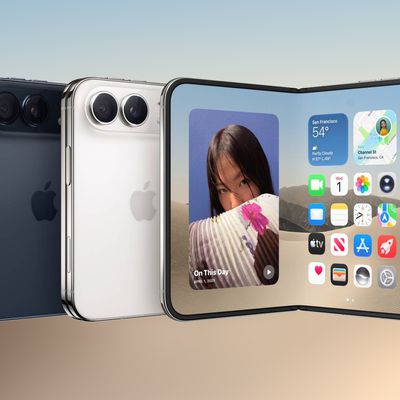
Apple's first foldable iPhone, with a book-style design featuring a 5.4-inch outer display and a 7.6-inch inner display with a minimal crease down the middle.





/https://forums.macrumors.com/attachments/2551735/)
/https://forums.macrumors.com/attachments/2551759/)