Windows 11 Now Lets You Access Your iPhone from the Start Menu
Microsoft has announced an update to Windows 11 that allows iPhone users to access their devices directly from the Start menu, bringing feature parity with its existing Android phone integration.
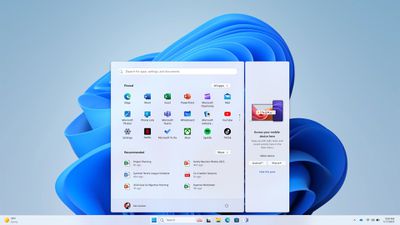
The new functionality lets you view your device's battery status, cellular connectivity, and recent activities without leaving the Windows environment. You can also access messages, calls, and file sharing capabilities directly from the Start menu interface.
Setting up the integration is straightforward. Just open the Start menu and select "iPhone" from the right-side pane, then follow the on-screen instructions to establish the connection between your iPhone and PC.
The feature is currently rolling out to Windows Insiders in both Dev and Beta channels. To access the new functionality, you must be running Windows 11 Insider Preview Build 4805 or higher in the Beta Channel, or Build 26120.3000 or higher in the Dev Channel. Additional requirements include Phone Link version 1.24121.30.0 or higher and a PC with Bluetooth LE capability.
Note that not all Windows 11 users will have immediate access to the feature. Microsoft says the integration is not supported on PCs running Windows 11 Pro Education or Education SKUs.
Popular Stories
Microsoft today announced launch timing and pricing for the Surface Laptop Ultra that it unveiled earlier this year.
The 15-inch Surface Laptop Ultra is priced starting at $2,599, undercutting Apple's $2,999 16-inch MacBook Pro, and it targets the same creator and developer market. Microsoft says it is built for "demanding creative, software development, AI, engineering, and 3D workloads."
...
Some iPhone Duos are already experiencing hinge issues that cause display cracks, based on photos shared on Reddit and the MacRumors forums. Almost all of the display faults are right along the hinge, and most result in a line of bright pixels across one side of the screen.
An iPhone Duo owner in Australia said his device cracked after being opened fewer than 20 times, and there was no...
Apple Music has a 404 page easter egg on the web: a functional iPod that appears when you load a page that does not exist, such as music.apple.com/macrumors.
"Page Not Found," says Apple. "Give this a spin instead."
Apple is clever with this. If you navigate to music.apple.com/ipod instead, the page says "Looking for something?" instead of "Page Not Found."
The easter egg is only...