

Apple Releases First Betas of iOS 18, iPadOS 18, macOS Sequoia, tvOS 18, watchOS 11, and visionOS 2

Following today's WWDC keynote event that saw the unveiling of new software, Apple has provided the first betas of iOS 18, iPadOS 18, macOS Sequoia, tvOS 18, watchOS 11, and visionOS 2 to developers for testing purposes. Developers have access to the software so they can begin incorporating all of the new features into their apps.
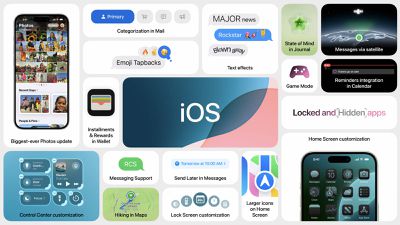
ios 18 tile summary
Registered developers are able to opt into the betas by opening up the Settings app on their device, going to the Software Update Section, tapping on the "Beta Updates" option, and toggling on the Developer Beta. Note that an Apple ID associated with a developer account is required to download and install the beta, but Apple allows even free developer accounts to install beta software.

It is a bad idea to install early betas on a main device, and we recommend having a secondary device if you want to try out the software. There are often significant bugs in early versions of iOS and macOS, so if you do install on a main device, make sure to create a backup beforehand.

Over the course of the next several months, Apple will refine the features available in all of its new software, and we will go through several betas before the updates see a public release around September.

While the betas are limited to developers right now, Apple typically provides a public beta in July, which is usually much more stable than the early developer betas.


Popular Stories

maxresdefault

Apple Shows Off a Key Reason to Upgrade to the iPhone 17

Saturday February 7, 2026 9:26 am PST by
Apple today shared an ad that shows how the upgraded Center Stage front camera on the latest iPhones improves the process of taking a group selfie. "Watch how the new front facing camera on iPhone 17 Pro takes group selfies that automatically expand and rotate as more people come into frame," says Apple. While the ad is focused on the iPhone 17 Pro and iPhone 17 Pro Max, the regular iPhone...
apple wallet drivers license feature iPhone 15 pro

Apple Says These 7 U.S. States Plan to Offer iPhone Driver's Licenses

Monday February 9, 2026 6:24 am PST by
In select U.S. states, residents can add their driver's license or state ID to the Apple Wallet app on the iPhone and Apple Watch, and then use it to display proof of identity or age at select airports and businesses, and in select apps. The feature is currently available in 13 U.S. states and Puerto Rico, and it is expected to launch in at least seven more in the future. To set up the...


m5 macbook pro deal

Why You Shouldn't Buy the Next MacBook Pro

Tuesday February 10, 2026 4:27 pm PST by
Apple is planning to launch new MacBook Pro models as soon as early March, but if you can, this is one generation you should skip because there's something much better in the works. We're waiting on 14-inch and 16-inch MacBook Pro models with M5 Pro and M5 Max chips, with few changes other than the processor upgrade. There won't be any tweaks to the design or the display, but later this...
Apple Logo Zoomed

Apple Expected to Launch These 10+ Products Over the Coming Months

Tuesday February 10, 2026 6:33 am PST by
It has been a slow start to 2026 for Apple product launches, with only a new AirTag and a special Apple Watch band released so far. We are still waiting for MacBook Pro models with M5 Pro and M5 Max chips, the iPhone 17e, a lower-cost MacBook with an iPhone chip, long-rumored updates to the Apple TV and HomePod mini, and much more. Apple is expected to release/update the following products...
iOS 26

Apple Releases iOS 26.3 and iPadOS 26.3

Wednesday February 11, 2026 10:07 am PST by
Apple today released iOS 26.3 and iPadOS 26.3, the latest updates to the iOS 26 and iPadOS 26 operating systems that came out in September. The new software comes almost two months after Apple released iOS 26.2 and iPadOS 26.2. The new software can be downloaded on eligible iPhones and iPads over-the-air by going to Settings > General > Software Update. According to Apple's release notes, ...

Top Rated Comments

DMG35 Avatar
22 months ago
I bow down to the brave souls putting this beta on their main device. I know you are out there, God Speed.
Score: 28 Votes (Like | Disagree)
WhackyNinja Avatar
22 months ago

I bow down to the brave souls putting this beta on their main device. I know you are out there, God Speed.
“Don’t put this on your main device”

Jokes on you, I live DANGEROUSLY. Fortune favors the bold!
Score: 26 Votes (Like | Disagree)
sniffies Avatar
22 months ago
Let the complaining commence!!!
Score: 24 Votes (Like | Disagree)
22 months ago
First developer betas are usually pretty safe. It's the beta 2 or 3 that breaks things.
Score: 23 Votes (Like | Disagree)
spinedoc77 Avatar
22 months ago
I wonder if RCS support will make it into the beta, if anyone installs please let us know.
Score: 10 Votes (Like | Disagree)
coffeemilktea Avatar
22 months ago

It is a bad idea to install early betas on a main device, and we recommend having a secondary device if you want to try out the software. There are often significant bugs in early versions of iOS and macOS, so if you do install on a main device, make sure to create a backup beforehand.
This is such wonderful advice! :D

...sadly I didn't follow it: the beta download has already started on my main device and I haven't backed up a thing. I'm just rawdogging the future with no safety net. o_O
Score: 6 Votes (Like | Disagree)








































