Some iPhone Users Unable to Update Apps After Installing iOS 16 [Update: Fixed]
It appears that there is an issue with the App Store, as some iPhone users who have updated have found themselves unable to install apps. MacRumors has received several reports from people who are running into an issue that seems to be caused by an updated Terms and Conditions page.
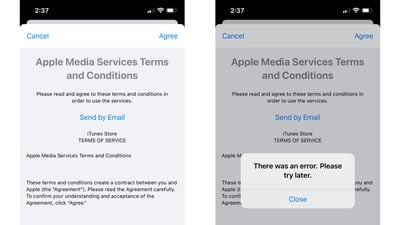
After installing iOS 16, attempting an app update directs affected users to a new Terms and Conditions page. When accepting the Terms and Conditions, it loads momentarily and then pops up an error alert. "There was an error. Please try later," reads the notification.
Apple's servers may be having problems at the current time, which is likely what's leading to the error message. There is no word yet on when the problem will be fixed, and it does not appear to be affecting all users.
Most people who are running into issues have installed iOS 16, but it may also be impacting some people who are still running iOS 15 or who have updated to iOS 15.7 or iPadOS 15.7.
Update: Apple has fixed the problem and apps are now able to be downloaded.
Popular Stories
Some iPhone Duos are already experiencing hinge issues that cause display cracks, based on photos shared on Reddit and the MacRumors forums. Almost all of the display faults are right along the hinge, and most result in a line of bright pixels across one side of the screen.
An iPhone Duo owner in Australia said his device cracked after being opened fewer than 20 times, and there was no...
Apple Music has a 404 page easter egg on the web: a functional iPod that appears when you load a page that does not exist, such as music.apple.com/macrumors.
"Page Not Found," says Apple. "Give this a spin instead."
Apple is clever with this. If you navigate to music.apple.com/ipod instead, the page says "Looking for something?" instead of "Page Not Found."
The easter egg is only...
Apple's iPhone Duo has failed JerryRigEverything's latest durability test. Despite its IP68 dust-resistance rating, dust entered the hinge through several ingress points, overwhelming the magnets that hold the phone shut. The bend test then left a permanent green line across the inner display, before the screen became unresponsive.
The outer screen with Ceramic Shield 2 scratched at level 7...