Apple Adds 'Test Alerts' Toggle to iPhone Just in Case You Really Want to Receive Test Emergency Alerts
Apple has added a new "Test Alerts" toggle to the Settings app in iOS 15.6 and the third beta of iOS 16. The toggle is visible only on iPhones connected to a U.S. carrier and allows users to enable test emergency alerts from the U.S. government.
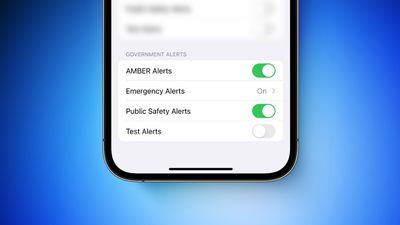
Turning on "Test Alerts" enables test emergency alerts to be received on both the iPhone and Apple Watch. The toggle is located in the Settings app under Notifications → Government Alerts and is turned off by default. Apple says the government is responsible for the content and the frequency of the test alerts.
It was already possible to enable test alerts on previous versions of iOS by installing a special profile from Apple or dialing a code in the Phone app. The toggle simply provides users with an easier way to opt in to receive test alerts.
Apple has updated support documents for the iPhone and Apple Watch with more details.
(Test Alerts graphic based on screenshot shared by via @MikeBeas)
Popular Stories
In a memo shared with Apple Stores and Apple Authorized Service Providers this week, and later obtained by MacRumors, Apple provided technicians with guidance on how to diagnose and address the iPhone Duo's inner display cracking issue.
If a customer reports the issue, Apple advised technicians to inspect the iPhone Duo and repair or replace it in accordance with their standard procedures....
While the new iPad mini has an OLED display, the device does not support ProMotion, meaning the display's refresh rate is limited to 60Hz instead of 120Hz.
ProMotion support would have allowed for the iPad mini's refresh rate to automatically adjust from 10Hz to 120Hz depending on the content being displayed, but evidently Apple has kept the feature exclusive to the iPad Pro among iPad...
In the U.S. and most other countries, Apple's website shows the new iPad mini being held by pinched fingers, but this is not the case in South Korea.
The new iPad mini shown with pinched fingers on Apple's website in the U.S.
On its South Korean website, Apple simply shows an image of the iPad mini on its own.
The new iPad mini shown without pinched fingers on Apple's website in South Korea ...



















































