Comcast Xfinity Stream App With Live Channels and On-Demand Shows Now Available on Apple TV

Comcast today released its long-awaited Xfinity Stream app on the Apple TV, allowing ‌Apple TV‌ HD and ‌Apple TV‌ 4K owners who subscribe to Xfinity TV to access live TV shows and on-demand content on their set-top boxes.
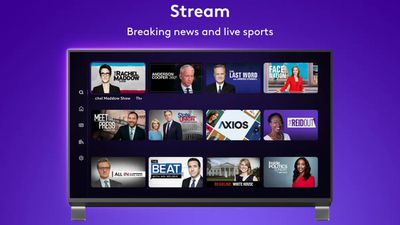
comcast xfinity app
According to Comcast, the app supports more than 250 live TV channels and DVR recordings that can be accessed from any device. There are also thousands of movies and shows that can be streamed on demand.

The ‌Apple TV‌ app provides access to the same content that is available through the iPhone and iPad apps, which in turn is identical to what's accessible through the Xfinity box.

Xfinity TV customers can log in with their credentials to access content through the new ‌Apple TV‌ app.

Popular Stories

Apple Logo Black

Apple Just Made Its Second-Biggest Acquisition Ever After Beats

Thursday January 29, 2026 10:07 am PST by
Apple today confirmed to Reuters that it has acquired Q.ai, an Israeli startup that is working on artificial intelligence technology for audio. Apple paid close to $2 billion for Q.ai, according to sources cited by the Financial Times. That would make this Apple's second-biggest acquisition ever, after it paid $3 billion for the popular headphone and audio brand Beats in 2014. Q.ai has...
Aston Martin CarPlay Ultra Screen

Apple's CarPlay Ultra to Expand to These Vehicle Brands Later This Year

Sunday February 1, 2026 10:08 am PST by
Last year, Apple launched CarPlay Ultra, the long-awaited next-generation version of its CarPlay software system for vehicles. Nearly nine months later, CarPlay Ultra is still limited to Aston Martin's latest luxury vehicles, but that should change fairly soon. In May 2025, Apple said many other vehicle brands planned to offer CarPlay Ultra, including Hyundai, Kia, and Genesis. At the time,...
14 inch MacBook Pro Keyboard

Apple Changes How You Order a Mac

Saturday January 31, 2026 10:51 am PST by
Apple recently updated its online store with a new ordering process for Macs, including the MacBook Air, MacBook Pro, iMac, Mac mini, Mac Studio, and Mac Pro. There used to be a handful of standard configurations available for each Mac, but now you must configure a Mac entirely from scratch on a feature-by-feature basis. In other words, ordering a new Mac now works much like ordering an...
imac video apple feature

Apple Unveils First New Products of 2026

Monday January 26, 2026 1:55 pm PST by
Apple today introduced its first two physical products of 2026: a second-generation AirTag and the Black Unity Connection Braided Solo Loop for the Apple Watch. Read our coverage of each announcement to learn more:Apple Unveils New AirTag With Longer Range, Louder Speaker, and More Apple Introduces New Black Unity Apple Watch BandBoth the new AirTag and the Black Unity Connection Braided...
apple unsold web store

Retail Accessories Apple Won't Sell You Now Available via New Site

Friday January 30, 2026 8:46 am PST by
A newly surfaced resale operation is seemingly offering Apple Store–exclusive display accessories to the public for the first time, potentially giving consumers access to Apple-designed hardware that the company has historically kept confined to its retail environments. Apple designs a range of premium MagSafe charging stands, display trays, and hardware systems exclusively for displays in ...

Top Rated Comments

HobeSoundDarryl Avatar
47 months ago
Posted this in the other (Realityck's) thread but it is probably helpful here too...

Some early insights for those interested:

* unlike several different smart TV app versions of this app, this one DOES include HD channels.
* those with channels that have become DRM'd such as certain movie channels and select others like Bally Sun and Bally Florida for me will be happy to know that those will play through this app.
* the app UI seems to be several steps above versions for smart TVs I own from Samsung and TCL. Fast, crisp, seemingly intuitive (so far).
* certain channels that won't show up in cablecard scans in HDHomeRun Prime do show up here. For example, through this I get Smithsonian Channel HD (channel 1477 where I am).
* it appears videos that have a DD5.1 soundtrack use it, not downing the audio to stereo only... but still investigating this one. Down in post #68, user enricoclaudio seems to have put this one to bed: NOT 5.1 unfortunately.

* On demand has a LOT of "free" content. I spot checked a few videos and they look and sound good.

Continuing to test and will add more if I notice anything else interesting relative to TV app versions or things lacking via cablecard alternatives.

Anyone paying for the box lease and not really needing a big DVR might look into this. I don't recall what else the leased box offers but an AppleTV might scratch the itch for basic watching and some level of DVR storage (unclear what it is). Anyone who also owns an AppleTV may want to do some side-by-side comparisons of features to identify what the Xfinity box retains as exclusive vs. this app on AppleTV.

I'm still a big fan of Channels (app) with HDHomeRun devices to own my own gigantic-and-scalable DVR and solid integration of locals and cable channels (and doesn't count against the data cap)... BUT that doesn't deliver:

* Xfinity on demand (been using Peacock app for that),
* a few channels I should get but aren't available via cablecard, and
* any DRM'd channels that I'd have if I leased a box from Xfinity (been using individual apps like Bally Sports for that).

So this does deliver a few nice bonuses and can definitely be a great backup for my own purposes. At the price of free, what's not to like?
Score: 14 Votes (Like | Disagree)
mnsportsgeek Avatar
47 months ago

Why would anyone who has their TV service choose to log into an app on Apple TV, when they can just watch the same channel live on the same TV, or just DVR their favorite shows for later viewing?

I swear, this world...

People who don't want to pay a monthly fee for a 2nd TV.

Score: 10 Votes (Like | Disagree)
xjt Avatar
47 months ago

Interesting. From a technical standpoint, why is this the case?
The video looks different on cable box because the box applies a filter to everything you watch on it. I first noticed when got new X1 box back in 2017… did some research and saw someone mention the filter on Reddit or DSL Reports forum. The filter applied to video on the cable box smooths out the image in some cases but can also cause artifacts. Also the cable box 4K upscaler is not as good as the Apple TV.
Score: 5 Votes (Like | Disagree)
Realityck Avatar
47 months ago
I first reported this news in Xfinity Stream app for Apple TV available ('https://forums.macrumors.com/threads/xfinity-stream-app-for-apple-tv-available.2349738/')

I laughed at "Made with love in Philadelphia"

Like all internet traffic on Comcast/Xfinity, it all goes against your data cap unlike the cable modem box receiving TV channels.
Score: 5 Votes (Like | Disagree)
JayAgostino Avatar
47 months ago

I happily kicked Xfinity to the curb a few years back.
But I'm confused by why an Xfinity subscriber would also want this app. Better UI?
Live TV without the cable box!
Score: 4 Votes (Like | Disagree)
xjt Avatar
47 months ago

So you still need to be a paying Xfinity subscriber, just not renting/buying their cable box?
What kind of savings does that offer?
Saves about $10 a month. We had cable box on each TV so switching to Roku app while waiting for Apple TV app has saved us about $40 a month.
Score: 4 Votes (Like | Disagree)










































