WhatsApp Starts Rolling Out Profile Pictures in iOS Message Notifications
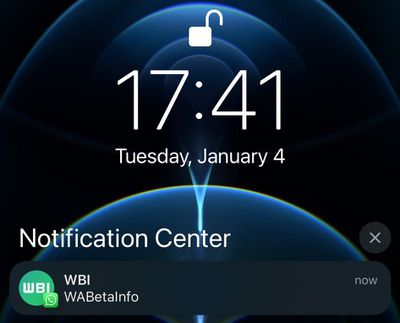
WhatsApp is testing a helpful new feature on iOS that displays profile pictures in system notifications when users receive new messages from chats and groups.
First spotted by app specialist
WABetaInfo, the first new feature for the platform in 2022 uses APIs in iOS 15 to add the WhatsApp profile images to notifications in top-screen banners and in the Notification Center when users receive a message.
WhatsApp on Android has been able to display the profile pictures in system notifications for some time, so this change brings parity to the app across both platforms.
If you don't see the profile pictures in your notifications yet, that's because WhatsApp is first making the change for beta testers so they can report bugs, before the feature is rolled out to millions of users on iOS devices worldwide.
The last update to WhatsApp came in December, and was a privacy change to prevent people on the messaging platform from viewing the "Last Seen" status of users whom they have never chatted with.
Popular Stories
WhatsApp has started rolling out its paid WhatsApp Plus subscription to iOS, following beta testing of the new personalization-focused tier amongst a small group of users, reports WABetaInfo.
The plan is light on practical features, and is aimed more at heavier users who want to customize various aspects of the WhatsApp experience. It gives you access to premium sticker packs with fullscreen ...
The Meta AI app and Meta AI on WhatsApp have a new "incognito chat" option, which Meta CEO Mark Zuckerberg said is a "completely private way to interact with AI."
Zuckerberg also said that Meta AI's incognito mode is the first major AI product where there is no log of conversations stored on servers. Zuckerberg likened the feature to end-to-end encryption, and said no one will be able to...
WhatsApp is rolling out a new media attachment sheet on iOS, providing iPhone users with a faster way to share their most recent files without losing sight of the chat.
Usually in WhatsApp, sharing media within a chat requires you to tap a plus button to reveal the app's custom share sheet, and then tap into photos to see your full library, which takes over most of the screen.
As spotted...