Satechi Launches USB-C Stand and Hub for Mac Mini
Satechi today announced the launch of its latest Apple accessory, a USB-C Stand & Hub for the Mac mini with SSD Enclosure, which is designed to combine the functionality of a stand with the additional ports in a hub.
According to Satechi, the
Mac mini Stand & Hub was designed to optimize the
M1 Mac mini. It connects to a Mac mini over USB-C and adds three USB-A data ports, micro/SD card readers, and a 3.5mm headphone jack, plus it supports an SSD for additional storage.
As with most Satechi accessories, the Mac mini Stand & Hub is made from a brushed silver aluminum alloy to match the color and design of the Mac mini. It is sized to the Mac mini, so it looks like a natural add-on to Apple's smallest desktop computer.
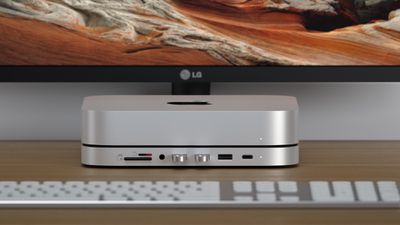
The Type-C Stand & Hub for Mac Mini with SSD Enclosure is available from Amazon or from the Satechi website for $99.99, with a 15 percent discount available when using the code MACMINISSD at checkout.
Popular Stories
Apple today announced a new high-end MacBook Pro, which is available in 14-inch and 16-inch sizes. The new device has a PROLED XDR display that supports touch gestures, and a glowing rear Apple logo.
Pricing on the MacBook Pro starts at $2,899 for the 14-inch model and $3,399 for the 16-inch model.
Apple says the MacBook Pro has the "world's best display in a pro laptop." The PROLED...
In a memo shared with Apple Stores and Apple Authorized Service Providers this week, and later obtained by MacRumors, Apple provided technicians with guidance on how to diagnose and address the iPhone Duo's inner display cracking issue.
If a customer reports the issue, Apple advised technicians to inspect the iPhone Duo and repair or replace it in accordance with their standard procedures....
While the new iPad mini has an OLED display, the device does not support ProMotion, meaning the display's refresh rate is limited to 60Hz instead of 120Hz.
ProMotion support would have allowed for the iPad mini's refresh rate to automatically adjust from 10Hz to 120Hz depending on the content being displayed, but evidently Apple has kept the feature exclusive to the iPad Pro among iPad...






















































