Testing Apple's New Magic Keyboard for iPad Pro - MacRumors
Skip to Content

Testing Apple's New Magic Keyboard for iPad Pro

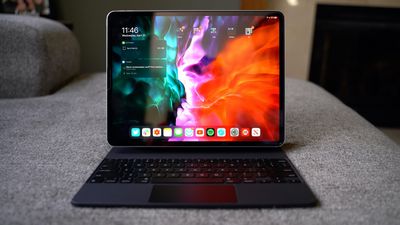
Apple last week surprised us with the early launch of the new Magic Keyboard designed for the 2018 and 2020 iPad Pro models, and as of this week, orders are arriving to customers. We picked up one of the new Magic Keyboards for the 12.9-inch ‌iPad Pro‌ and tested it out to see how it works and whether it's worth the $350 selling price.


Apple actually sells the Magic Keyboard in 11 and 12.9-inch sizes, and while the 12.9-inch model is $350, the 11-inch version is priced at $299. Though sized to fit the 2020 ‌iPad Pro‌ models, the Magic Keyboards are also compatible with the 2018 ‌iPad Pro‌ models, so 2018 ‌iPad Pro‌ owners won't need to upgrade to take advantage of the keyboard.
magickeyboard
Apple has offered an iPad keyboard in the form of the Smart Keyboard (and ‌Smart Keyboard‌ Folio) for quite some time, but this is the first time that Apple has developed an ‌iPad‌ keyboard with a trackpad with the intention of turning the ‌iPad‌ into something more akin to a MacBook.

Design wise, coming out of the box, the Magic Keyboard looks similar to the ‌Smart Keyboard‌ that was previously sold, but it's a lot thicker and a lot heavier.
magickeyboard4
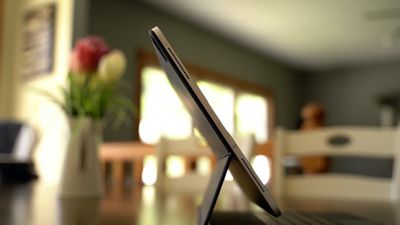
The Magic Keyboard for the 12.9-inch ‌iPad Pro‌ weighs more than the ‌iPad Pro‌ itself, in fact, at 1.6 pounds (the ‌iPad Pro‌ weighs 1.4 pounds). When you put the keyboard on the ‌iPad Pro‌, that's a combined weight of three pounds, which is heavier than a MacBook Air and close to the weight of a MacBook Pro.

It is a hefty keyboard that absolutely adds a lot of bulk to the sleek and slim ‌iPad Pro‌. The 11-inch Magic Keyboard is smaller and not quite as heavy, but you're still doubling the weight of the ‌iPad‌.

magickeyboard2
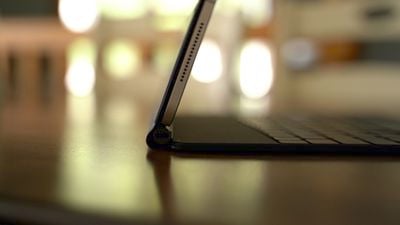
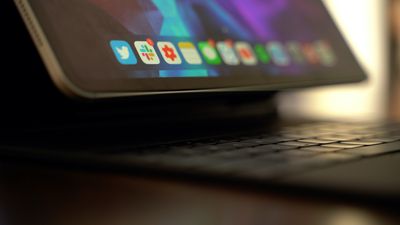
The Magic Keyboard is made from the same polyurethane material that Apple's ‌Smart Keyboard‌ Folio was made from, and design wise, what sets it apart is a hinge that enables a "floating" design. The case attaches magnetically but pulls away at the bottom when the keyboard is in use, with lower part of the ‌iPad‌ kind of floating in space to allow for adjustable viewing angles with the hinge.
magickeyboard5
The magnetic attachment is strong enough that you don't need to worry about the ‌iPad Pro‌ shifting or being shaken loose if you move it, and the case itself provides a minimal amount of protection, similar to the ‌Smart Keyboard‌ case.

The hinge at the bottom of the case is made from aluminum and it has a built-in USB-C port for passthrough charging so you can charge your ‌iPad Pro‌ while the Magic Keyboard is connected. The USB-C port on the ‌iPad Pro‌ isn't obscured by the Magic Keyboard, but a cable from the side of the keyboard itself and out of the way looks nicer than one coming out of the middle of the ‌iPad‌ while it's used in landscape mode.

magickeyboard7
The USB-C port is limited to passthrough charging and it does not support data transfer, so you'll still need adapters for doing things like connecting the ‌iPad Pro‌ to an external display. Charging is also not quite as fast as it is when plugging a USB-C cable directly into the ‌iPad Pro‌.

When it comes to the hinge, it's sturdy and strong, and when the Magic Keyboard is opened, it locks right into place and is in an upright position, but then you can make adjustments to the viewing angle. Apple's ‌Smart Keyboard‌ Folio only had two viewing angles, but the hinge can be fine tuned and set at more angles, though the range of motion is similar to the ‌Smart Keyboard‌ Folio.

magickeyboard3
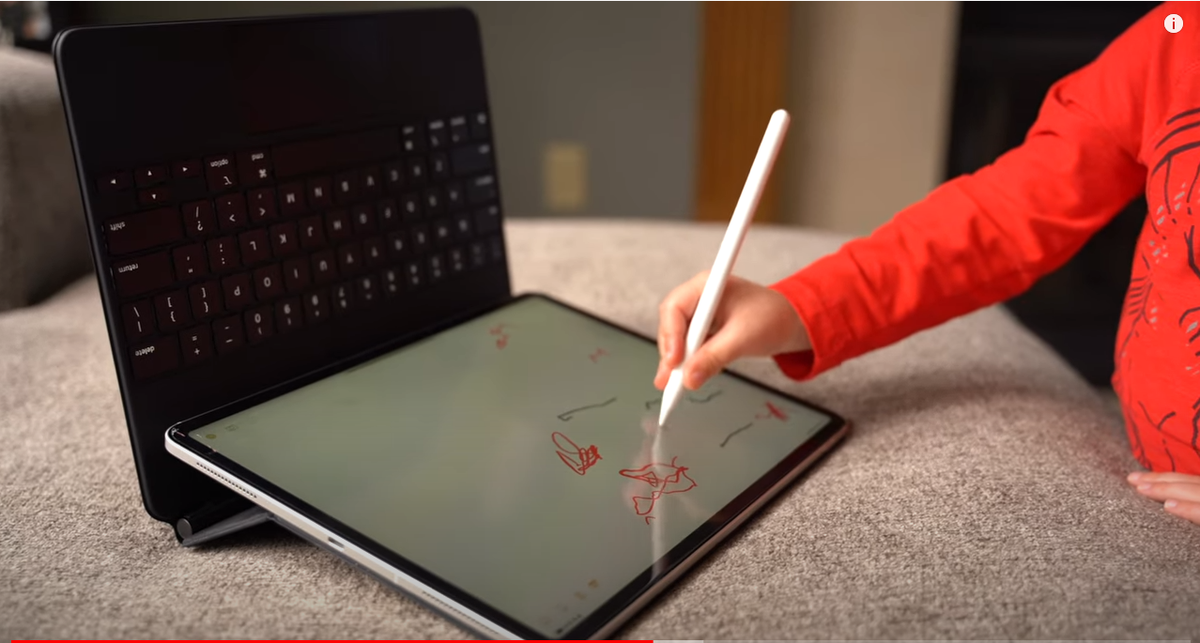
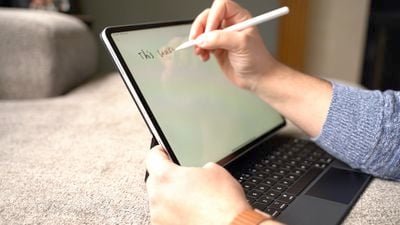
There is no way to fold the Magic Keyboard back behind the ‌iPad Pro‌ to get to an ideal sketching angle for the ‌iPad Pro‌, but flipping the whole thing backwards kind of works. The best solution for drawing is probably to pop the Magic Keyboard off of the ‌iPad Pro‌, but it's definitely a disappointment that there's no built-in drawing angle.

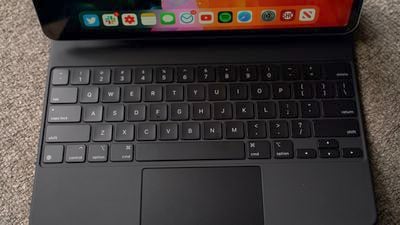
The keyboard itself feels great, and it's nothing like Apple's previous Smart Keyboards. The keys have a good amount of travel and feel nice under the fingers, plus there's backlighting for the keys. Unfortunately Apple did not include a row of function keys so there's no quick way to adjust backlighting, change brightness, or access media playback controls from the keyboard itself.
magickeyboard6
The backlighting changes based on the ambient lighting in the room so users shouldn't need too much manual adjustment, but it's still a disappointment not to have the function keys, including an escape key. Command + the period key typically serves as an alternative to an escape key or another key can be remapped to that function, but it would have been nice to have a dedicated escape key.

Apple's main selling point for the new Magic Keyboard is, of course, the trackpad, and it works great. It's similar to using a trackpad with a Mac, though much smaller of course. Many gestures are supported, such as swiping down with three fingers to access the Home screen, swiping up with three fingers to get to the multitasking view, and more. We have a list of gestures in our Magic Keyboard guide, if you're looking for more comprehensive gesture info.

Having a trackpad to use with the keyboard and the touch screen makes the ‌iPad Pro‌ experience much more similar to a traditional laptop, but you are, of course, still limited to iPadOS rather than macOS, which is still a major factor when it comes to multitasking, app selection, and more.

The Magic Keyboard is heavy and it definitely reduces the portability of the ‌iPad Pro‌, but for those who plan to use the ‌iPad Pro‌ as a full computer replacement, it adds so much utility that it's most likely worth the weight and the price tag. If the ‌iPad Pro‌ is a secondary machine and you already have a Mac, the Magic Keyboard might not be as worthwhile, but it certainly provides the most Mac-like experience on an ‌iPad‌ to date.

What do you think of the Magic Keyboard? Are you getting one? Let us know in the comments.

Popular Stories

Apple 2026 Black Friday Event Hero

Apple Announces 2026 Black Friday Event, Here's What You Can Get

Thursday November 19, 2026 9:11 am PST by
Apple's annual four-day Black Friday through Cyber Monday shopping event is returning on Friday, November 27 through Monday, November 30 in many countries, including the United States, Canada, Australia, New Zealand, France, Germany, Italy, Spain, the United Kingdom, Belgium, the Netherlands, Sweden, Thailand, and others. In the U.S., Apple's terms and conditions say the promotion begins on...

apple design award 2025

Apple Announces 2025 Design Award Winners Ahead of WWDC 2025

Tuesday June 3, 2025 10:14 am PDT by
As we wait for WWDC to kick off next Monday, Apple today announced the winners of its annual Apple Design Awards, recognizing apps and games for their innovation, ingenuity, and technical achievement. The 2025 Apple Design Award winners are listed below, with one app and one game selected per category: Delight and Fun - CapWords (App) and Balatro (Game) Innovation - Play (App) and PBJ -...
Apple Support Community

Tomorrow Marks the End of a 28-Year Era at Apple

Thursday November 19, 2026 7:08 am PST by
Apple previously announced that the Apple Support Community discussion forums for user-to-user tech support will be permanently closing this Friday, November 20. The forums have existed in some form for 28 years. It is the end of an era. It is our understanding that the forums will eventually be removed entirely, meaning that existing posts will no longer be visible. However, it is not clear ...

Top Rated Comments

LeeW Avatar
86 months ago
4 mins 50 in, how to justify the poor design


Attachment Image
Score: 41 Votes (Like | Disagree)
AngerDanger Avatar
86 months ago
I'm glad Dan didn't have any notable issues with the hummingbirds these things seem to attract.


Attachment Image
Score: 31 Votes (Like | Disagree)
aevan Avatar
86 months ago

Apple digs themselves in a hole all the time. Magic mouse design (charging port on bottom) is one of the many. They are just like the japanese - 2 steps forward, 3 steps backwards (see psp, walkman, minidisc, etc).

They will eat poo if they are caught “copying” great designs on the market right now - as in touch screen laptop - which makes sense because you can choose to use it or not.

They won’t even make any of the macbooks pencil compatible. This keyboard is an optional accessory but the price is just bonkers. Unless you are one of those people like in the show succession, this keyboard is just sold to the dumb. Look at post #8 - this is exactly how apple designers think these days - it’s almost as if they don’t go outside their labs ever to see products that are sold currently.
You could’ve just written “I don‘t like Apple”.
Score: 28 Votes (Like | Disagree)
CausticSoda Avatar
86 months ago
It just seems a clumsy direction to go in. They are trying to morph the iPad into a MacBook replacement. Why not give us a MacBook Air with a touch screen that double back on itself? I suppose they want people owning both devices, which I can understand. I do have both, but I prefer the Air by far.
Score: 21 Votes (Like | Disagree)
86 months ago

Mine is due to arrive on Friday and this does not damper my excitement!
I was so upset after I placed the order and I saw the reviews I almost canceled.
Then I lost the chance and the keyboard arrived.

I was - and still am - blown away!
So glad to have it. The weight is high but it’s not as much of a problem as people make it.
It is heavy, true, but the size and portability is still there. It’s not that much of weight to cry about it.
Score: 18 Votes (Like | Disagree)
86 months ago
Bought one, love it. I used a Smart Keyboard Folio since the launch of the 3rd gen iPad Pro 11 and its ok but this is a dream for me. Rock solid, don't think this is the "same" thing as the SKF because the material looks the same... its rigid and well built. The magnets are rock solid unlike the SKF, your iPad isn't going anywhere. The keyboard is as good as any Mac keyboard and the folding and unfolding is perfect. The integrated trackpad changes everything and makes this a truly do everything device.
Score: 16 Votes (Like | Disagree)
Latest Stories
Apple Black Friday Deals Available Now: AirPods, Apple Watches, MacBooks, and More
7 hours ago
Siri Recap Hands-On: Private, But Not Very Useful
8 hours ago
Save on Headphones This Black Friday With Major Deals on Beats, Sony, Soundcore, and More
11 hours ago
MacRumors Giveaway: Win a 512GB OLED iPad Mini and a Year of Astropad Workbench
12 hours ago
The MacRumors Show: What's Next for iPhone Duo?
13 hours ago
Anker's Black Friday Steals: The Lowest Prices Yet on MagSafe Favorites
13 hours ago
Microsoft to Retire 'To Do' Apps Next Year
14 hours ago
First Look at iPhone Air 2 and iPhone 18 Revealed By Dummy Models
17 hours ago
WhatsApp Raises Group Chat Limit to 1,500 Members
17 hours ago
MacBook Pro Black Friday Deals Are Here: Get Up to $250 Off M6 and PROLED XDR
1 day ago
Apple is Building an AI Agent That Can Use Apps and Code
1 day ago
Black Friday Deal: Apple TV Streaming Service for $6.99/Month
1 day ago
AirPods Black Friday Deals Hit Pro 3 at $179 and Max 2 at $429
1 day ago
Second iOS 27.3 and macOS Golden Gate 27.3 Public Betas Now Available
1 day ago
Google's Gemini Can Now Control Apps on Your Mac
1 day ago
iPhone Duo vs. Samsung Galaxy Z Fold8: Which is Better?
2 days ago
Apple Executive in Charge of iPhone's Camera App Reportedly Retires
2 days ago
Apple Announces 2026 Black Friday Event, Here's What You Can Get
2 days ago
Sonos Black Friday Sale Takes Up to 25% Off Speakers, Soundbars, and More
2 days ago
Apple TV to Stream Female 'F1 Academy' Races in U.S. Starting in 2027
2 days ago
Tomorrow Marks the End of a 28-Year Era at Apple
2 days ago
Amazon Takes $200 Off Every Apple Studio Display for Black Friday
2 days ago
UK Loses Secrecy Fight Over Apple 'Backdoor' Order
2 days ago
Beats 360 Black Friday Deal Arrives With Massive $100 Discount on Amazon
2 days ago
Apple Music Radio Now Reaches Over 50 Million Monthly Listeners
2 days ago
Future Macs Could Get Brighter, Longer-Lasting OLED Displays in 2030
2 days ago
Apple Faces 'Planned Obsolescence' Trial Over iPhone Repairs
2 days ago
Apple May Cancel OLED iMac
2 days ago
Instagram Now Lets You Save Songs to Apple Music
2 days ago
Apple Releases Safari Technology Preview 257 With Bug Fixes and Performance Improvements
2 days ago