iOS 13 Can Auto-Close Safari Tabs for You Based on When You Last Viewed Them - MacRumors
Skip to Content

iOS 13 Can Auto-Close Safari Tabs for You Based on When You Last Viewed Them

by

In iOS 13, Apple has added new functionality in Safari that should enable iPhone and iPad users to better manage their open tabs.

Because of the way Safari for iOS displays tabs in a vertical array, the amount of open tabs in the browser can often get out of hand, and sometimes number in the tens or even hundreds.
D8ovBA8UEAAPwiX


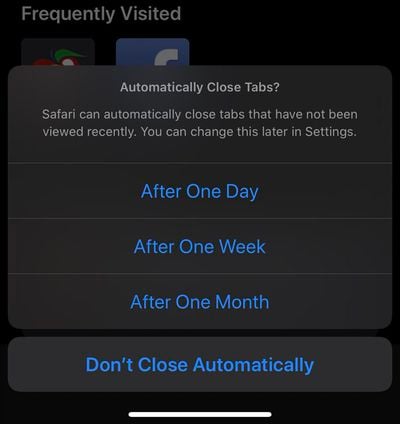
However in iOS 13, Safari will offer to automatically close tabs that have not been viewed recently after one day, one week, or one month. The new Safari function can be changed later in the Settings app.


Apple unveiled iOS 13 last week at WWDC. The newest version of the operating system for iPhone (and the ‌iPad‌, though the ‌iPad‌ version has been renamed to iPadOS) introduces a long list of new features and some changes that are quite exciting. Be sure to check out the video above for more.

(Thanks, Chris!)

Related Forum: iOS 13

Top Rated Comments

89 months ago
I’m I the only one who opens at most 2, rarely 3, tabs in a browser, then closes them when I’m done?
Score: 14 Votes (Like | Disagree)
I7guy Avatar
89 months ago
I went to use my wife’s xr and she had 300+ tabs open. I looked at her like ??? She said, what’s wrong with that?

So when iOS 13 comes around I’m setting this option on her phone.
Score: 10 Votes (Like | Disagree)
89 months ago
I’m I the only one who opens at most 2, rarely 3, tabs in a browser, then closes them when I’m done?
I think a lot of people (including myself) are using tabs as reminders for stuff.
Score: 6 Votes (Like | Disagree)
Spartan Weaver Avatar
89 months ago
Woo hoo I'm popular! :P thanks Macrumors.
Score: 4 Votes (Like | Disagree)
xraydoc Avatar
89 months ago
A necessary feature for my wife. It’s insane how many tabs she has open... and isn’t aware of them at all.
[doublepost=1560197849][/doublepost]
I went to use my wife’s xr and she had 300+ tabs open. I looked at her like ??? She said, what’s wrong with that?
We must be married to the same woman.
Score: 3 Votes (Like | Disagree)
macduke Avatar
89 months ago
I’m I the only one who opens at most 2, rarely 3, tabs in a browser, then closes them when I’m done?
Every few weeks I have to hold it down and click on the "Close 500 tabs" button. That is the limit. I am a tab whore.
[doublepost=1560184983][/doublepost]

How could one find a previously open tab within 300? Safari became a digital garbage can. lol.
If you tap to go to the top of your tabs, and then pull down, there is a search bar.
Score: 3 Votes (Like | Disagree)

Popular Stories

iOS 26

iOS 26.4 Adds Two New Features to CarPlay

Tuesday March 24, 2026 1:55 pm PDT by
iOS 26.4 was released today, and it includes a couple of new features for CarPlay: an Ambient Music widget and support for voice-based chatbot apps. To update your iPhone 11 or newer to iOS 26.4, open the Settings app and tap on General → Software Update. CarPlay will automatically offer the new features so long as the iPhone connected to your vehicle is running iOS 26.4 or later....
AirPods Pro Firmware Feature

Apple Releases New Firmware for AirPods Pro 3, AirPods Pro 2 and AirPods 4

Tuesday March 24, 2026 12:31 pm PDT by
Apple today released new firmware for the AirPods Pro 2, AirPods Pro 3, and the AirPods 4. The firmware has a version number of 8B39, up from 8B34 on the AirPods Pro 3, 8B28 on the AirPods Pro 2, and 8B21 on the AirPods 4. There is no word on what's included in the firmware, but Apple has a support document with limited notes. Most updates are limited to bug fixes and performance...
apple tv 4k new orange

tvOS 26.4 Adds These New Features to Your Apple TV

Wednesday March 25, 2026 3:33 pm PDT by
Apple this week released tvOS 26.4, and the software update includes a handful of new features and changes for the Apple TV. tvOS 26.4 is compatible with all Apple TV 4K and Apple TV HD models released since 2015. To update your Apple TV, open the Settings app on the device, navigate to System → Software Updates, and select Update Software. Below, we have recapped what is new in tvOS...