

Skype for iOS Now Lets You Share Your iPhone Screen With a Friend - MacRumors
Skip to Content

Skype for iOS Now Lets You Share Your iPhone Screen With a Friend

by

Skype this week launched a new screen sharing feature on iOS and Android devices, allowing users to share their smartphone screens with any of their Skype friends. Microsoft said that this should be useful for helping family members figure out their new smartphone, shopping online with a friend, and more.
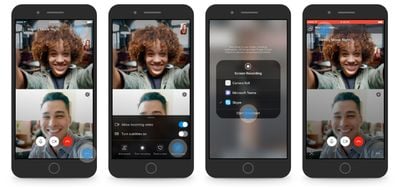
skype screen share
Skype on desktop already supports screen sharing, but this is a brand new addition for the iOS and Android apps and was previously in beta testing earlier this year. To find the feature on your iPhone, start a Skype call, tap the "..." menu at the bottom right of the screen, and choose to start sharing your screen.

The company has also redesigned the app to streamline video calls: users can simply tap to dismiss all call controls so they can see their friend or family member without any obstructions. To remove all UI from the call, they can double tap the screen, and then single tap again to bring everything back.

Skype for iPhone is available to download for free [Direct Link], and the new screen sharing feature is available on devices running iOS 12 and up.


Tag: Skype

Top Rated Comments

89 months ago
Finally.

I’ve spent many times hitting my face against a brick wall trying to explain to my mum what to do on her phone to fix/do general things and this should make that much easier.
Score: 6 Votes (Like | Disagree)
89 months ago
Facetime needs this ability like yesterday.
Score: 3 Votes (Like | Disagree)
Sharewaredemon Avatar
89 months ago
Is there something similar for the Mac OS?
It's actually built into the iChat protocol that still lingers in Messages for Mac OS.
If you are communicating with someone who uses iMessage you can share, and even control each others screens if they both are using Mac OS.
On Mac OS, the feature has been around for over ten years now I think.
Score: 3 Votes (Like | Disagree)
chucker23n1 Avatar
89 months ago
And what if you don't have friends, only colleagues? Is it restricted to friends? XD
And if so, how do they know you're friends?
Skype is the consumer product; Teams (née Skype for Business, Lync, OCS and all sorts of other crazy rebrandings) is the new business version.
[doublepost=1559766701][/doublepost]
The user was supposed to have to opt in on Group FaceTime as well by answering the call, but as we learned the potential for privacy-leaking bugs for such a potentially-invasive feature is pretty high. That is what I meant by "what could possibly go wrong?"
I don't think "we risk privacy bugs; ergo, we shouldn't offer this feature at all" is a reasonable path here.
Score: 1 Votes (Like | Disagree)

Popular Stories

iOS 26

iOS 26.4 Adds Two New Features to CarPlay

Tuesday March 24, 2026 1:55 pm PDT by
iOS 26.4 was released today, and it includes a couple of new features for CarPlay: an Ambient Music widget and support for voice-based chatbot apps. To update your iPhone 11 or newer to iOS 26.4, open the Settings app and tap on General → Software Update. CarPlay will automatically offer the new features so long as the iPhone connected to your vehicle is running iOS 26.4 or later....
AirPods Pro Firmware Feature

Apple Releases New Firmware for AirPods Pro 3, AirPods Pro 2 and AirPods 4

Tuesday March 24, 2026 12:31 pm PDT by
Apple today released new firmware for the AirPods Pro 2, AirPods Pro 3, and the AirPods 4. The firmware has a version number of 8B39, up from 8B34 on the AirPods Pro 3, 8B28 on the AirPods Pro 2, and 8B21 on the AirPods 4. There is no word on what's included in the firmware, but Apple has a support document with limited notes. Most updates are limited to bug fixes and performance...
apple tv 4k new orange

tvOS 26.4 Adds These New Features to Your Apple TV

Wednesday March 25, 2026 3:33 pm PDT by
Apple this week released tvOS 26.4, and the software update includes a handful of new features and changes for the Apple TV. tvOS 26.4 is compatible with all Apple TV 4K and Apple TV HD models released since 2015. To update your Apple TV, open the Settings app on the device, navigate to System → Software Updates, and select Update Software. Below, we have recapped what is new in tvOS...









































