Apple Plans to Expand Uses of Haptic Touch on iPhone XR Over Time - MacRumors
Skip to Content

Apple Plans to Expand Uses of Haptic Touch on iPhone XR Over Time

By now, you've probably heard that the iPhone XR features a new technology called Haptic Touch instead of the usual 3D Touch.

haptic touch
Haptic Touch is simply a marketing name for a long press combined with haptic feedback from the Taptic Engine. The feature is a substitute for 3D Touch, which Apple wasn't able to include on the iPhone XR in order to achieve a nearly edge-to-edge LCD screen, a remarkable engineering feat.

The biggest downfall with Haptic Touch is that it currently works in only a few places, such as the flashlight and camera shortcuts on the lock screen, and in Control Center to pop open additional toggles and menus. Fortunately, that won't be the case forever, according to The Verge's Nilay Patel.

From Patel's iPhone XR review, emphasis ours:

Haptic Touch does not have equivalents to everything 3D Touch can do, however — I missed previewing links in Safari and Twitter quite a bit. Apple told me it's working to bring it to more places in iOS over time, but that it's going slow to make sure the implementation is right.

Apple did not provide a timeframe, but it's safe to assume that additional Haptic Touch gestures will be added in future software updates.

It'll be interesting to see where Apple expands Haptic Touch across iOS, as the feature can only be implemented for actions that don't already rely on a long press. For example, long-pressing on an app icon on the home screen enables "wiggle mode," allowing apps to be deleted or rearranged on the home screen.

For that reason, Haptic Touch does not work with Quick Actions when you long press on an app icon on the iPhone XR home screen. Haptic Touch also doesn't support Peek and Pop for previewing content such as links and messages.
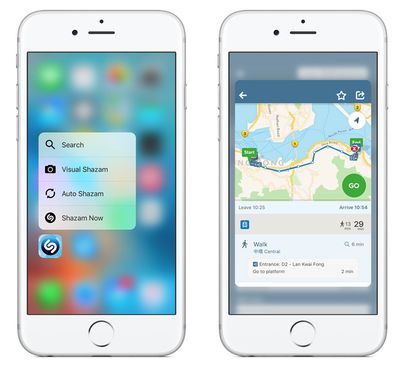
peek pop

3D Touch: Quick Actions on left, Peek and Pop on right

Apple already works around the lack of 3D Touch for keyboard trackpad mode. In iOS 12, users can simply tap and hold the space bar to enter the trackpad mode, which allows for easier movement of the cursor within text fields. This user interface change was more than likely inspired by the iPhone XR.

A few months ago, Barclays analysts said it is "widely understood" among Apple's supply chain partners that all 2019 iPhones will lack 3D Touch. If accurate, Apple's plans to expand Haptic Touch may go beyond software. For now, the pressure-sensitive feature lives on with the iPhone XS and iPhone XS Max.


Related Forum: iPhone

Popular Stories

WWDC26 MR Live Coverage Article

WWDC 2026 Apple Event Live Keynote Coverage: iOS 27, Revamped Siri, and More

Monday June 8, 2026 9:15 am PDT by
Apple's Worldwide Developers Conference (WWDC) starts today with the traditional keynote kicking things off at 10:00 a.m. Pacific Time. MacRumors is on hand for the event and we'll be sharing details and our thoughts throughout the day. We're expecting to see a number of software-related announcements today, headlined by a reset on Apple's push into AI that should see a significant overhaul...

Aston Martin CarPlay Ultra Screen

Apple Says CarPlay Ultra is Coming to These Vehicle Brands

Thursday May 21, 2026 11:53 am PDT by
Last year, Apple launched CarPlay Ultra, the long-awaited next-generation version of its CarPlay software system for vehicles. Nearly a year later, CarPlay Ultra is still limited to Aston Martin's latest luxury vehicles, but that should change fairly soon. In May 2025, Apple said many other vehicle brands planned to offer CarPlay Ultra, including Hyundai, Kia, and Genesis. CarPlay Ultra...
ios 26 iphone 16 pro lock screen notifications feature 1

iOS 27 Notifications Will Slide in From Left Side of Your iPhone's Screen

Friday June 5, 2026 7:24 am PDT by
Bloomberg's Mark Gurman today revealed another iOS 27 change: notifications will slide in from the left side of the screen instead of from the top. In addition, accessing Notification Center on iOS 27 will require swiping down on the top-left corner of the screen. If you swipe down on the Dynamic Island area, a new "Search or Ask" interface tied to the revamped Siri will appear, instead of...

Top Rated Comments

100 months ago
Not liking this. 3D Touch is my most favorite feature on iPhone. Can't fathom it's disappearance.
Score: 30 Votes (Like | Disagree)
100 months ago
3D Touch could have been "long press" since day 1. Wasted engineering effort, like the compact Mac Pro.
Score: 21 Votes (Like | Disagree)
Shadow Jolteon Avatar
100 months ago
Not liking this. 3D Touch is my most favorite feature on iPhone. Can't fathom it's disappearance.
Same here. Both me and my husband use it all the time and love it. The lack of it was the one thing that made me go back and forth on whether or not to get an iPhone Xr. (Though, we ended up preordering ours a couple days ago.)

I didn't realize that the long press solution wasn't replacing the functionality of 3D Touch/Force Touch all around. A long press isn't as convenient or quick, but I was willing to compromise if I could still use the preview features, which I use all the time. I'm really hoping they add at least the Peek and Pop feature for devices without it really soon.
Score: 14 Votes (Like | Disagree)
100 months ago
3D Touch could have been "long press" since day 1. Wasted engineering effort, like the cMP.
That’s horrendously false. I am not tied to the amount of time a tap and hold takes with 3D Touch. Over time, that’s a lot of
3D Touch could have been "long press" since day 1. Wasted engineering effort, like the cMP.
I’m amazed at how many people don’t understand what 3D Touch is. You should work with them, and merge your $1T Tap-and-Hold company with Apple’s.
Score: 9 Votes (Like | Disagree)
100 months ago
How about they focus on getting Touch ID and the headphone jack re-introduced instead???
Score: 9 Votes (Like | Disagree)
100 months ago
3D Touch was useless from the beginning. And it makes the devices thicker and more expensive for Apple.
Long press and hold is the solution, works great on the spacebar for moving the cursor in iOS 12.
Score: 9 Votes (Like | Disagree)