

Fantastical 2 for iPhone and Apple Watch Gains Support for Siri Shortcuts, New Watch Faces - MacRumors
Skip to Content

Fantastical 2 for iPhone and Apple Watch Gains Support for Siri Shortcuts, New Watch Faces

by

Popular calendar app Fantastical 2 for the iPhone, iPad, and Apple Watch, was today updated to version 2.10, introducing full support for the recent iOS 12 and watchOS 5 updates.
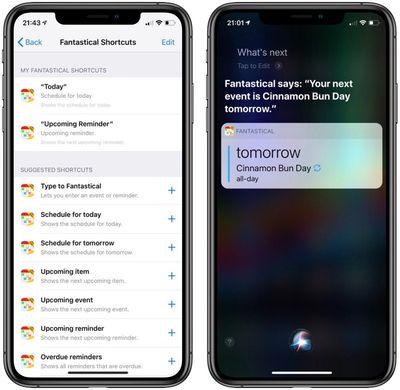
fantasticalshortcuts
Starting today, Fantastical 2 offers Siri Shortcuts that are designed to let you add new calendar events, view upcoming events and reminders, and more. Some examples of Fantastical Shortcut options:

  • Set a phrase such as "Hey Fantastical" to automatically open Fantastical to quickly begin creating a new event or reminder using Fantastical's parser
  • Show upcoming events or reminders as part of a custom shortcut using the Shortcuts app
  • Jump to a specific reminders list by creating a button on the home screen with the Shortcuts app

All of the available Fantastical Shortcuts can be viewed in the Settings app under Siri & Search > Fantastical after updating to the latest version.

With support for interactive notifications, Fantastical 2 will allow you to snooze alerts for events and reminders right from your iOS notifications list.

On the Apple Watch, Fantastical 2 will work with the Siri watch face, letting you get Fantastical 2 Siri suggestions for upcoming events and reminders on your wrist.

It also supports the new Infograph watch faces with Fantastical 2 complications. There are two complication styles available for the Infograph face and one available for the Infograph Modular face. Complications can be customized in the Fantastical app by going to Settings > Apple Watch.

Fantastical 2.10 now requires users to be running iOS 11 or later on iOS devices and watchOS 4 or later on the Apple Watch.

Fantastical 2 for iPhone and Apple Watch can be downloaded from the App Store for $2.99. [Direct Link]

Fantastical 2 for iPad can be downloaded from the App Store for $4.99. [Direct Link]

Top Rated Comments

n-evo Avatar
99 months ago
The default Calendar apps on iOS and macOS are free and support natural input in more than those 5-6 languages Fantastical has been stuck on for a while now. That’s pretty cool too.
Score: 1 Votes (Like | Disagree)

Popular Stories

iOS 27 on iPhone 17 1

iOS 27 Will Add These New Features to Your iPhone

Saturday May 2, 2026 8:43 am PDT by
Apple is expected to unveil iOS 27 during its WWDC 2026 keynote on June 8, and there are already many rumored features and changes for iPhones. The first developer beta of iOS 27 will likely be available immediately following the keynote, and a public beta typically follows in July. Following beta testing, the software update should be released to all users with a compatible iPhone in...
Apple MacBook Pro M4 hero

Why You Might Want to Wait to Buy a MacBook Pro

Friday May 1, 2026 3:43 pm PDT by
Apple refreshed the 14-inch and 16-inch MacBook Pro with M5 Pro and M5 Max models in March 2026, but depending on your needs and interests, you might want to skip this generation because there's something better in the works. The M5 Pro and M5 Max MacBook Pro models have faster chips, but the same design that Apple has used since 2021. An updated design with new display technology and faster ...
Apple Announces 2026 Pride Band Watch Face and iPhone Wallpaper Article 2

iOS 26.5 Coming Soon With These New Features

Monday May 4, 2026 8:40 am PDT by
iOS 26.5 is expected to be released next week, following more than a month of beta testing. The update is relatively minor, but there are a couple of new features and changes across the operating system that we have recapped below. iOS 26.5 lays the groundwork for end-to-end encryption for RCS in the Messages app and ads in the Apple Maps app, and it will include a new Pride wallpaper and a...











































